




Here's how it works



How to use or fill out DocHub form-library145143-usssaUsssa Softball Waiver Form - US Legal Forms

- Click ‘Get Form’ to open it in the editor.
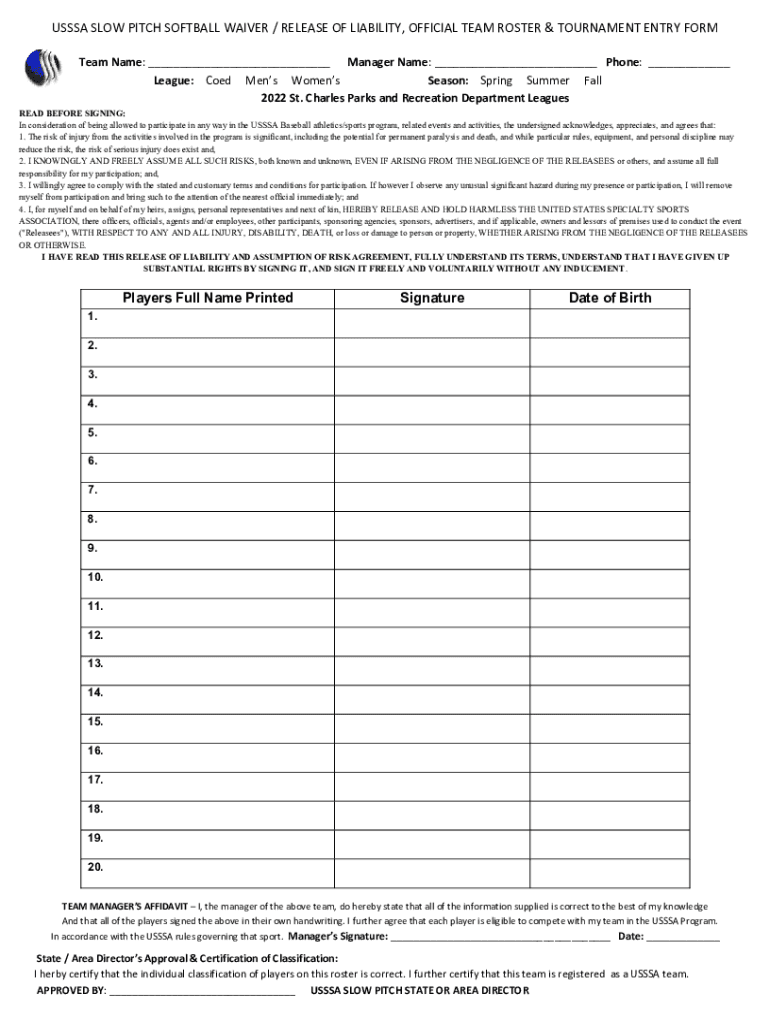
- Begin by entering your Team Name and Manager Name at the top of the form. Ensure that all information is accurate for proper identification.
- Select the appropriate League (Coed, Men’s, Women’s) and Season (Spring, Summer, Fall) from the dropdown options provided.
- In the Players section, fill in each player's Full Name, Signature, and Date of Birth. Make sure each player signs in their own handwriting for validity.
- Complete the Team Manager’s Affidavit by signing and dating it to confirm that all information is correct and that players are eligible.
- Finally, ensure that the State/Area Director's Approval section is filled out correctly before submitting your form.
Start filling out your waiver form today for free using our platform!
It's free
See more DocHub form-library145143-usssaUsssa Softball Waiver Form - US Legal Forms versions
Got questions?
Can I draw my electronic signature to sign my DocHub form-library145143-usssaUsssa Softball Waiver Form - US Legal Forms?
Of course, electronically drawing your signature is appropriate, but only if you use a tool that complies with industry laws and regulations. Consider DocHub, which ensures eSignature validity under ESIGN and UETA requirements. All you need to approve your DocHub form-library145143-usssaUsssa Softball Waiver Form - US Legal Forms electronically is an account with DocHub and an internet connection. After you open your document in our editor, click Sign and choose the Draw option.
Can I sign my DocHub form-library145143-usssaUsssa Softball Waiver Form - US Legal Forms while I edit it?
When you edit your DocHub form-library145143-usssaUsssa Softball Waiver Form - US Legal Forms with DocHub, you simply will not need to look for other software or solutions to sign it. An electronic signature is a component of DocHub’s extensive editing toolset, which enables you to implement changes in your form without jumping between platforms. Simply complete your form, double-check the correctness of the data and put your electronic signature at the end to make it submission-ready in minutes.
Security and compliance
At DocHub, your data security is our priority. We follow HIPAA, SOC2, GDPR, and other standards, so you can work on your documents with confidence.
Learn more




