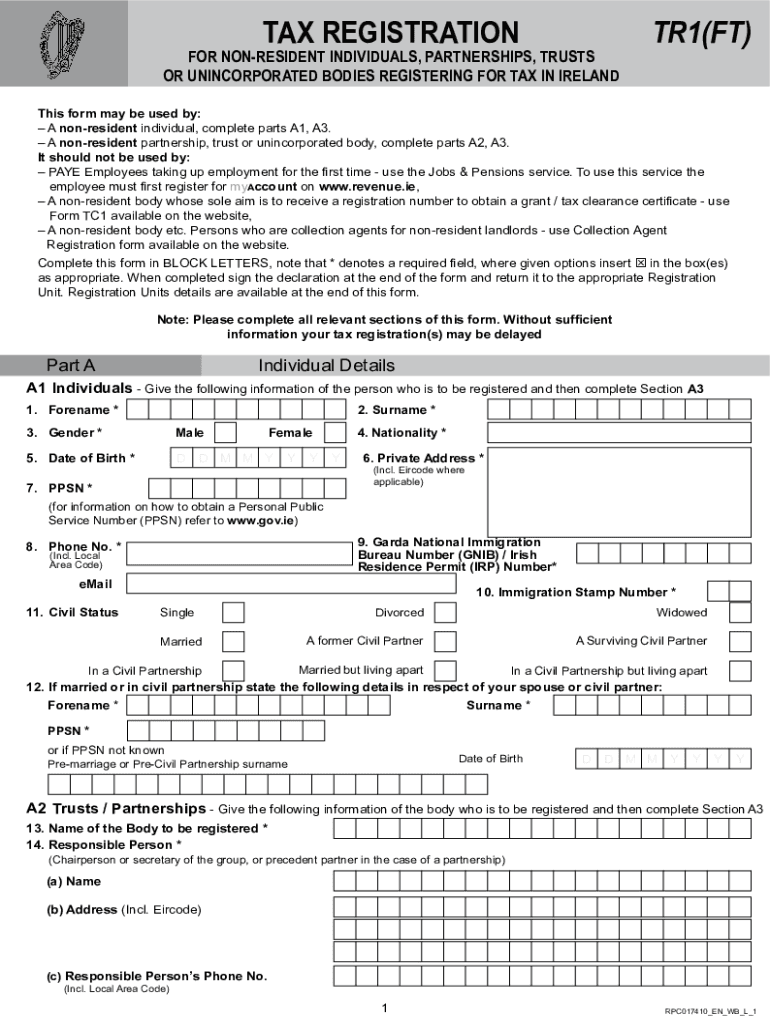
TR1 (FT) - Tax Registration 2026

Get Form
tr1 ft form Preview on Page 1

Here's how it works

01. Edit your tr1 ft form online
Type text, add images, blackout confidential details, add comments, highlights and more.
02. Sign it in a few clicks
Draw your signature, type it, upload its image, or use your mobile device as a signature pad.
03. Share your form with others
Send tr1 ft via email, link, or fax. You can also download it, export it or print it out.

How to use or fill out TR1 (FT) - Tax Registration with our platform

Form edit decoration
9.5
Ease of Setup
DocHub User Ratings on G2
9.0
Ease of Use
DocHub User Ratings on G2
  1. Click ‘Get Form’ to open the TR1 (FT) - Tax Registration in the editor.
  2. Begin with Part A, where you will provide individual details. Fill in your forename, surname, gender, date of birth, and nationality. Ensure all required fields marked with * are completed.
  3. If applicable, complete Section A2 for trusts or partnerships by entering the name of the body and details of the responsible person.
  4. Proceed to Section A3 to describe your business activity. Specify if you are trading under a business name and provide detailed descriptions of your business operations.
  5. Continue through Parts B to F as necessary, ensuring that you check all relevant boxes and provide accurate information regarding income tax, VAT registration, and any other applicable sections.
  6. Finally, review all entries for accuracy before signing the declaration at the end of the form. Once completed, submit it to the appropriate Registration Unit.

Start filling out your TR1 (FT) - Tax Registration form online for free today!

See more TR1 (FT) - Tax Registration versions

We've got more versions of the TR1 (FT) - Tax Registration form. Select the right TR1 (FT) - Tax Registration version from the list and start editing it straight away!
Versions Form popularity Fillable & printable
2023 4.9 Satisfied (54 Votes)
2017 4.4 Satisfied (45 Votes)
2014 4.7 Satisfied (52 Votes)
be ready to get more

Complete this form in 5 minutes or less

Get form

Got questions?

We have answers to the most popular questions from our customers. If you can't find an answer to your question, please contact us.
Contact us

Many software applications are available out there for document modifying and signing. DocHub is one of the most popular online solutions that comply with all security and compliance requirements and ensures your eSigned documentation is legally enforceable. All you need to give it a try is to register an account, add your employer tr1 ft, provide the necessary information, and click Sign. Generate your electronic signature by typing, drawing it, uploading its picture to your document, or scanning a unique QR code.

You need only a web connection and a browser to fill out your tr1ft form on an iOS phone. Open the DocHub website and authenticate. Then, add your document or select it from the list in your dashboard. Then use our editing tools to fill out your form and preserve all your adjustments. You can also send it to a dedicated recipient straight away.

Drafting a Deed of Transfer. This legally documents the transfer of ownership from one person to another. Registering the Deed of Transfer with the Land Registry to update the record of property ownership.
The TR1 is the legal document which the parties to the transfer are required to sign in order to effect the transaction, known as the transfer deed. The deed has a number of different panels that you should ensure you understand before signing.
A TR1 form (Transfer of Whole of Registered Title) is the legal document used to transfer ownership of a property. It is completed by the seller and signed by both parties before being sent to the Land Registry to update the official property records.

People also ask

The tax registration number is used to identify taxpayers in various transactions, including the filing of tax returns, payment of taxes, and correspondence with the Revenue Commissioners.
TR1: Notification of Major Interest in Shares. 1. Identity of the issuer or the underlying issuer. of existing shares to which voting rights are.
The Irish Tax Reference Number (TRN) is 8 or 9 characters in the format NNNNNNXAA with an optional prefix of IE when used as a VAT number. A TRN is issued by the Revenue Commissioners when a non-natural person registers for tax, and is subsequently used by the Revenue Commissioners to identify those taxpayers.
Income tax is a tax levied on the profits generated by a Sole Traders business activities. In Ireland, income tax for Sole Traders is calculated at a progressive rates tax, which is currently 20% and 40%, respectively. Claiming allowable expenses and deductions can lower income tax, thus reducing the total tax owed.
If you are not eligible to register online, you can register using the paper tax registration form TR1 (pdf). You can also use this paper form to register for VAT. You will then get a Notice of Registration confirming that you are registered for income tax and, if applicable, for VAT.

Related links