




Here's how it works



How to use or fill out Fillable Online Division of Professional Regulation Bond

- Click ‘Get Form’ to open it in the editor.
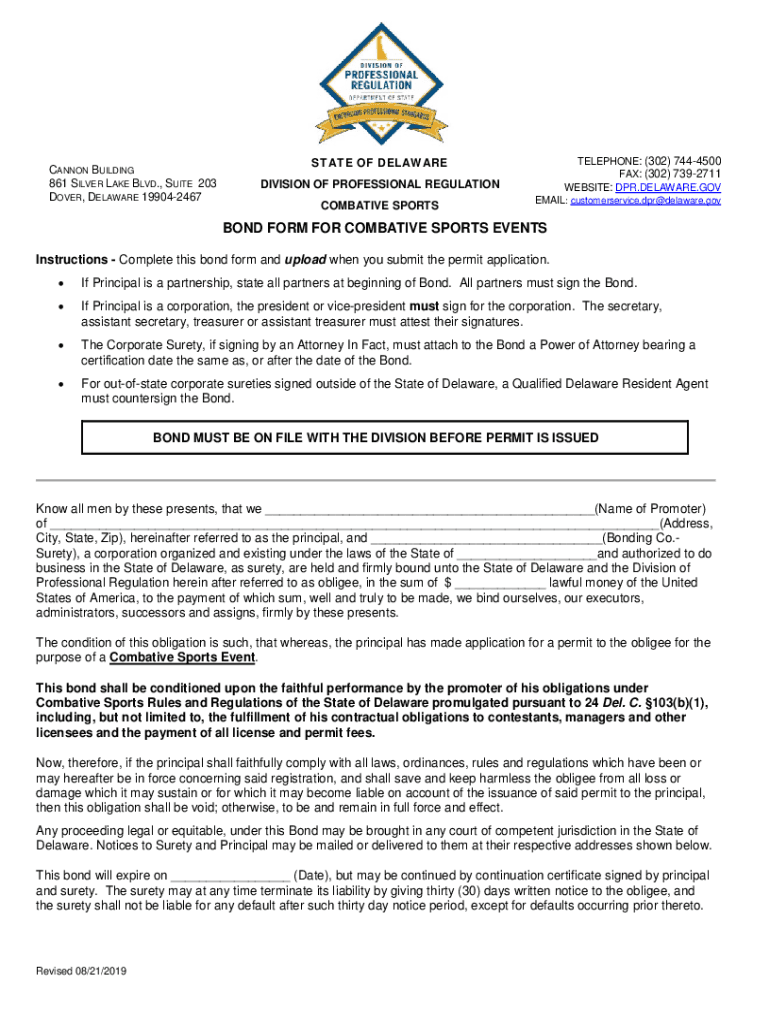
- Begin by entering the name of the promoter in the designated field. Ensure that all partners are listed if the principal is a partnership.
- Fill in the address, including city, state, and zip code of the principal. This information is crucial for identification purposes.
- Specify the bonding company or surety's name and ensure it is a corporation authorized to operate in Delaware.
- Indicate the bond amount in dollars. This should reflect the financial commitment required for compliance with regulations.
- Complete any additional fields regarding obligations under Combative Sports Rules and Regulations as outlined in the document.
- Ensure signatures are obtained from authorized individuals, including corporate officers if applicable. Attestations must be completed where necessary.
- Finally, upload this completed bond form with your permit application through our platform.
Start filling out your Fillable Online Division of Professional Regulation Bond today for free!
It's free
See more Fillable Online Division of Professional Regulation Bond versions
Got questions?
How do I sign my Fillable Online Division of Professional Regulation Bond online?
Log in to your DocHub account and add your Fillable Online Division of Professional Regulation Bond to our editor using one of its upload options - from your device, cloud storage, protected URL, or your DocHub folders if you have already managed your form before. Open our editor, click the Sign key in the top toolbar, and decide on your signing method. You can use a picture of your handwritten signature, draw it, enter your name, or utilize a QR code instead.
How do you edit Fillable Online Division of Professional Regulation Bond in Chrome?
If you use Chrome, there are two straightforward methods to modify your Fillable Online Division of Professional Regulation Bond online. First, go to the DocHub website, add your file, and modify it utilizing our toolbar. You may also install our Chrome extension and modify any document by dragging and dropping it in your browser tab.
What is an example of a security bond?
What is a bond application form?
How do you write a bond?
Security and compliance
At DocHub, your data security is our priority. We follow HIPAA, SOC2, GDPR, and other standards, so you can work on your documents with confidence.
Learn more


