Type text, add images, blackout confidential details, add comments, highlights and more.
02. Sign it in a few clicks
Draw your signature, type it, upload its image, or use your mobile device as a signature pad.
03. Share your form with others
Send it via email, link, or fax. You can also download it, export it or print it out.
How to use or fill out form online with our platform
Ease of Setup
DocHub User Ratings on G2
Ease of Use
DocHub User Ratings on G2
Click ‘Get Form’ to open it in the editor.
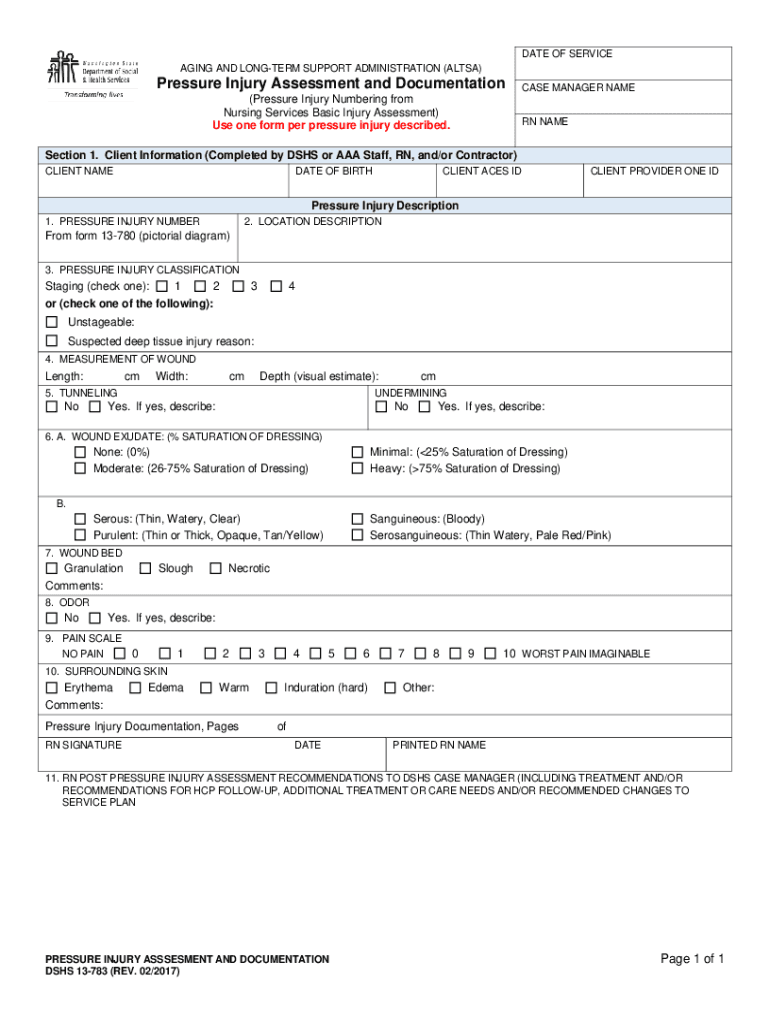
Begin by filling out Section 1, Client Information. Enter the CLIENT NAME, CLIENT ACES ID, DATE OF BIRTH, and CLIENT PROVIDER ONE ID as required.
In the Pressure Injury Description section, assign a PRESSURE INJURY NUMBER and provide a LOCATION DESCRIPTION using the pictorial diagram from form 13-780.
Select the PRESSURE INJURY CLASSIFICATION by checking the appropriate staging option (1, 2, 3, 4, or Unstageable).
Measure the wound dimensions: Length, Width, and Depth. Indicate any tunneling or undermining if applicable.
Assess WOUND EXUDATE by selecting the saturation level of dressing and describe any odor present.
Evaluate the WOUND BED condition and provide comments on granulation, slough, or necrotic tissue.
Rate PAIN SCALE from 0 (No Pain) to 10 (Worst Pain Imaginable) based on client feedback.
Document observations regarding SURROUNDING SKIN conditions such as erythema or edema.
Finally, ensure RN SIGNATURE is included along with PRINTED RN NAME and DATE before submitting your completed form.
Start filling out your form online for free today!
Fill out Pressure Injury Assessment Form online It's free
We've got more versions of the Pressure Injury Assessment Form form. Select the right Pressure Injury Assessment Form version from the list and start editing it straight away!
by SF Kamdem 2022 Cited by 2 To compare the time elapsed between the occurrence of pressure injuries (PI) with the attainment of nutritional goals and recognize the riskRead more
BRADEN SCALE For Predicting Pressure Sore Risk. Use the form only for the approved purpose. Any use of the form in publications (other than internal policyRead more
Cookie consent notice
This site uses cookies to enhance site navigation and personalize your experience.
By using this site you agree to our use of cookies as described in our Privacy Notice.
You can modify your selections by visiting our Cookie and Advertising Notice.