Tax certification statement 2026

Get Form
pennsylvania tax certification statement Preview on Page 1

Here's how it works

01. Edit your pennsylvania tax certification statement online
Type text, add images, blackout confidential details, add comments, highlights and more.

02. Sign it in a few clicks
Draw your signature, type it, upload its image, or use your mobile device as a signature pad.

03. Share your form with others
Send tax certification statement via email, link, or fax. You can also download it, export it or print it out.

How to use or fill out tax certification statement with our platform

Form edit decoration
9.5
Ease of Setup
DocHub User Ratings on G2
9.0
Ease of Use
DocHub User Ratings on G2
  1. Click ‘Get Form’ to open the Tax Certification Statement in the editor.
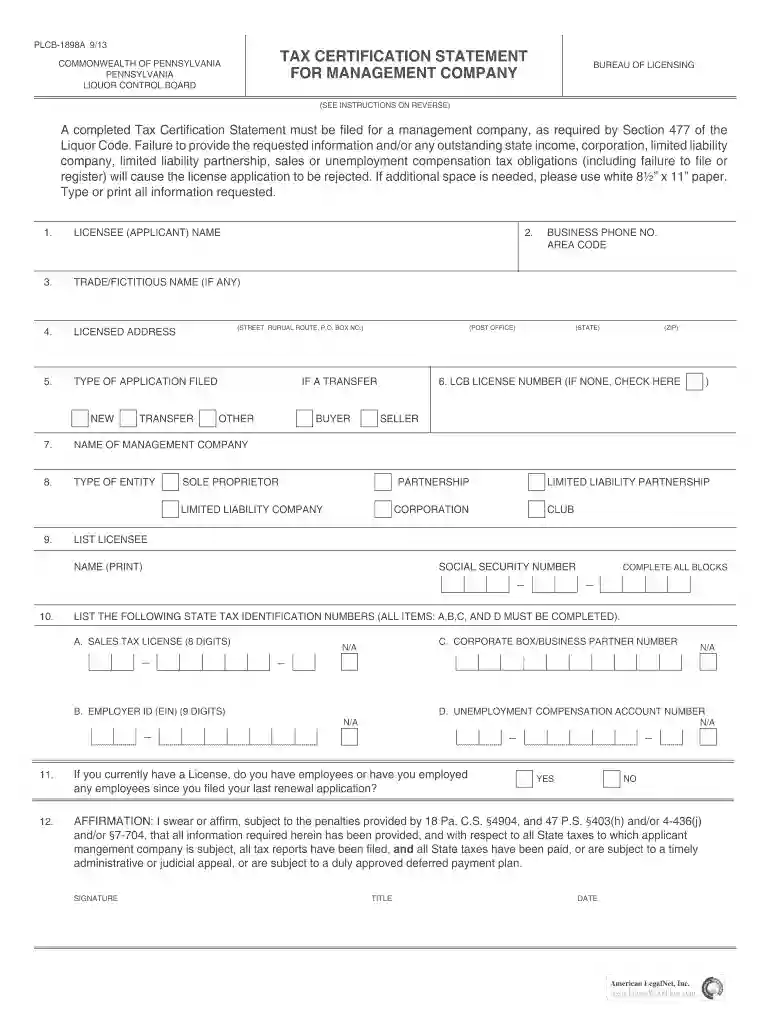
  2. Begin by entering the LICENSEE (APPLICANT) NAME in the first field. Ensure that you provide the full name as it appears on your license.
  3. In the next section, input your TRADE/FICTITIOUS NAME if applicable. This should match any registered names with the Pennsylvania Department of State.
  4. Fill in your LICENSED ADDRESS, including street, rural route, or P.O. Box number. Make sure this address is accurate as per your application.
  5. Select the TYPE OF APPLICATION FILED: NEW, TRANSFER, or OTHER. This helps categorize your submission correctly.
  6. Provide the NAME OF MANAGEMENT COMPANY and specify its TYPE OF ENTITY (e.g., Sole Proprietor, Corporation).
  7. Complete all required fields for state tax identification numbers (Sales Tax License, Employer ID, etc.) ensuring no blanks are left.
  8. Finally, sign and date the form in the AFFIRMATION section to confirm that all information is accurate and complete.

Start filling out your Tax Certification Statement online for free today!

See more tax certification statement versions

We've got more versions of the tax certification statement form. Select the right tax certification statement version from the list and start editing it straight away!
Versions Form popularity Fillable & printable
2013 4.8 Satisfied (45 Votes)
2011 4.3 Satisfied (60 Votes)
be ready to get more

Complete this form in 5 minutes or less

Get form

Got questions?

We have answers to the most popular questions from our customers. If you can't find an answer to your question, please contact us.
Contact us
While the majority of these notices and letters are sent via non-certified mail, the IRS sends certain pieces typically the most important ones via certified mail.
A Form W9 is completed by an independent contractor, freelancer, or consultant for a business and provided to that business for their records. Employers use the W-9 to complete Form 1099, which details the employer-paid wages to the independent contractor, freelancer, or consultant.
What is a Tax Certification? A Tax Certification is a written statement of the status of delinquent taxes on property.
The reason they send the letter by a certified carrier is to have legal proof that they sent you a notice on a certain date and to your address of record. In fact, all the taxing authorities have to do to meet their legal requirement is to prove they sent you a certified letter.
You can find digital copies of most IRS notices in your online account, under the Notices and Letters section.

People also ask

It confirms that your business has registered for tax purposes and demonstrates your compliance with tax regulations, serving as evidence of your tax payments and regulatory adherence.
To obtain Form 6166, a letter of U.S. Residency Certification, you must submit a completed Form 8802, Application for United States Residency Certification. A user fee is charged to process all Forms 8802.
Many U.S. treaty partners require the IRS to docHub that the person claiming treaty benefits is a resident of the United States for federal tax purposes. The IRS provides this residency certification on Form 6166, a letter of U.S. residency certification.

Related links