




Here's how it works



How to use or fill out PEBB OEBB Insurance Claim Form and Consent Influenza with our platform

- Click ‘Get Form’ to open it in the editor.
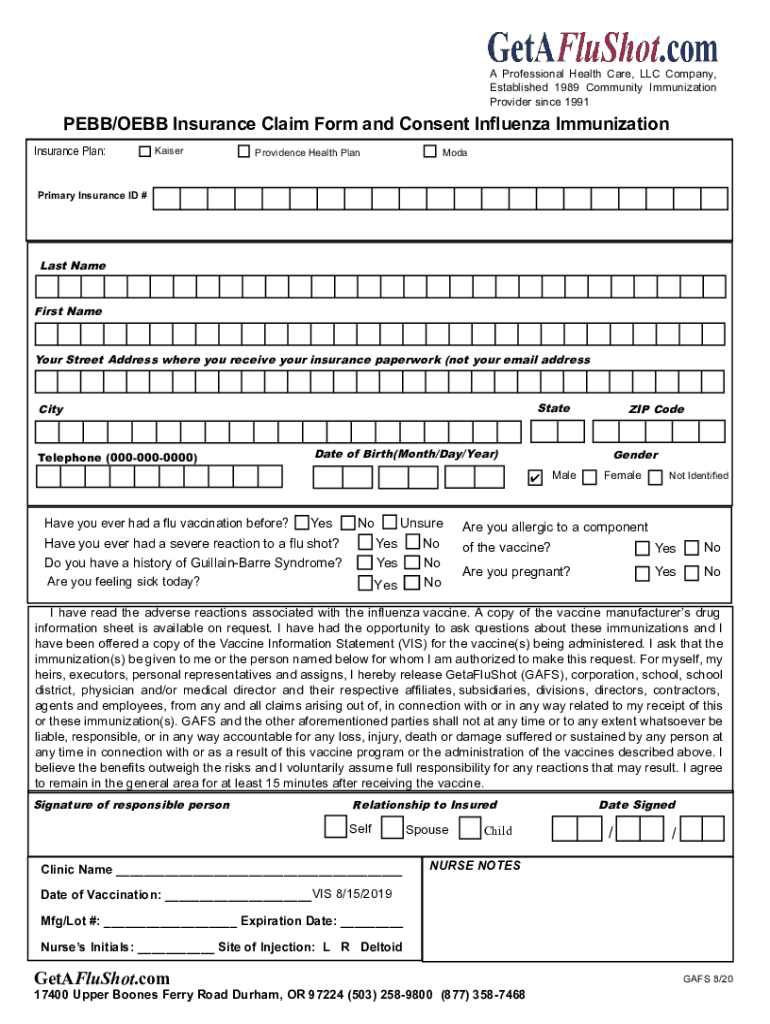
- Begin by entering your insurance plan details, selecting from options like Kaiser, Moda, or Providence Health Plan. Fill in your Primary Insurance ID number for accurate processing.
- Complete the personal information section by providing your last name, first name, street address (where you receive insurance paperwork), city, state, ZIP code, telephone number, date of birth, and gender.
- Answer the health-related questions regarding previous flu vaccinations and any severe reactions. This includes inquiries about Guillain-Barre Syndrome and current health status.
- Indicate any allergies to vaccine components and whether you are pregnant. Review the consent statement carefully before signing.
- Sign the form as a responsible person and indicate your relationship to the insured. Ensure that all fields are completed accurately before submission.
Start using our platform today for free to streamline your form completion process!
It's free
See more PEBB OEBB Insurance Claim Form and Consent Influenza versions
Got questions?
What is the optimum way to electronically sign my PEBB OEBB Insurance Claim Form and Consent Influenza?
Many software solutions are available out there for document modifying and signing. DocHub is one of the most popular online solutions that comply with all data protection and compliance standards and ensures your electronically signed documentation is legally enforceable. All you need to try it out is to create an account, upload your PEBB OEBB Insurance Claim Form and Consent Influenza, provide the required details, and click Sign. Create your electronic signature by typing, drawing it, uploading its picture to your template, or scanning a unique QR code.
How do you get PEBB OEBB Insurance Claim Form and Consent Influenza?
You can find the latest and most relevant version of the PEBB OEBB Insurance Claim Form and Consent Influenza in our DocHub forms collection. Search it by categories or use the search field to get the exact template that fits your case. You may open this form for editing after you find it.
Security and compliance
At DocHub, your data security is our priority. We follow HIPAA, SOC2, GDPR, and other standards, so you can work on your documents with confidence.
Learn more




