




Here's how it works



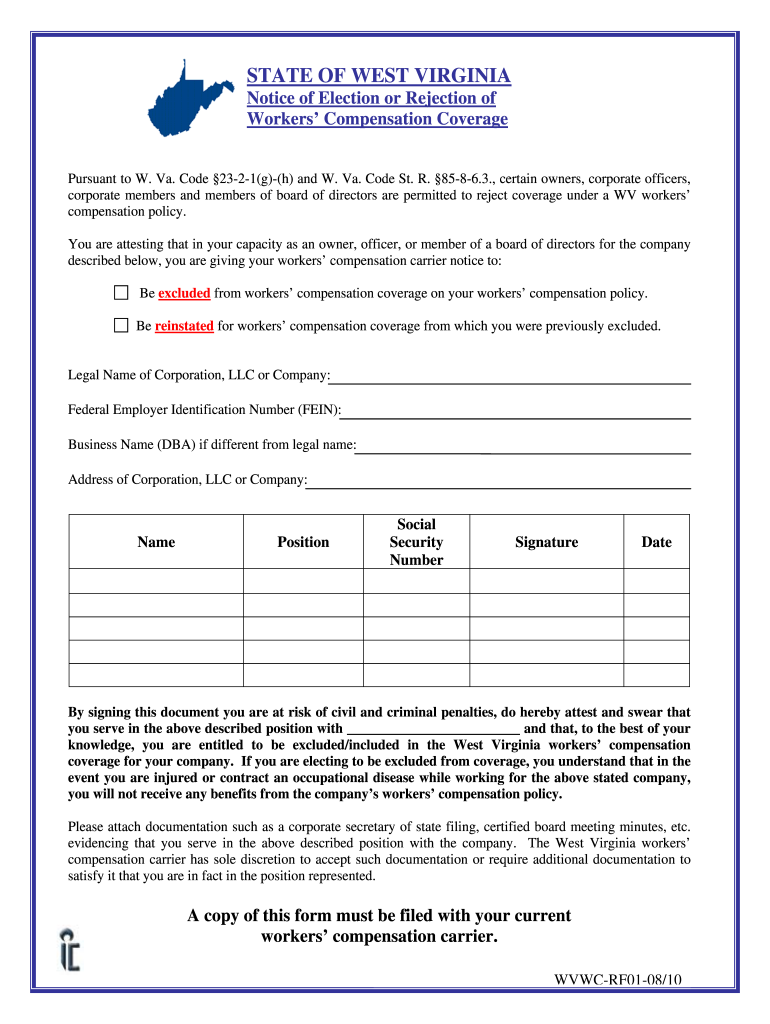
How to use or fill out West Virginia Form Compensation with Our Platform

- Click ‘Get Form’ to open it in the editor.
- Begin by entering the 'Legal Name of Corporation, LLC or Company' in the designated field. Ensure that this matches your official registration documents.
- Next, input the 'Federal Employer Identification Number (FEIN)' accurately. This is crucial for identification purposes.
- If your business operates under a different name, fill in the 'Business Name (DBA)'. Otherwise, you can leave this blank.
- Provide the complete 'Address of Corporation, LLC or Company' to ensure proper correspondence.
- In the section for personal details, enter your 'Name', 'Position', and 'Social Security Number'. Double-check for accuracy.
- Sign and date the form at the bottom. Remember that signing attests to your position and eligibility regarding workers’ compensation coverage.
- Finally, attach any required documentation such as corporate filings or meeting minutes before submitting it to your workers’ compensation carrier.
Start using our platform today to fill out your West Virginia Form Compensation easily and for free!
It's free
See more west virginia form compensation versions
| Versions | Form popularity | Fillable & printable |
|---|---|---|
| 2010 | 4.8 Satisfied (101 Votes) |
Got questions?
Can I sign my west virginia form compensation on a mobile?
Yes, you’ll find many different applications for this on the web. Nevertheless, if you need to eSign your west virginia form compensation without installing additional software, DocHub is the optimum choice you can make. This powerful editor works on mobile devices just as on desktops. Open our editor in any internet browser, register or sign in to your account, and start processing your forms.
Can I sign my west virginia form compensation while I edit it?
If you edit your west virginia form compensation with DocHub, you simply will not need to look for other software or services to eSign it. An electronic signature is a component of DocHub’s substantial editing toolset, which enables you to apply changes in your form without switching between websites. Simply complete your form, double-check the correctness of your data and place your electronic signature at the end to make it submission-ready within a few minutes.
Security and compliance
At DocHub, your data security is our priority. We follow HIPAA, SOC2, GDPR, and other standards, so you can work on your documents with confidence.
Learn more




