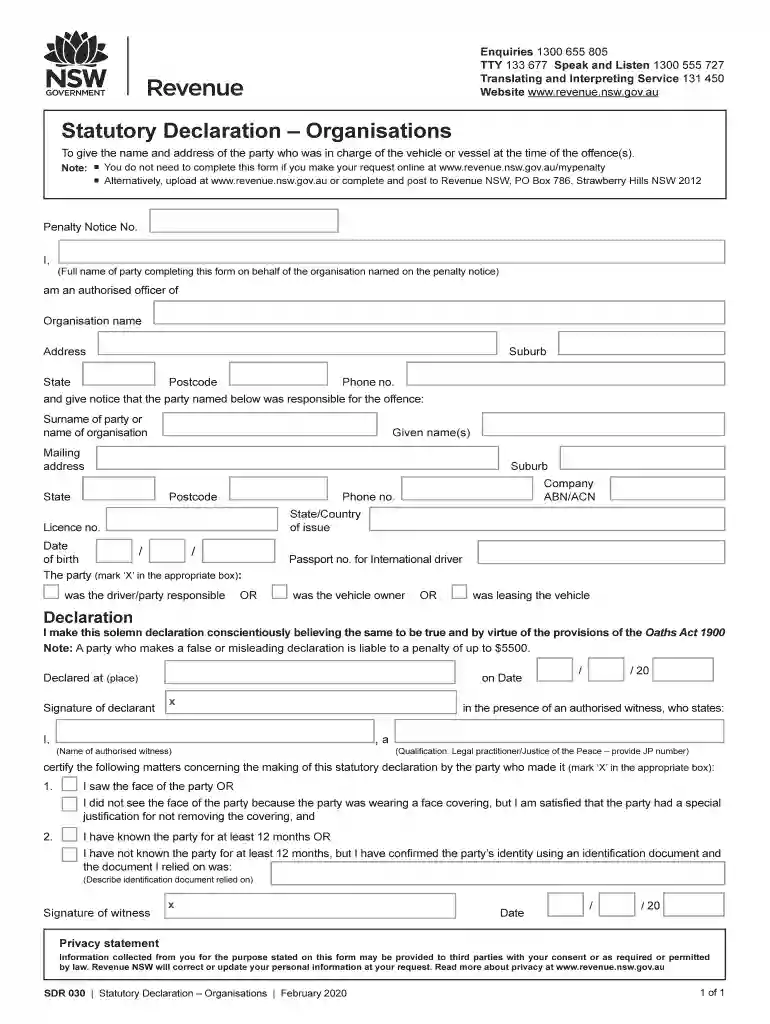
Contact usRevenue NSW Preview on Page 1

Contact usRevenue NSW 2026

Here's how it works

  • 01. Edit your form online

    Type text, add images, blackout confidential details, add comments, highlights and more.

  • 02. Sign it in a few clicks

    Draw your signature, type it, upload its image, or use your mobile device as a signature pad.

  • 03. Share your form with others

    Send it via email, link, or fax. You can also download it, export it or print it out.

How to use or fill out Contact us Revenue NSW with our platform

Form edit decoration
9.5
Ease of Setup
DocHub User Ratings on G2
9.0
Ease of Use
DocHub User Ratings on G2
  1. Click ‘Get Form’ to open the Contact us Revenue NSW form in the editor.
  2. Begin by entering the Penalty Notice Number at the top of the form. This is essential for identifying your case.
  3. Fill in your full name as the party completing this form on behalf of the organization named on the penalty notice.
  4. Provide the organization name, suburb, address, state, phone number, and postcode in the designated fields.
  5. Indicate who was responsible for the offence by filling in their surname, given names, mailing address, and other relevant details.
  6. Mark ‘X’ in the appropriate box to specify whether they were the driver, vehicle owner, or leasing the vehicle.
  7. Complete the declaration section by signing and dating it. Ensure you have an authorized witness present to certify your declaration.

Start using our platform today to streamline your document editing and form completion process for free!

See more Contact usRevenue NSW versions

We've got more versions of the Contact usRevenue NSW form. Select the right Contact usRevenue NSW version from the list and start editing it straight away!

VersionsForm popularityFillable & printable
20224.4 Satisfied (33 Votes)
20204.7 Satisfied (182 Votes)
20124.8 Satisfied (163 Votes)

be ready to get more

Complete this form in 5 minutes or less

Security and compliance

At DocHub, your data security is our priority. We follow HIPAA, SOC2, GDPR, and other standards, so you can work on your documents with confidence.

Related links

Office of the Commissioner - Department of Revenue

Contact the Call Center for Help. Telephone help for Primary: 470-451-3280. If you prefer, contact us via email at Revenue.Commissioner@dor.ga.gov.Read more

Learn more
Policies and Procedures - OUHSC Financial Services

Contact Info. Senior Associate VP CFO Front Desk - (405) 271-2376. Accounts Payable. Front Desk - (Read more

Learn more
If you believe that this page should be taken down, please follow our DMCA take down process here