Employment history forms child sexual abuse 2026

Get Form
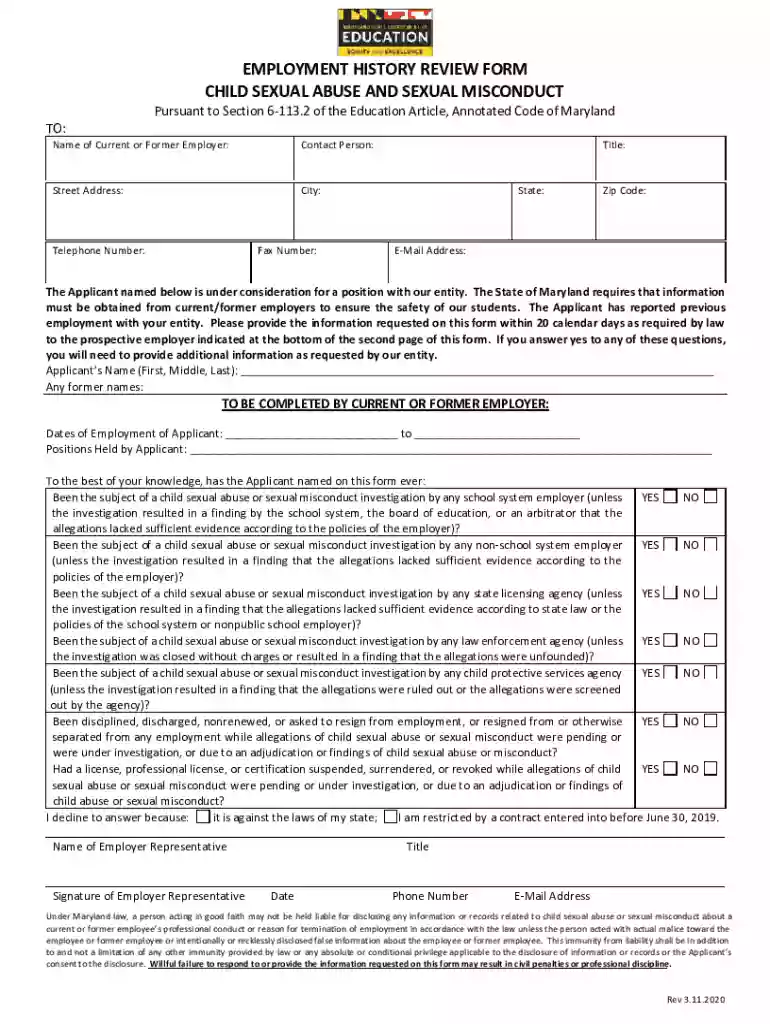
employment history forms child sexual abuse Preview on Page 1

Here's how it works

01. Edit your form online
Type text, add images, blackout confidential details, add comments, highlights and more.

02. Sign it in a few clicks
Draw your signature, type it, upload its image, or use your mobile device as a signature pad.

03. Share your form with others
Send it via email, link, or fax. You can also download it, export it or print it out.

How to use or fill out employment history forms child sexual abuse with our platform

Form edit decoration
9.5
Ease of Setup
DocHub User Ratings on G2
9.0
Ease of Use
DocHub User Ratings on G2
  1. Click ‘Get Form’ to open the employment history form in the editor.
  2. Begin by filling in the 'Name of Current or Former Employer' and 'Contact Person' fields. Ensure that all contact details, including address and phone number, are accurate for effective communication.
  3. In the section labeled 'Applicant’s Name', provide the full name of the applicant, including any former names if applicable. This is crucial for identification purposes.
  4. Complete the 'Dates of Employment' section by entering the start and end dates of the applicant's employment with the entity. Be precise to avoid any discrepancies.
  5. Answer each question regarding investigations into child sexual abuse or misconduct truthfully. Select 'YES' or 'NO' as appropriate, and be prepared to provide additional information if necessary.
  6. For applicants, fill out your personal details in the designated section, including your date of birth and social security number's last four digits. This information is vital for background checks.
  7. Finally, review all entries for accuracy before signing and dating the form. Once completed, submit it as instructed at the bottom of the document.

Start using our platform today to efficiently complete your employment history forms for free!

See more employment history forms child sexual abuse versions

We've got more versions of the employment history forms child sexual abuse form. Select the right employment history forms child sexual abuse version from the list and start editing it straight away!
Versions Form popularity Fillable & printable
2020 4.8 Satisfied (88 Votes)
2019 4.1 Satisfied (52 Votes)
be ready to get more

Complete this form in 5 minutes or less

Get form

Got questions?

We have answers to the most popular questions from our customers. If you can't find an answer to your question, please contact us.
Contact us

Approving paperwork on a mobile device is quick, straightforward, and doesn’t require software installation when you have an account with DocHub. Sign in from any browser, fill in your empty fields with your information, and click on Sign → Create your signature. You can draw your electronic signature just as you usually do on paper, add its image to your employment history forms child sexual abuse, or type in your name and stylize its look. Whatever option you choose, your form will be valid.

It is a no-brainer on a computer or via a mobile phone to fill out a employment history forms child sexual abuse with DocHub. All you need to do is open any installed internet browser on your smartphone and proceed to the DocHub site. Once authenticated, add your file and open it in editing mode. Use our toolbar to make your edits and save adjustments. Optionally, keep your file in your files or send it to a recipient immediately.

Education Article 6-113.2(a)(4) defines direct contact with minors as: the care, supervision, guidance, or control of, or routine interaction with, a minor. Because every job position will be different, MSDE cannot provide blanket guidance about what constitutes direct contact with minors as part of someones
Call the Child Abuse Hotline to get help if you, or children you know, are being neglected, abused or sexually exploited. If you believe a child is at risk, you must report it. Help is available in multiple languages 24/7. Phone: 1-800-387-5437 (KIDS) in Canada and the United States.
Section 6-202 - Suspension or dismissal of teachers, principals, and other professional personnel (a) (1) On the recommendation of the county superintendent, a county board may suspend or dismiss a teacher, principal, supervisor, assistant superintendent, or other professional assistant for: (i) Immorality; (ii)

People also ask

An employment history form can showcase the length or period of time that an applicant has been employed by previous companies. Even if the applicant has an impressive list of work experiences, you also have to consider the amount of time that the applicant has spent per employer.
Effects of child sexual exploitation struggle with trust and be fearful of forming new relationships. become isolated from family and friends. fail exams or drop out of education. become pregnant at a young age.
(4) Direct contact with minors means the care, supervision, guidance, or control of, or routine interaction with, a minor.

Related links