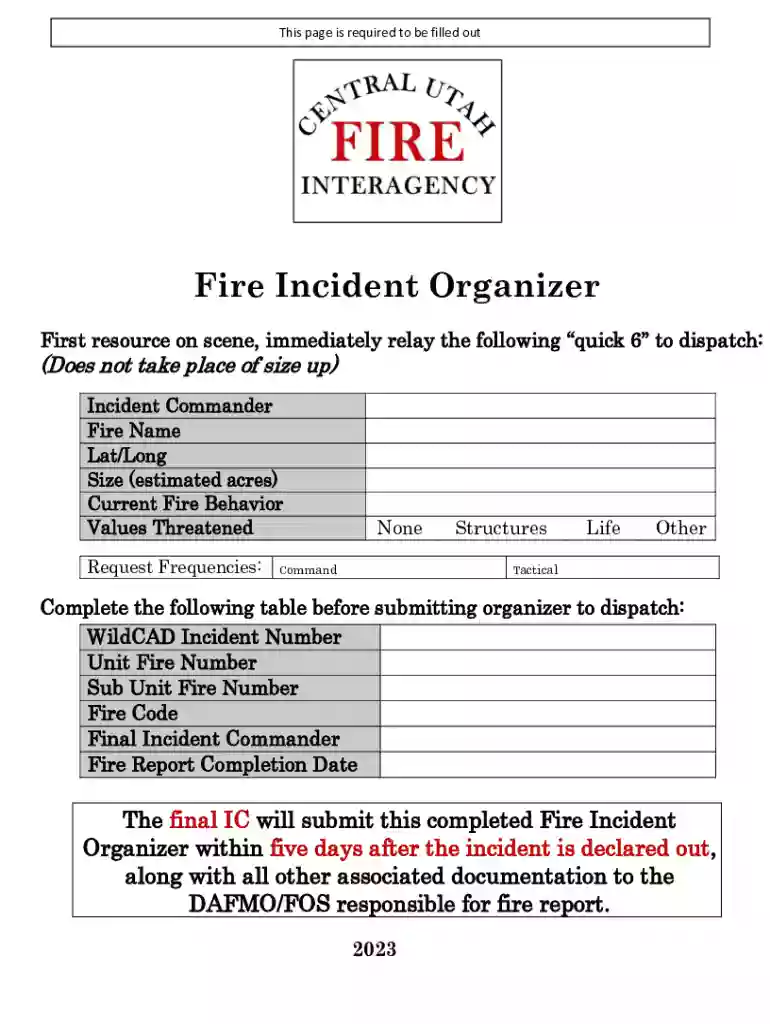
Fire Incident Organizer 2026

Get Form
Fire Incident Organizer Preview on Page 1

Here's how it works

01. Edit your form online
Type text, add images, blackout confidential details, add comments, highlights and more.

02. Sign it in a few clicks
Draw your signature, type it, upload its image, or use your mobile device as a signature pad.

03. Share your form with others
Send it via email, link, or fax. You can also download it, export it or print it out.

Definition & Purpose of the Fire Incident Organizer

The Fire Incident Organizer is a crucial tool designed for managing and documenting fire incidents efficiently. It serves as a comprehensive form that aids incident commanders and responders in effectively handling situations by providing structured guidance for initial responses, resource allocation, and communication protocols. This form is essential for ensuring streamlined operations during fire emergencies, allowing for quick decision-making and safety management.

Key Components

  • Incident Details: Captures crucial information about the fire incident, including location, type of fire, and time of occurrence, helping responders to strategize and prioritize actions.
  • Initial Response Checklist: Provides a guided framework for immediate actions, ensuring that all necessary steps are taken for controlling the fire and ensuring public safety.

Steps to Complete the Fire Incident Organizer

Filling out the Fire Incident Organizer requires attention to detail and accuracy. By following these steps, responders can ensure the form captures all necessary information effectively.

  1. Gather Preliminary Information: Collect initial details about the fire incident, including the exact location, time of discovery, and initial observations from the scene.
  2. Document Resources Available: List all available resources such as personnel, vehicles, equipment, and any backup units.
  3. Complete the Initial Response Section: Ensure that the initial actions taken align with the incident’s demands, noting any immediate challenges or barriers faced.

Additional Considerations

  • Order of Actions: Sequence the steps logically to mirror the flow of events during the incident.
  • Verification: Double-check all recorded details for accuracy to prevent potential miscommunication.

How to Use the Fire Incident Organizer

Using the Fire Incident Organizer involves systematic documentation and coordination during fire emergencies.

Effective Use Cases

  • Coordination of Resources: Facilitates the efficient allocation of firefighting teams and equipment.
  • Communication Tool: Acts as a central piece for aligning communication between various departments and units involved in fire management.

Benefits of Proper Usage

  • Improved Response Times: Streamlines the response process by providing clear guidelines on resource deployment.
  • Safety Enhancement: Helps ensure all safety protocols are followed, mitigating risks during fire emergencies.

Important Terms Related to Fire Incident Organizer

Understanding specific terminology related to the Fire Incident Organizer enhances the form’s usefulness and application.

Key Terms

  • Incident Commander (IC): The person responsible for all aspects of emergency response management, including developing incident objectives and keeping the incident on plan.
  • Resource Allocation: The distribution and assignment of available resources to ensure optimal efficacy during incident management.

Legal Use and Compliance of the Fire Incident Organizer

Proper legal use of the Fire Incident Organizer is critical to its effectiveness in fire management operations.

Applicability

  • Conformity with Federal and State Laws: Ensure that the form complies with regulations governing fire safety and emergency response.
  • Data Privacy Considerations: Adhere to data protection laws when documenting sensitive information related to the incident.

Compliance Benefits

  • Legal Protection: Provides documented evidence of protocol adherence, reducing liability during audits or incident reviews.
  • Standardized Response: Ensures a consistent approach to managing fire incidents as per legal requirements.

Software Compatibility

The Fire Incident Organizer's digital and paper versions allow flexibility in documentation and form management.

Compatible Platforms

  • Online Platforms: Supports various online document management systems for easy access and collaboration.
  • Integration: Seamless compatibility with document editing and storage platforms like Google Drive for storage and sharing purposes.

Advantages of Digital Use

  • Real-Time Updates: Facilitates real-time updates and communication, vital for emergency response teams.
  • Efficient Storage and Retrieval: Provides easy archiving and retrieval of historical incident data for analysis and review.

State-Specific Rules for the Fire Incident Organizer

Adapting the Fire Incident Organizer according to state-specific requirements ensures its applicability across different jurisdictions.

Variability in Regulations

  • State-Specific Protocols: Different states may have unique guidelines or additions to the standard Fire Incident Organizer.
  • Compliance Requirements: Some states may require additional documentation or specific formats, enhancing localized fire management strategies.

Examples of Using the Fire Incident Organizer

Real-world scenarios demonstrate the effective application of the Fire Incident Organizer.

Case Study Scenarios

  • Urban Fire Emergency: In a city-wide fire outbreak, the organizer tailored quick deployment of resources, leading to efficient control and reduced impact.
  • Wildfire Management: Used in coordinating multiple agencies during a large-scale wildfire, the organizer facilitated seamless communication and coherent action plans.

Practical Application

  • Training Exercises: Utilized in drills to simulate fire incident scenarios, preparing teams for actual deployment through experience with realistic examples.

These components collectively ensure that fire incident management is conducted efficiently, securely, and in compliance with necessary protocols, enhancing safety and response quality.

See more Fire Incident Organizer versions

We've got more versions of the Fire Incident Organizer form. Select the right Fire Incident Organizer version from the list and start editing it straight away!
Versions Form popularity Fillable & printable
2023 4.8 Satisfied (27 Votes)
2020 4.8 Satisfied (112 Votes)
2015 4.2 Satisfied (41 Votes)
be ready to get more

Complete this form in 5 minutes or less

Get form

Got questions?

We have answers to the most popular questions from our customers. If you can't find an answer to your question, please contact us.
Contact us

If you regularly work with documents stored in your Google Drive, DocHub is a perfect option for you to easily and quickly complete, adjust, and approve them. This editor integrates well with Google apps, so you can export your Fire Incident Organizer from your Google Drive to the editor without downloading and re-uploading it. Right-click on your file, select Open With → DocHub PDF Sign and Edit. In our editor, add and assign Signature Fields for all people involved, then click on the Menu button above → Send → choose how you want to share your form.

Document editing with DocHub is equally convenient on desktop and mobile devices. You just need an internet browser to modify your Fire Incident Organizer on Android. Open our site and sign in to access the instruments you need. Add your file and introduce your intended modifications. Next, you can keep your form in your file storage or send it out immediately.

The Incident Commander (IC) is responsible for the overall management of the incident and determines which Command or General Staff positions to staff in order to maintain a manageable span of control and ensure appropriate attention to the necessary incident management functions.
The Incident Commander is responsible for developing a tactical plan and overall strategy to resolve the incident as well as ensuring that operational crews are safe. The Incident Commander can change throughout an incident.
Becoming an incident commander The core responsibilities of an incident commander are resource management, communication, and problem-solving. Anyone with these skillsfrom senior leadership all the way down to internscan make a great incident commander.

Security and compliance

At DocHub, your data security is our priority. We follow HIPAA, SOC2, GDPR, and other standards, so you can work on your documents with confidence.

Learn more
ccpa2
pci-dss
gdpr-compliance
hipaa
soc-compliance