APPLICATION DEPOSIT ACKNOWLEDGEMENT AND AGREEMENT 2026

Get Form
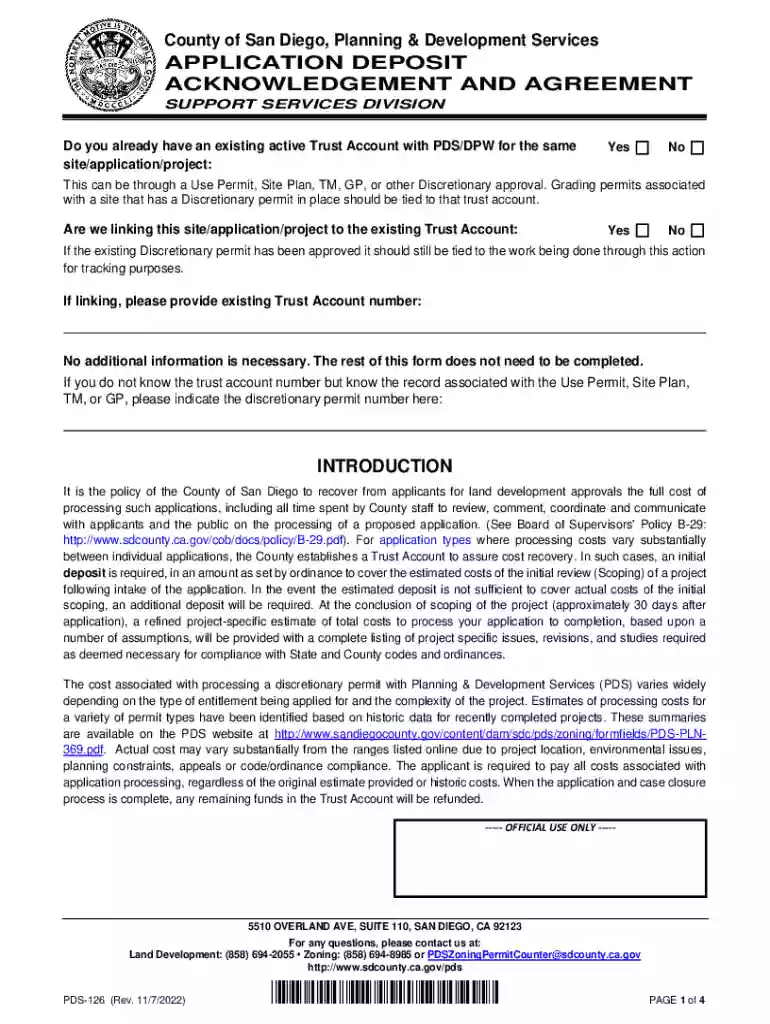
APPLICATION DEPOSIT ACKNOWLEDGEMENT AND AGREEMENT Preview on Page 1

Here's how it works

01. Edit your form online
Type text, add images, blackout confidential details, add comments, highlights and more.

02. Sign it in a few clicks
Draw your signature, type it, upload its image, or use your mobile device as a signature pad.

03. Share your form with others
Send it via email, link, or fax. You can also download it, export it or print it out.

How to use or fill out APPLICATION DEPOSIT ACKNOWLEDGEMENT AND AGREEMENT

Form edit decoration
9.5
Ease of Setup
DocHub User Ratings on G2
9.0
Ease of Use
DocHub User Ratings on G2
  1. Click ‘Get Form’ to open the APPLICATION DEPOSIT ACKNOWLEDGEMENT AND AGREEMENT in our editor.
  2. Begin by indicating whether you have an existing active Trust Account with PDS/DPW for the same site/application/project by selecting 'Yes' or 'No'.
  3. If applicable, specify if you are linking this application to the existing Trust Account and provide the Trust Account number if you have it.
  4. Fill in the Financially Responsible Party's information accurately, including name, address, and contact details. Ensure all fields are completed as this information is crucial for processing.
  5. Review the agreement section carefully. Confirm your understanding of the terms regarding deposits and responsibilities before signing.
  6. Once all sections are filled out, save your changes and proceed to submit the form through our platform for processing.

Start using our platform today to streamline your document editing and submission process for free!

See more APPLICATION DEPOSIT ACKNOWLEDGEMENT AND AGREEMENT versions

We've got more versions of the APPLICATION DEPOSIT ACKNOWLEDGEMENT AND AGREEMENT form. Select the right APPLICATION DEPOSIT ACKNOWLEDGEMENT AND AGREEMENT version from the list and start editing it straight away!
Versions Form popularity Fillable & printable
2022 4.7 Satisfied (33 Votes)
2021 4.8 Satisfied (112 Votes)
2021 4.4 Satisfied (88 Votes)
2021 4.3 Satisfied (178 Votes)
2017 4.2 Satisfied (53 Votes)
be ready to get more

Complete this form in 5 minutes or less

Get form

Got questions?

We have answers to the most popular questions from our customers. If you can't find an answer to your question, please contact us.
Contact us
An application deposit is a sum of money a potential tenant pays when submitting a rental application to a landlord. The money, also known as a holding deposit, gives the landlord assurance that the applicant is serious about renting the residence.
Deposits, also called upfront payments, down payments, or advance amounts, help prevent no-shows, late cancellations, and profit loss by making sure time slots are not wasted. When a customer no-shows or cancels their appointment or class, you get to keep their deposit.
A deposit is a sum of money that is held in an account. It may be secured in a bank for safekeeping or to secure goods for renting or purchase. Many different kinds of business transactions involve the use of a deposit. During daily operations, your business may pay regular deposits and receive deposits from customers.
An application deposit is not a security deposit since the parties have yet to sign a residential lease agreement. If the landlord accepts an application, the application may be used toward the security deposit. However, landlords vary on this practice.
An application deposit is also known as a holding deposit. An application deposit is a deposit paid to the landlord by the applicant at time of application to request the landlord hold the rental unit for the applicant until the processing of his application has been completed.

Security and compliance

At DocHub, your data security is our priority. We follow HIPAA, SOC2, GDPR, and other standards, so you can work on your documents with confidence.

Learn more
ccpa2
pci-dss
gdpr-compliance
hipaa
soc-compliance
be ready to get more

Complete this form in 5 minutes or less

Get form