Type text, add images, blackout confidential details, add comments, highlights and more.

02. Sign it in a few clicks
Draw your signature, type it, upload its image, or use your mobile device as a signature pad.

03. Share your form with others
Send it via email, link, or fax. You can also download it, export it or print it out.

How to use or fill out pptc190 with our platform
Ease of Setup
DocHub User Ratings on G2
Ease of Use
DocHub User Ratings on G2
Click ‘Get Form’ to open the pptc190 application in the editor.
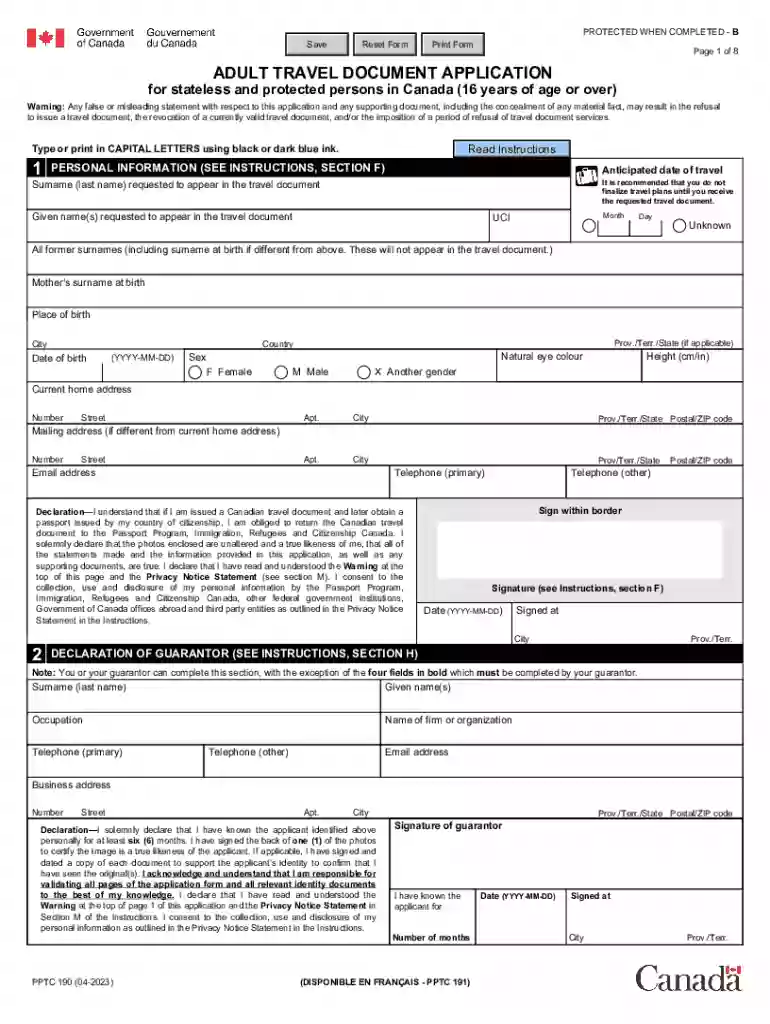
Begin by filling out your personal information. Enter your surname and given names as they should appear on the travel document, along with your anticipated date of travel.
Complete the sections for your current home address and mailing address if different. Ensure all details are accurate to avoid delays.
In the Declaration section, confirm that all information provided is true and sign within the designated area.
Proceed to fill out the Declaration of Guarantor section, ensuring that your guarantor completes their required fields accurately.
Attach any necessary supporting documents as specified in the instructions, such as proof of immigration status and identity documents.
Review all entries for accuracy before saving or printing your completed form for submission.
Start using our platform today to streamline your pptc190 application process for free!
PPTC 190 form PDFAdult travel document application for stateless and protected persons in CanadaPod PPT-COI PO Box 8100 Stn A Sydney NS B1P 0M2Refugee travel document Canada requirementsTravel document application fee paymentTravel document application PDFTravel document application form for permanent residentRenew travel document Canada
Security and compliance
At DocHub, your data security is our priority. We follow HIPAA, SOC2, GDPR, and other standards, so you can work on your documents with confidence.
Personal information provided on your application form is protected and used in accordance with the provisions of the Privacy Act (Personal Information.Read more
Cookie consent notice
This site uses cookies to enhance site navigation and personalize your experience.
By using this site you agree to our use of cookies as described in our Privacy Notice.
You can modify your selections by visiting our Cookie and Advertising Notice.