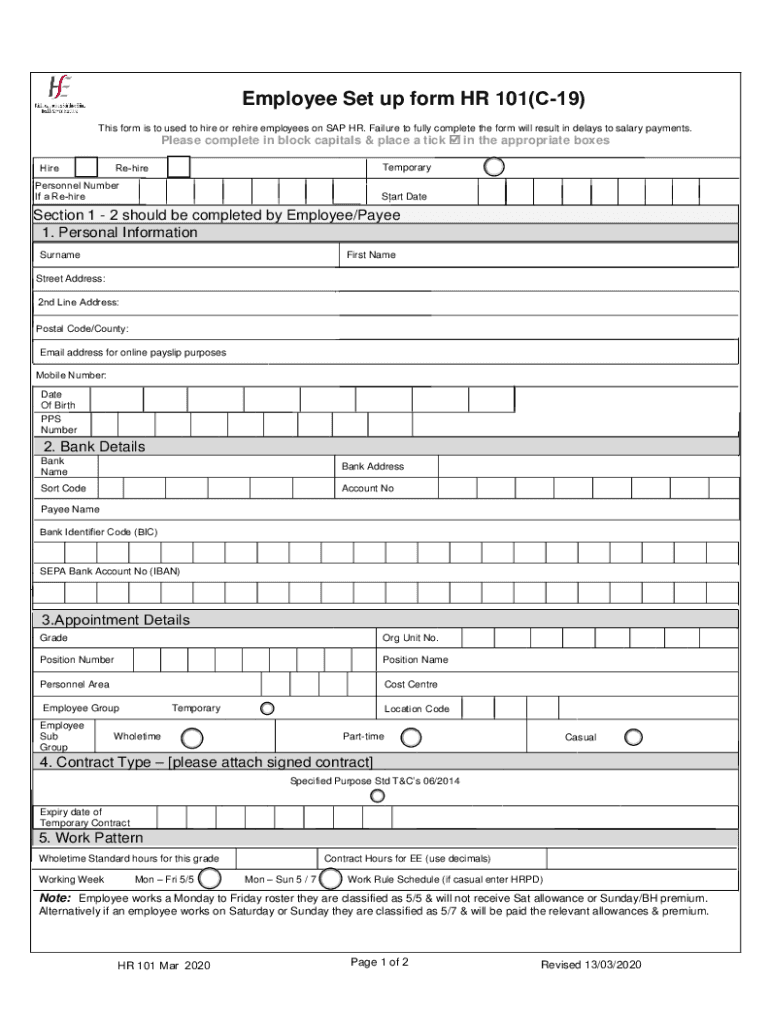







Definition & Purpose of the HR 101C19 Employee Set Up Form
The HR 101C19 Employee Set Up Form is a crucial document used for hiring or rehiring employees within the SAP HR system. It serves as a comprehensive record-keeping tool that includes detailed personal data, banking instructions, and employment specifics necessary for payroll and HR processes. By capturing essential employee information, the form facilitates a smooth transition for new or returning employees, ensuring that all procedural and compliance requirements are met efficiently.
How to Use the HR 101C19 Employee Set Up Form
To effectively utilize the HR 101C19 Employee Set Up Form, it is vital to understand its structure and requirements. Users should:
- Gather all necessary information beforehand, such as personal, bank, and employment details.
- Fill out the form digitally or in block capitals if completing a printed version to ensure clarity.
- Review each section carefully to prevent errors that could delay processing.
- Submit the completed form to the HR department or the designated electronic system within the organization for approval and processing.
Steps to Complete the HR 101C19 Employee Set Up Form
Completing the HR 101C19 form involves several detailed steps:
- Personal Information: Enter the employee's full name, contact information, and Social Security Number accurately.
- Bank Details: Specify the bank account information for direct deposits, including account and routing numbers.
- Employment Details: Include job title, department, start date, and supervisor information.
- Contract & Work Pattern: Outline the terms of employment, contract type, and expected work hours or patterns.
- Signature & Verification: Both the employee and hiring manager must sign the form, verifying the accuracy and completeness of the information provided.
Key Elements of the HR 101C19 Employee Set Up Form
The form consists of various critical sections, each serving a unique purpose:
- Employee Details: Captures personal and contact information.
- Bank Information: Necessary for setting up payroll direct deposits.
- Appointment Specifications: Details related to the employment position, including start dates and job roles.
- Declarations & Approvals: Areas for necessary signatures from both the employee and HR representatives to validate the form's accuracy.
Legal Use of the HR 101C19 Employee Set Up Form
The HR 101C19 form complies with legal standards for employment documentation within the United States. It ensures that organizations gather accurate and legally required information from employees. The form supports compliance with employment laws and data protection regulations, playing a role in safeguarding both employer and employee interests.
Why the HR 101C19 Employee Set Up Form is Essential
This form is essential for streamlining the onboarding and rehiring process in SAP HR. It ensures all relevant employee details are collected systematically, reducing administrative overhead and minimizing errors that could affect payroll. By standardizing the information collection, organizations can expedite new hires' integration into their systems.
State-Specific Rules for the HR 101C19 Employee Set Up Form
Although the HR 101C19 form is standardized across the U.S., certain details may vary based on state regulations, particularly concerning tax withholding and employment eligibility verification. Employers should stay informed of potential state-specific deviations to ensure compliance with local laws.
Who Typically Uses the HR 101C19 Employee Set Up Form
This form is primarily used by HR professionals responsible for onboarding new employees or processing rehires. Additionally, department managers may engage with this form to confirm job-specific details, while employees themselves complete sections pertaining to their personal data and banking information for payroll setup.