







Definition & Meaning
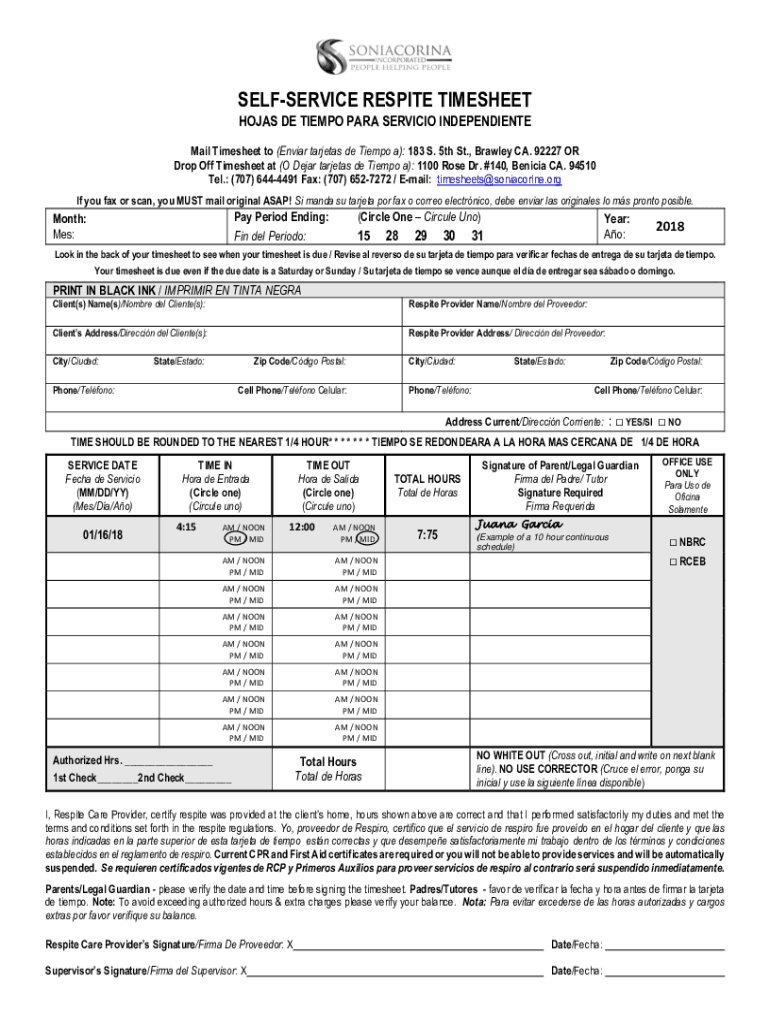
The "Respite Timesheet - Fill Online, Printable, Fillable, Blank" is a crucial document specifically designed for caregivers to record and report their working hours. This timesheet ensures accurate documentation of hours worked, services provided, and payment due. It serves as a legal record that both caregivers and employers can rely on to verify service delivery and calculate compensation. Often used in contexts involving government aid programs, the timesheet helps maintain transparency and accountability in caregiver-client relationships.
How to Use the Respite Timesheet
Using the Respite Timesheet involves several steps to ensure accurate completion and submission. Caregivers must fill in the timesheet with details such as the client’s name, caregiver’s information, and the service dates. It should include start and end times of service and a total number of hours worked each day. Each entry typically requires approval in the form of signatures from both the caregiver and the client. It is essential to follow any specific instructions or guidelines provided by the organization or agency conducting the program to avoid errors.
Filling in Details
- Client Information: Enter the full name and contact information of the recipient of care.
- Provider Information: Include the caregiver's personal and contact details.
- Service Dates: Specify the exact dates services were rendered.
- Time Logs: Record start and end times daily, ensuring calculation of total hours is accurate.
Key Elements of the Respite Timesheet
The timesheet consists of several sections that must be thoroughly completed to ensure its effectiveness and accuracy. These elements are critical in facilitating proper documentation and payment processing.
- Client and Provider Information: Clearly specified areas to document essential contact and identification details of both parties.
- Service Duration: Fields to log the precise hours worked each day during the pay period.
- Verification Signatures: Areas for both the caregiver and client to sign, confirming the services were provided as recorded.
- Submission Deadline: A section that specifies the date by which the timesheet must be submitted to ensure timely payment.
Why Should You Use the Respite Timesheet
Using this particular timesheet is vital for maintaining an accurate record of caregiver services, crucial for legal, financial, and organizational purposes. It protects both caregivers and clients by providing a clear, documented trail of services delivered and compensation agreed upon. Compliance with this standardized documentation can also facilitate seamless audits and reduce misunderstandings about service provision timings and payments, ensuring adherence to any contractual or statutory obligations.
Who Typically Uses the Respite Timesheet
This document is most commonly used by caregivers who provide temporary relief or support services to clients in need. This includes:
- Professional Caregivers: Employed by agencies offering respite services.
- Family Members: Who may receive compensation for acting as caregivers under specific programs.
- Healthcare Agencies: Which use these sheets to track staff hours for payroll and billing purposes.


Legal Use of the Respite Timesheet
The timesheet plays an essential role in the legal documentation of hours worked and can serve as evidence in disputes regarding service delivery or payment. It is essential that all entries are truthful and accurately reflect the hours worked, as falsifying records could result in severe legal penalties. In many programs, the timesheet acts as a formal contract, reinforcing the terms agreed upon for care services rendered.
State-Specific Rules for the Respite Timesheet
Different states may have specific rules governing the use of respite timesheets, including filing procedures, required documentation, or unique service definitions. Understanding these variations is crucial for compliance with local laws. For example, some states may mandate additional verification or require digital submissions through state-sanctioned platforms. Users should familiarize themselves with local regulations to avoid compliance issues.
Steps to Complete the Respite Timesheet
Successfully completing the timesheet requires attention to detail and adherence to instructions. Here’s a step-by-step guide:
- Gather Required Information: Ensure you have all necessary details about the client, provider, and service dates.
- Record Service Times: Accurately document start and end times for each workday.
- Calculate Total Hours: Summarize daily hours to ensure they align with documented work periods.
- Review for Accuracy: Double-check the entries for errors or omissions before signing.
- Obtain Signatures: Secure client and caregiver signatures for verification.
- Submit the Timesheet: Ensure timely delivery in accordance with the stated submission deadlines to avoid payment delays.
By adhering to these steps, users can ensure that the timesheet is completed thoroughly and accurately, promoting reliable record-keeping and financial transactions.




