



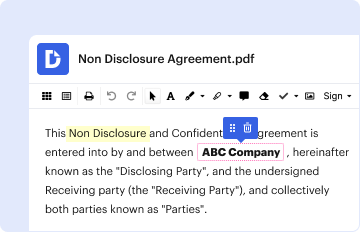
01. Edit your sainsbury's pet insurance claim form online
Type text, add images, blackout confidential details, add comments, highlights and more.


Type text, add images, blackout confidential details, add comments, highlights and more.
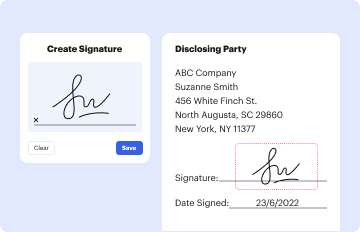
Draw your signature, type it, upload its image, or use your mobile device as a signature pad.
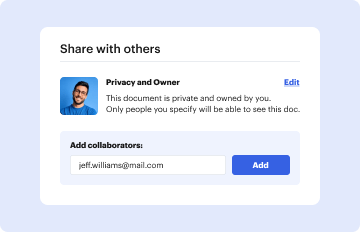
Send sainsbury pet insurance claim form via email, link, or fax. You can also download it, export it or print it out.
The Sainsbury's pet insurance claim form is a specific document required to initiate a claim under Sainsbury's pet insurance policies, which are managed by Allianz Insurance plc. This form serves not only as a formal request for reimbursement but also as an essential tool for collecting necessary details about the insurable event.
The claim form typically includes sections where policyholders provide personal information, details about the pet, and specifics concerning the veterinary treatment received. Accurately completing this form is critical as it governs the approval of claims and ensures pet owners receive timely reimbursements for eligible expenses related to their pets’ health.
By submitting the Sainsbury's pet insurance claim form, pet owners seek compensation for a variety of veterinary expenses, which may include routine check-ups, emergency treatments, surgeries, and medications, among other healthcare needs.
There are several straightforward ways to obtain the Sainsbury's pet insurance claim form. Policyholders can:
Download from the Official Website: The claim form is available as a PDF download directly from the Sainsbury's pet insurance webpage. This allows users to print and fill out the form at their convenience.
Contact Customer Support: Pet owners can contact Sainsbury's customer service via telephone or email to request a physical copy of the pet insurance claim form. The representatives can provide guidance on how to fill it out properly.
Visit the Pet Portal: If you are a registered user, you can access your claim form through the Sainsbury's pet insurance online portal. This option may offer features like pre-filled information, making the process easier.
Request via Mail: If preferred, you can send a request through postal mail to Sainsbury's insurance office, asking for a claim form to be sent to your address.
The availability through multiple channels ensures that all policyholders can easily access the necessary documentation to handle their claims effectively.
Completing the Sainsbury's pet insurance claim form requires attention to detail to ensure that all required information is filled out correctly. Follow these steps to guide you through the process:
Personal Information: Begin by filling out your name, address, and contact details. Ensure that the contact number provided is active for any follow-ups.
Policy Details: Enter your policy number exactly as it appears on your documents. This helps Sainsbury's locate your account quickly.
Pet Information: Include details about your pet, such as their name, breed, age, and any relevant medical history that may apply to the claim.
Claim Description: Provide a clear and concise description of the veterinary treatment received, including dates of service. Mention any specific symptoms that led to the veterinary visit.
Supporting Documentation: Attach copies of invoices, receipts, test results, and any medical reports from your veterinarian. Ensure these documents are legible.
Signature and Date: Sign and date the claim form. By signing, you confirm that all information provided is accurate and that you authorize Sainsbury's to access necessary veterinary information related to the claim.
Double-check all sections for accuracy before submitting your claim, as any inaccuracies or missing information could delay the approval process.
The Sainsbury's pet insurance claim form must be used in compliance with applicable laws and regulations. Legally, the form acts as a binding contract where the policyholder agrees to the terms of the insurance policy by submitting a claim for reimbursement.
It is important to consider the following legal aspects:
Authority to Use Form: Ensure you have the right to submit the claim on behalf of the pet, especially if you are submitting for someone else’s insurance policy.
Document Accuracy: All information must be truthful and accurate, as providing false or misleading details can result in denial of the claim or potential legal penalties.
Retention of Records: Keep a copy of the completed claim form and all attachments for personal records. This may be necessary for future inquiries or disputes regarding your claim.
Compliance with Privacy Regulations: When disclosing your pet’s medical information, ensure that the submission adheres to privacy laws such as the Health Insurance Portability and Accountability Act (HIPAA) that protect patient information.
By understanding the legal framework surrounding the claim form, policyholders can ensure their submissions are compliant and reduce the risk of complications during the claim process.
The Sainsbury's pet insurance claim form contains several key components that are pivotal in processing a claim. Understanding each element is crucial for ensuring a successful submission. Key elements include:
Claimant Information: This section collects personal details about the policyholder, such as name, contact information, and policy number.
Pet Details: Information about the pet is essential, including their name, date of birth, breed, and any known medical conditions.
Description of Treatment: Detailed descriptions of the veterinary visit must be included, highlighting the nature of the treatment or diagnosis.
Financial Documentation: The form requires that you attach invoices and receipts to substantiate the claim amount being requested.
Authorization Section: The form includes an authorization block where the policyholder allows Sainsbury's insurance to communicate with the veterinary practice regarding your claim.
These elements are directly related to verifying the authenticity and eligibility of the claim, ensuring that claims are processed efficiently and accurately.
Upload your sainsburys pet insurance claim form to DocHub (once you’ve created an account for this). If you need to fill out fields in it, use appropriate tools from the top pane. For example, add Signature Fields, assign each to a particular person, and click on Sign → Request signatures from others. Change your message for your recipients and click Send Request. You can also send your document by fax or as a Signing link instead of using email (you’ll locate these options by navigating to the Menu → Send)
You can easily edit and complete your sainsbury's pet claim form on any iOS device. Open an internet browser of your choice, visit the DocHub website, authorize or create a new account, upload your file for editing, and make your desired changes. Our service is mobile-friendly, so using its functions on your phone will be a no-brainer, even on the first try.
At DocHub, your data security is our priority. We follow HIPAA, SOC2, GDPR, and other standards, so you can work on your documents with confidence.
by L Asher 2011 Cited by 106 A list containing the breed of each insured dog was provided by J. Sainsburys PLC pet insurance without any accompanying information about the dog or owner.Read more
by FW Hargreaves 1891 Now having briefly stated the origin and general principles of subrogation, the main object of this paper will be to discuss,more or less in detail,itsRead more


