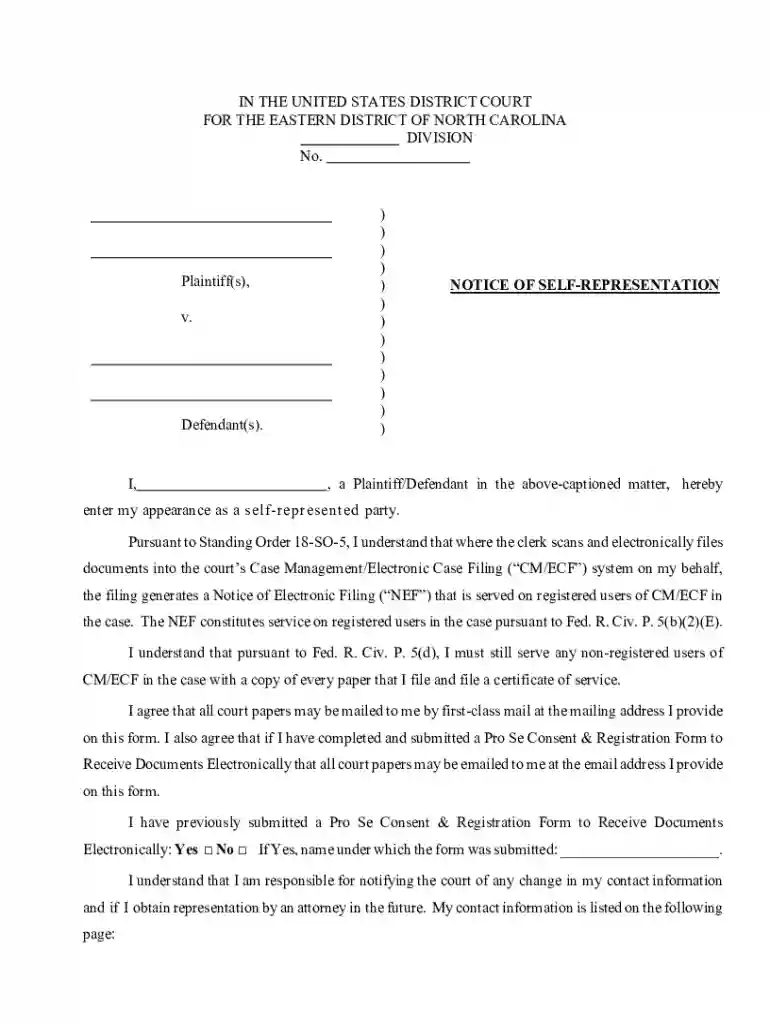
north carolina notice Preview on Page 1

Supplemental Removal Cover Sheet 2026

Here's how it works

  • 01. Edit your north carolina notice online

    Type text, add images, blackout confidential details, add comments, highlights and more.

  • 02. Sign it in a few clicks

    Draw your signature, type it, upload its image, or use your mobile device as a signature pad.

  • 03. Share your form with others

    Send it via email, link, or fax. You can also download it, export it or print it out.

How to use or fill out Supplemental Removal Cover Sheet with our platform

Form edit decoration
9.5
Ease of Setup
DocHub User Ratings on G2
9.0
Ease of Use
DocHub User Ratings on G2
  1. Click ‘Get Form’ to open the Supplemental Removal Cover Sheet in the editor.
  2. Begin by entering your name in the designated field as either Plaintiff or Defendant, indicating your self-representation.
  3. Provide your mailing address and street address if different. Ensure accuracy for proper communication from the court.
  4. Fill in your daytime and evening telephone numbers, along with your email address for electronic correspondence.
  5. Indicate whether you have previously submitted a Pro Se Consent & Registration Form by checking 'Yes' or 'No'. If 'Yes', specify the name under which it was submitted.
  6. Review all entered information for accuracy before signing and dating the form at the bottom.

Start using our platform today to easily complete your Supplemental Removal Cover Sheet online for free!

See more north carolina notice versions

We've got more versions of the north carolina notice form. Select the right north carolina notice version from the list and start editing it straight away!

VersionsForm popularityFillable & printable
20224.4 Satisfied (54 Votes)
20174.1 Satisfied (54 Votes)

be ready to get more

Complete this form in 5 minutes or less

Got questions?

We have answers to the most popular questions from our customers. If you can't find an answer to your question, please contact us.

Deadlines. Once a case is served, the defendant has 30 days to remove it to federal court. If a case is not initially removable, but becomes removable laterdue to amendment, joinder, or otherwisethis typically triggers the 30-day deadline from the date of the operative event.
Removing a case to federal court requires diversity of citizenship and an amount in controversy of more than $75,000. In a personal injury case, the easiest way to prove the amount in controversy is to show medical specials in excess of the threshold.
The notice of removal of a civil action or proceeding shall be filed within 30 days after the receipt by the defendant, through service or otherwise, of a copy of the initial pleading setting forth the claim for relief upon which such action or proceeding is based, or within 30 days after the service of summons upon
This form, approved by the Judicial Conference of the United States in September 1974, is required for the use of the Clerk of Court for the purpose of initiating the civil docket sheet. Consequently, a civil cover sheet is submitted to the Clerk of Court for each civil complaint filed.

Security and compliance

At DocHub, your data security is our priority. We follow HIPAA, SOC2, GDPR, and other standards, so you can work on your documents with confidence.

Related links

Supplemental Civil Cover Sheet for Cases Removed From

1. State Court Information: Please identify the court from which the case is being removed and specify the number assigned to the case in that courtRead more

Learn more
CIVIL COVER SHEET

by VICOF ACTION Consequently, a civil cover sheet is submitted to the Clerk of Court for each civil complaint filed. The attorney filing a case should complete the form asRead more

Learn more
FAA Form 8710-1, Airman Certificate and/or Rating

The information collected on this form is necessary to determine applicant eligibility for airman ratings. We estimate it will take 30.Read more

Learn more
If you believe that this page should be taken down, please follow our DMCA take down process here