




01. Edit your form online
Type text, add images, blackout confidential details, add comments, highlights and more.

Type text, add images, blackout confidential details, add comments, highlights and more.

Draw your signature, type it, upload its image, or use your mobile device as a signature pad.

Send it via email, link, or fax. You can also download it, export it or print it out.
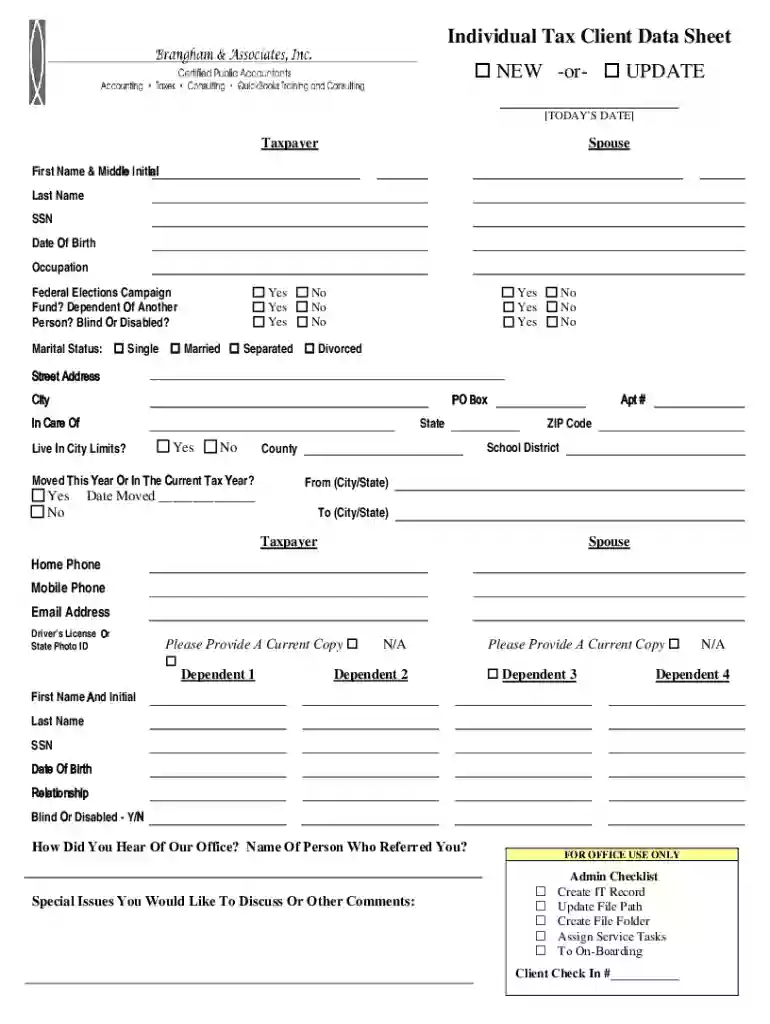
The Individual Tax Client Data Sheet is a critical document used primarily by tax preparation offices to gather comprehensive personal and financial information from clients. This form is designed to collect data from both new clients and existing ones who need to update their records. It gathers essential details such as marital status, dependents, contact information, and any specific tax-related issues that need attention. The primary purpose of this sheet is to ensure that tax preparers have all the necessary information to accurately file a client's taxes, minimize errors, and optimize tax outcomes.
Completing the Individual Tax Client Data Sheet involves several structured steps to ensure accuracy.
Gather Personal Information: Start by filling in your basic personal details, including full name, address, and contact information, which sets the foundation for the form.
Detail Your Financial Information: This section requires you to list your income sources, such as employment, investments, or rental properties, ensuring that all taxable income is captured.
Outline Dependent Information: Input details of any dependents, including names, ages, and social security numbers, which can impact your tax benefits.
Specify Marital Status and Changes: Indicate your current marital status and note any recent changes that might affect tax filing status.
Discuss Special Tax Considerations: Highlight any specific tax concerns or situations, such as inheritance, litigation, or tax credits, which require detailed attention.
Review and Sign: Carefully review the completed form for accuracy and provide your signature to authenticate the information supplied.
This form applies to U.S. taxpayers who need to prepare their taxes, whether they are filing independently or employing a tax preparer. It is particularly useful for:


In today's digital age, the Individual Tax Client Data Sheet is available in both paper and digital formats. The digital version offers several advantages:
For users seeking to streamline their tax process, integrating the Individual Tax Client Data Sheet with tax software can be beneficial. It is compatible with popular tools such as:
Various taxpayer scenarios necessitate the use of the Individual Tax Client Data Sheet:

Failing to fill out the Individual Tax Client Data Sheet accurately or omitting critical information can lead to various penalties:
By adhering to these structured guidelines, taxpayers can effortlessly complete their Individual Tax Client Data Sheet, ensuring accurate and efficient tax preparation.
We've got more versions of the Individual Tax Client Data Sheet NEW -or- UPDATE form. Select the right Individual Tax Client Data Sheet NEW -or- UPDATE version from the list and start editing it straight away!
Managing your documentation with DocHub this way is extremely simple after you have downloaded its extension for Google Chrome. Go to the Chrome Web Store and set up DocHub - Sign PDF from Gmail to obtain it. Give our tool access to your Google account, and then open an email with the Individual Tax Client Data Sheet NEW -or- UPDATE attached and point to the file with your cursor - the DocHub extension button will automatically appear there. Click on it to open your document in our editor. Make any required adjustments, fill out the blanks, and click Sign to create your legally-binding electronic signature.
In case your go-to email service is Gmail, you can easily integrate your DocHub editor in your work. Modify your Individual Tax Client Data Sheet NEW -or- UPDATE with DocHub tools and attach it to your drafts in Gmail. See how effortless it can be to exchange papers and collaborate with a swift PDF editing solution at hand.
At DocHub, your data security is our priority. We follow HIPAA, SOC2, GDPR, and other standards, so you can work on your documents with confidence.
This Community Developments Fact Sheet describes the earned income tax credit (EITC) and provides examples of what national bank and federal savingsRead more
Online Supplements and Datasheets Volume 55 Discover Current and Past Issues Explore Other Offerings Global Locations Follow.Read more


