







Definition and Meaning
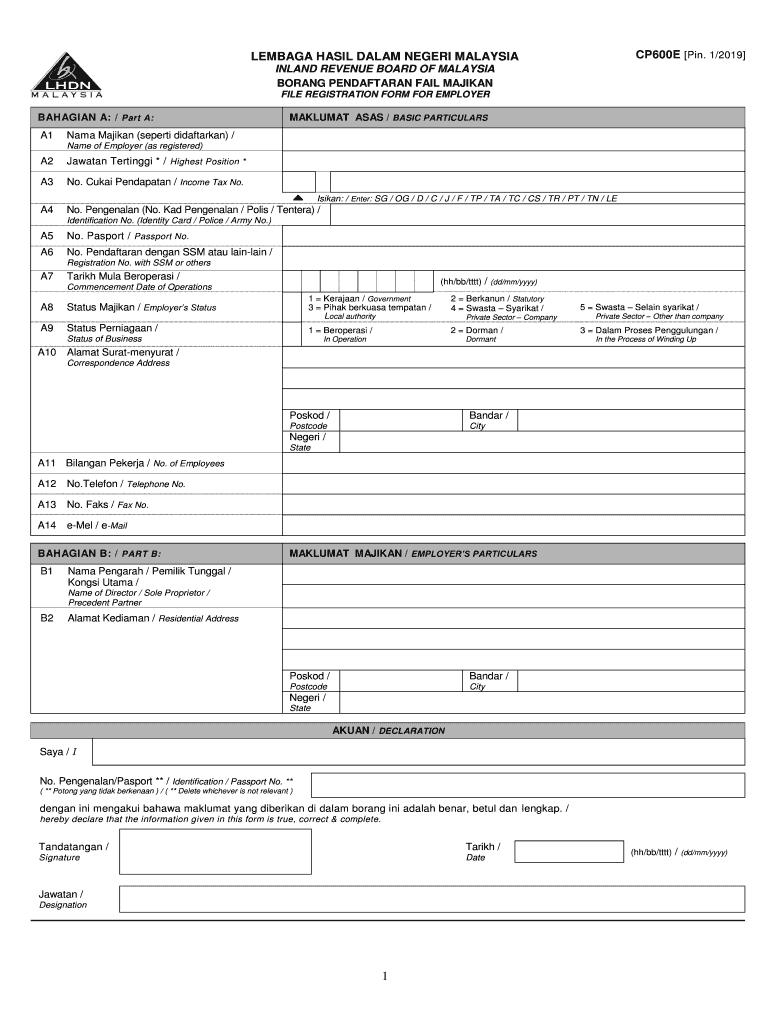
The "cp600e" is typically a registration or compliance form required by certain governing bodies or tax authorities. In the case of a registration form issued by the Inland Revenue Board in Malaysia, it collects essential information from employers, including their name, identification numbers, business status, and contact details. Understanding the specific purpose and scope of the cp600e is crucial for compliance, as it often involves submitting accurate and complete information to avoid penalties.
Key Elements of the cp600e
- Business Information: Collects details about the employer, such as the business name, registration numbers, and type of entity.
- Contact Information: Requires addresses, phone numbers, and official email addresses associated with the business.
- Declaration Section: Includes a statement where the employer confirms the accuracy and truthfulness of the provided information. False declarations can lead to legal repercussions.
- Signature Requirements: Specifies the parties authorized to sign and submit the form on behalf of the business, often requiring notarization or official seals.
Steps to Complete the cp600e
- Gather Required Information: Ensure all required details, such as business registration numbers, are ready.
- Fill Out Business Details: Enter the business name, type, and registration information.
- Provide Contact Information: Input complete contact details, including mailing addresses and emails.
- Complete Declaration: Fill in the declaration section attesting to the accuracy of the information.
- Signature and Submission: Ensure the correct parties have signed the form before submitting it through the preferred method, whether online, by mail, or in-person.
Important Tips
- Double-Check Details: Ensure every section is complete and accurate to avoid the need for resubmission.
- Keep Copies: Save copies of the completed form and all supporting documents for your records.
Who Typically Uses the cp600e
The primary users of the cp600e are employers and business owners required to report their business details to comply with national or regional regulations. This can include:
- Large Corporations: Which often have dedicated legal or HR departments managing compliance.
- Small and Medium Enterprises (SMEs): Owners themselves might complete these forms.
- Startups: Important for early-stage compliance in new businesses.
- Non-Profit Organizations: May need to complete a similar process with variations specific to non-profit activities.


Important Terms Related to cp600e
- "Employer": Refers to the business entity or individual responsible for completing the registration.
- "Declaration": A section where the signer agrees to the accuracy and truthfulness of the submitted information.
- "Submission": The formal act of sending the completed form and all necessary attachments to the relevant authority.
Legal Use of the cp600e
Filling out and submitting the cp600e ensures that businesses comply with legal requirements in their operating jurisdiction. The form often serves as a record for tax authorities or industry regulators to verify a business's adherence to local laws and regulations.
- Compliance: Ensures lawful operation and provides evidence of regulatory adherence.
- Protection: Helps safeguard against penalties or legal issues due to non-compliance or inaccurate reporting.
Required Documents
When completing the cp600e, businesses may need to provide additional documentation that supports the information provided on the form. This can include:
- Business Registration Certificates: Proves the legal establishment of the entity.
- Identification Documents: Such as passports or national IDs of owners or authorized signatories.
- Tax Identification Numbers: Ensures proper identification within tax systems.
Form Submission Methods
The cp600e can typically be submitted through multiple channels depending on the issuing body’s guidelines:
- Online Submission: Offers a quick and efficient method using official portals or websites.
- Mail: Involves sending the completed form and any supporting documents through postal services.
- In-Person: Direct submission to an office or branch, which can be advantageous for those seeking confirmation or assistance.
Penalties for Non-Compliance
Failing to properly fill out or submit the cp600e within the required timeframe can result in:
- Fines: Monetary penalties that vary depending on the jurisdiction or severity of non-compliance.
- Legal Actions: May include directives to cease operations until compliance is achieved or improved.
- Reputation Damage: Non-compliance can affect a business’s reputation, impacting client or investor trust.
Taking the time to understand and accurately complete the cp600e ensures compliance with relevant laws and aids in the smooth operation of the business.


