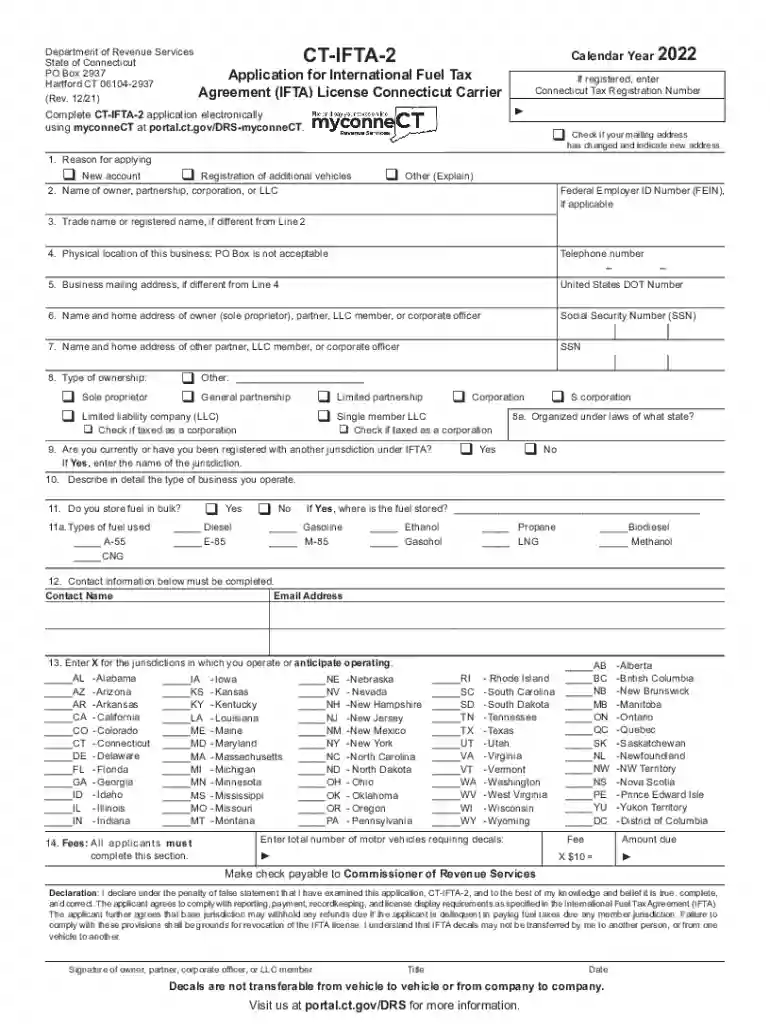
CT-IFTA-2, Application for International Fuel Tax 2026

Get Form
CT-IFTA-2, Application for International Fuel Tax Preview on Page 1

Here's how it works

01. Edit your form online
Type text, add images, blackout confidential details, add comments, highlights and more.

02. Sign it in a few clicks
Draw your signature, type it, upload its image, or use your mobile device as a signature pad.

03. Share your form with others
Send it via email, link, or fax. You can also download it, export it or print it out.

How to use or fill out CT-IFTA-2, Application for International Fuel Tax with DocHub

Form edit decoration
9.5
Ease of Setup
DocHub User Ratings on G2
9.0
Ease of Use
DocHub User Ratings on G2
  1. Click ‘Get Form’ to open the CT-IFTA-2 application in our editor.
  2. Begin by selecting the reason for applying in Line 1. Check the appropriate box for a new account, registration of additional vehicles, or other reasons.
  3. In Line 2, enter the name of the owner, partnership, corporation, or LLC. If applicable, include your Federal Employer ID Number (FEIN).
  4. For Line 3, provide the trade name if it differs from the name entered in Line 2.
  5. Complete Lines 4 and 5 with your business's physical location and mailing address. Remember that a PO Box is not acceptable as a physical address.
  6. Fill out Lines 6 and 7 with the names and home addresses of owners or corporate officers. Include Social Security Numbers where required.
  7. Indicate your type of ownership in Line 8 and provide details about your business operations in Line 10.
  8. Complete all remaining sections including fuel storage information and jurisdictions where you operate before signing at the end of the form.

Start using our platform today to complete your CT-IFTA-2 application online for free!

See more CT-IFTA-2, Application for International Fuel Tax versions

We've got more versions of the CT-IFTA-2, Application for International Fuel Tax form. Select the right CT-IFTA-2, Application for International Fuel Tax version from the list and start editing it straight away!
Versions Form popularity Fillable & printable
2022 4.8 Satisfied (125 Votes)
2021 4.3 Satisfied (47 Votes)
2020 4.2 Satisfied (62 Votes)
2010 4.9 Satisfied (48 Votes)
be ready to get more

Complete this form in 5 minutes or less

Get form

Got questions?

We have answers to the most popular questions from our customers. If you can't find an answer to your question, please contact us.
Contact us
How to calculate IFTA tax Track Total Miles Driven in Each Jurisdiction. Record the miles driven in each state or province using trip logs, odometer readings, or GPS tracking. Calculate Overall Fuel Mileage. Determine Fuel Consumed per Jurisdiction. Apply the Jurisdictions Tax Rate. Reconcile Tax Paid and Tax Owed.
How to File an IFTA Report: Step-by-Step See if your states IFTA form does the calculations for you (if it does, skip 2-7) Track and calculate total taxable miles driven in each jurisdiction. Add the number of gallons of fuel purchased in each jurisdiction. Calculate the average miles per gallon for the quarter.
This begins by filling out an electronic return form (ERF) which will require information such as miles traveled within each jurisdiction, fuel gallons purchased, and other fuel mileage information related to the previous quarter. The ERF will then calculate the amount of taxes to pay with your quarterly tax return.
If you operate a qualified motor vehicle without carrying a copy of your current, valid IFTA license, you may be subject to a citation, fine, penalty, and possible seizure and sale of your vehicle. In addition, you may be required to purchase fuel trip permits to travel into or through each member jurisdiction.
Click here to File, Pay, or Register Now on myconneCT! All IFTA tax payments (e.g., return payments) must be made electronically. Visit myconneCT to make an electronic payment. After logging in to myconneCT, find your tax account on the Summary screen, select the Make a Payment link, and choose your payment method.

Security and compliance

At DocHub, your data security is our priority. We follow HIPAA, SOC2, GDPR, and other standards, so you can work on your documents with confidence.

Learn more
ccpa2
pci-dss
gdpr-compliance
hipaa
soc-compliance
be ready to get more

Complete this form in 5 minutes or less

Get form

People also ask

If you are considered a full-year or part-year resident, your worldwide income is taxable at the state level. You cannot exclude foreign earned income, deduct foreign housing expenses, or claim credits for foreign taxes paid. The only credit Connecticut allows is for taxes paid to another US state on the same income.
Connecticut Resident Income Tax Information File and pay Form CT-1040 electronically using myconneCT at portal.ct.gov/DRS-myconneCT.

Related links