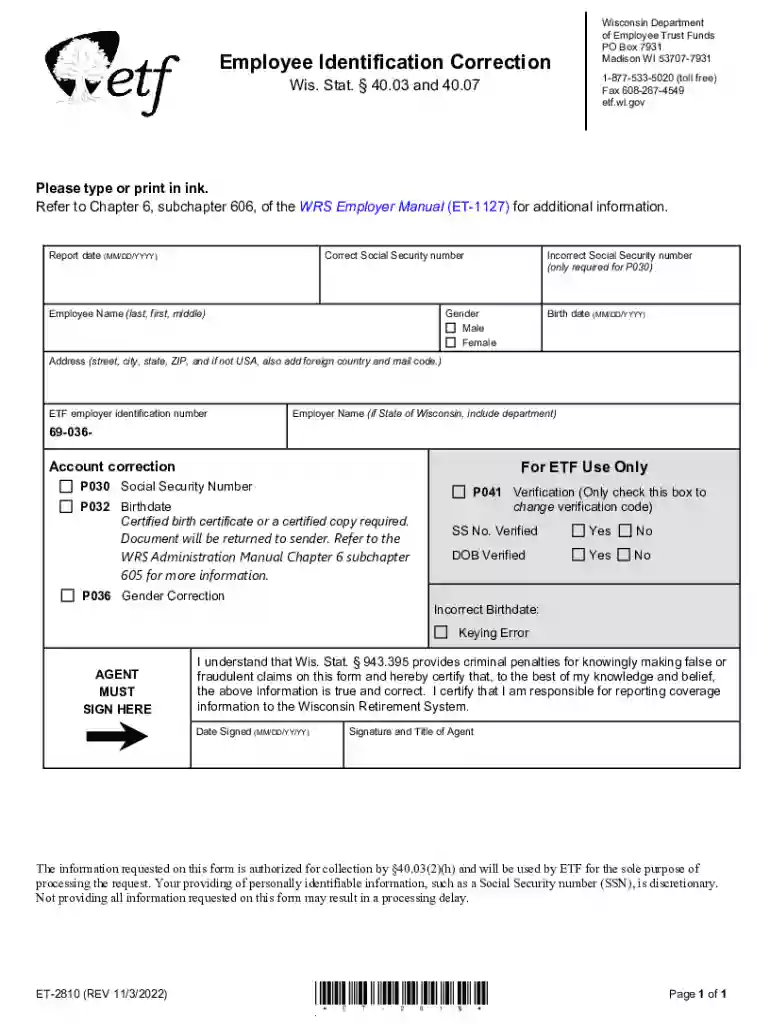
Employee Identification Correction - Wis Stat 40 03 and 2026

Get Form
Employee Identification Correction - Wis Stat 40 03 and Preview on Page 1

Here's how it works

01. Edit your form online
Type text, add images, blackout confidential details, add comments, highlights and more.

02. Sign it in a few clicks
Draw your signature, type it, upload its image, or use your mobile device as a signature pad.

03. Share your form with others
Send it via email, link, or fax. You can also download it, export it or print it out.

Definition & Meaning

The Employee Identification Correction under Wis Stat 40.03 is a form used to address inaccuracies in employee identification details. It specifically focuses on correcting errors related to Social Security numbers, birthdates, and gender. This form plays a crucial role within the Wisconsin Retirement System by ensuring that records accurately reflect an employee’s personal information. Correcting these details is vital for maintaining the integrity of employee data, which can have significant implications for benefits and legal compliance.

Key Elements of the Employee Identification Correction

The form comprises several key elements designed to capture essential details needed for correction.

  • Employee Details: Includes fields for entering corrected information such as the Social Security number, date of birth, and gender.
  • Instructions for Completion: A section dedicated to guiding users through the process of filling out each part of the form accurately.
  • Certification and Signature: Requires the signature of the individual submitting the correction, affirming that the information provided is accurate to the best of their knowledge.
  • Warnings and Legal Notices: Outlines the potential legal implications of furnishing false information, which can result in penalties or legal action.

Steps to Complete the Employee Identification Correction

Completing the form involves a systematic approach to ensure accuracy and compliance.

  1. Gather Necessary Information: Before starting, collect documents like the employee's Social Security card, birth certificate, or any official document verifying the correct information.
  2. Complete Employee Details: Fill out all relevant sections on the form with the corrected information, ensuring each field is accurately updated.
  3. Review Instructions: Carefully read the provided guidelines to ensure all parts of the form are completed correctly.
  4. Sign and Certify: Sign the certification section, attesting to the accuracy of the given information.
  5. Submit the Form: Depending on your preference, submit the form electronically or via mail, ensuring it reaches the Wisconsin Department of Employee Trust Funds.

Why Use the Employee Identification Correction

This form is essential for correcting any discrepancies within the Wisconsin Retirement System records. Accurate identification information is crucial to avoid complications with retirement benefits and compliance with legal standards. The correction ensures every employee's data is reliable and up-to-date, which supports smooth operations within the employee benefits framework.

Legal Use of the Employee Identification Correction

From a legal standpoint, the form serves as a compliance tool, facilitating the correction of personal identification errors in official records. It supports the Wisconsin Department of Employee Trust Funds in maintaining accurate and legally compliant records and also protects individuals by ensuring their data is corrected promptly in official personal records.

Required Documents

To successfully complete the form, you will need:

  • Social Security Card: To verify and correct the Social Security number.
  • Birth Certificate: For accurate date of birth verification.
  • Government-issued ID: To confirm identity and facilitate gender correction if necessary.

Having these documents ready ensures the correction process is efficient and error-free.

State-Specific Rules for the Employee Identification Correction

Wisconsin-specific regulations dictate the use and submission of this form. These rules include compliance with the Wisconsin Retirement System's requirements and adherence to state data protection laws. It's crucial to follow these guidelines to ensure the effectiveness and legal compliance of the correction process.

Penalties for Non-Compliance

Failing to correct inaccuracies can result in severe penalties. Providing false information on the form may lead to legal action, fines, and the possible denial of benefits through the Wisconsin Retirement System. Ensuring that corrections are submitted promptly and accurately can prevent these potential ramifications.

Examples of Using the Employee Identification Correction

Real-world scenarios illustrate the utility of this form:

  • Case of Mismatched Birthdate: An employee discovers that their birthdate is incorrect in company records, potentially affecting retirement age calculations. Correcting this discrepancy ensures their benefits are accurately determined.
  • Social Security Number Correction: An employee's payroll reports a wrong Social Security number, which could impact tax reporting and credit scores. Submitting this corrected form rectifies the issue, preventing future complications.

Form Submission Methods (Online / Mail / In-Person)

Wisconsin provides multiple ways to submit the form:

  • Online: Upload the completed form securely via the official Wisconsin Department of Employee Trust Funds website.
  • Mail: Send the form to the department's address for submission via postal service.
  • In-person: Direct submission at the department's office allows immediate assistance if needed.

Ensuring the form is submitted through one of these official channels guarantees that corrections are processed efficiently.

Software Compatibility

For digital completion, this form is compatible with several document management platforms, including DocHub, which supports comprehensive editing and secure submission. Additionally, various tax software products like TurboTax and QuickBooks might provide tools for managing related document corrections and submissions.

See more Employee Identification Correction - Wis Stat 40 03 and versions

We've got more versions of the Employee Identification Correction - Wis Stat 40 03 and form. Select the right Employee Identification Correction - Wis Stat 40 03 and version from the list and start editing it straight away!
Versions Form popularity Fillable & printable
2022 4.4 Satisfied (45 Votes)
2021 4.8 Satisfied (165 Votes)
2018 4.2 Satisfied (26 Votes)
2012 4 Satisfied (26 Votes)
be ready to get more

Complete this form in 5 minutes or less

Get form

Got questions?

We have answers to the most popular questions from our customers. If you can't find an answer to your question, please contact us.
Contact us
In Wisconsin, passengers in a traffic stop have the right to remain silent and refuse identification when pulled over for traffic violations, since they are not the ones driving, and are protected against unreasonable searches and prolonged detention, with these rights rooted in their protection from unwarranted
THE STOP A Terry stop is defined as a brief, temporary involuntary detention of a person suspected of being involved in criminal activity for the purpose of investigating the potential criminal violation.
As the passenger, you are under no suspicion of wrongdoing, and as such do not need to answer any line of questions, provide any identification on request or demand, or provide proof of legal immigration status. The police are not able to arrest you for simply refusing to identify yourself.
If the police ask you to show them your identification and you have not been detained or taken into custody, you are not legally required to show your ID in Wisconsin.
This section authorizes officers to demand identification only when a person is suspected of committing a crime but does not govern the lawfulness of requests for identification in other circumstances.

Security and compliance

At DocHub, your data security is our priority. We follow HIPAA, SOC2, GDPR, and other standards, so you can work on your documents with confidence.

Learn more
ccpa2
pci-dss
gdpr-compliance
hipaa
soc-compliance
be ready to get more

Complete this form in 5 minutes or less

Get form

People also ask

Every employer shall, upon the request of an employee, which the employer may require the employee to make in writing, permit the employee to inspect any personnel documents which are used or which have been used in determining that employees qualifications for employment, promotion, transfer, additional compensation,

Related links