Type text, add images, blackout confidential details, add comments, highlights and more.

02. Sign it in a few clicks
Draw your signature, type it, upload its image, or use your mobile device as a signature pad.

03. Share your form with others
Send tsp 17 via email, link, or fax. You can also download it, export it or print it out.

How to use or fill out tsp 17 with our platform
Ease of Setup
DocHub User Ratings on G2
Ease of Use
DocHub User Ratings on G2
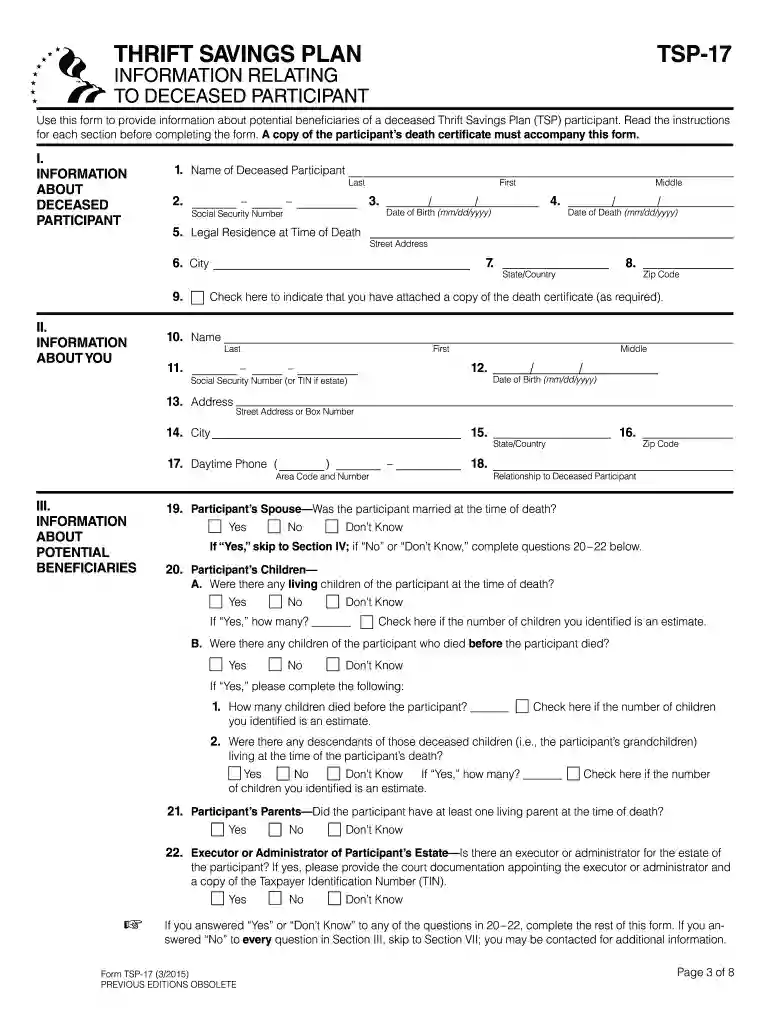
Click ‘Get Form’ to open the TSP-17 in the editor.
Begin by filling out Section I, providing all necessary information about the deceased participant, including their name, Social Security number, and date of death. Remember to attach a copy of the death certificate.
In Section II, complete your personal information. If you are not a potential beneficiary, you may leave certain fields blank.
Proceed to Section III to provide details about potential beneficiaries. If the participant was married at the time of death, skip to Section IV.
In Section IV, list detailed information about each potential beneficiary. Ensure you include their names and relationships to the deceased participant.
If needed, use Section V for referrals if you lack contact information for any beneficiaries.
Finally, sign and date the form in Section VII before submitting it through our platform for processing.
Start using our platform today for free to streamline your TSP-17 form completion!
Torstar acquired TSP in 1996 before selling to Scholastic in late 2001. The animation division spun off from TSP in February of that year becoming Soup2Nuts.Read more
Cookie consent notice
This site uses cookies to enhance site navigation and personalize your experience.
By using this site you agree to our use of cookies as described in our Privacy Notice.
You can modify your selections by visiting our Cookie and Advertising Notice.