
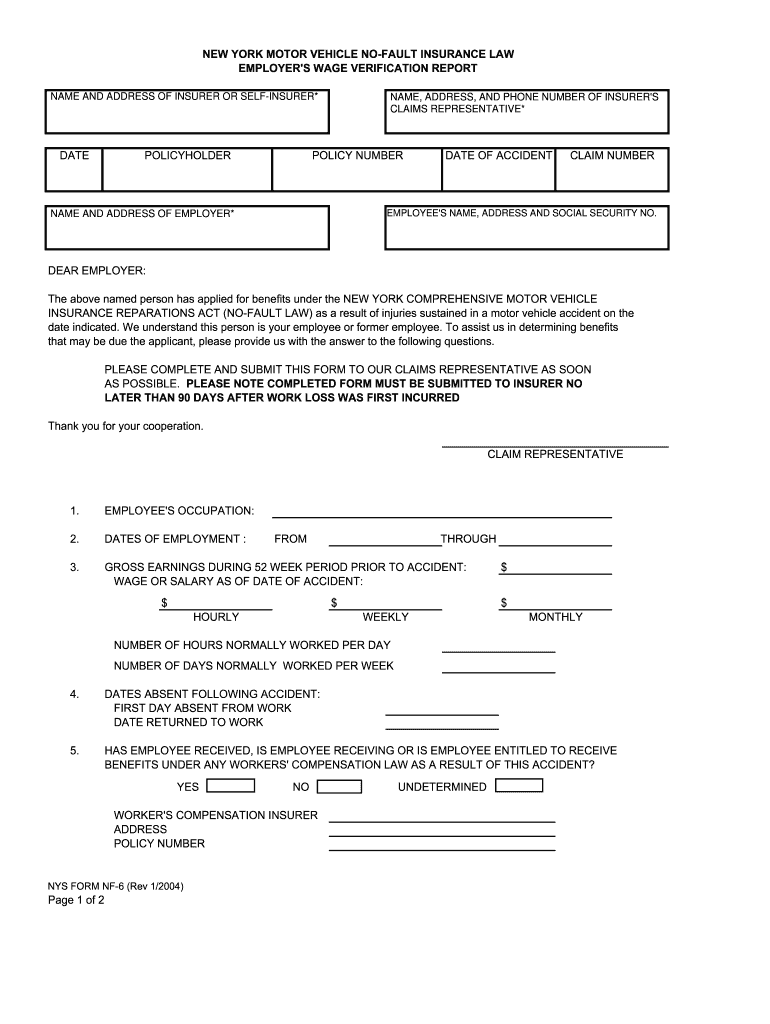




Here's how it works

01. Edit your nf6 form online
Type text, add images, blackout confidential details, add comments, highlights and more.

02. Sign it in a few clicks
Draw your signature, type it, upload its image, or use your mobile device as a signature pad.

03. Share your form with others
Send nys form nf 6 via email, link, or fax. You can also download it, export it or print it out.
How to use or fill out nf6 form with our platform

- Click ‘Get Form’ to open the nf6 form in the editor.
- Begin by filling in the 'Name and Address of Insurer or Self-Insurer' section. Ensure all details are accurate to avoid processing delays.
- Next, provide the 'Policyholder' information along with the 'Date of Accident' and 'Claim Number'. This is crucial for linking your submission to the correct case.
- In the 'Employee's Name, Address, and Social Security No.' section, enter the employee's details as they appear on official documents.
- Complete the employment details including 'Employee's Occupation', 'Dates of Employment', and 'Gross Earnings'. Be precise with figures to ensure compliance.
- Fill out questions regarding any workers' compensation or disability benefits received by the employee. This information is vital for claims assessment.
- Finally, review all entries for accuracy before submitting. Use our platform’s features to save your progress and make edits as needed.
Start using our platform today for free to streamline your nf6 form completion!
Fill out nf6 form online
It's free
It's free
See more nf6 form versions
We've got more versions of the nf6 form form. Select the right nf6 form version from the list and start editing it straight away!
| Versions | Form popularity | Fillable & printable |
|---|---|---|
| 2004 | 4.9 Satisfied (495 Votes) |
Security and compliance
At DocHub, your data security is our priority. We follow HIPAA, SOC2, GDPR, and other standards, so you can work on your documents with confidence.
Learn more


Related forms
Personalized Diagnostics Test Request Form - Penn Medicine - pennmedicine
The document is a test requisition form from the Center for Personalized Diagnostics at the Hospital of The University o ...
Engineering logbook template
The document is a log book for the CIVL401 Capstone Project at Eastern Mediterranean University, detailing group assignm ...

Mymaxcard bapplicationb form - Bracknell Forest Council - bracknell-forest gov
The document is an application form for the Max Card, designed for children and young people in Bracknell Forest with ad ...
Generator service contract
The document is a Generator Service Contract outlining the maintenance services provided to customers every six months a ...

Adfelps test online
The document is a reading test consisting of various sections that include personal information about an individual name ...

Fitness for duty form template
The document outlines the process for obtaining a Fitness for Duty Certification required by Portland Community College ...

Modified possession order texas template
The document outlines a Modified Possession and Access Order for child custody, designating two conservators (Parent A a ...