
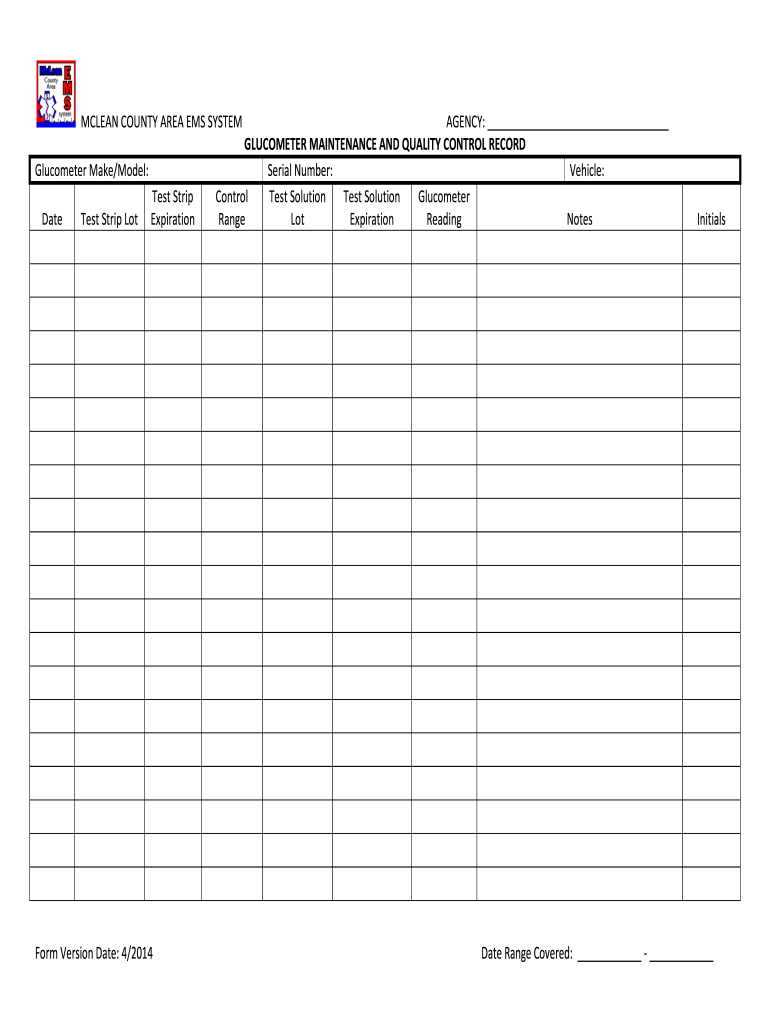







Definition and Importance of the Glucometer Quality Control Log Template
A glucometer quality control log template is an essential tool for documenting the performance and accuracy of blood glucose meters. This log helps healthcare providers and patients track the quality control (QC) checks performed on glucometers, which are crucial for ensuring reliable blood glucose readings. Regular use of a QC log is vital for maintaining compliance with medical regulations and standards, ultimately ensuring patient safety.
The log typically captures key details, such as:
- Date and time of the QC test
- Manufacturer's instructions reference
- Control solution lot number and expiration date
- Results of the control test (high, low, or within range)
- Operator signature for accountability
By using a quality control log, users can identify trends or inconsistencies in glucometer performance, facilitating timely interventions when discrepancies arise.
How to Use the Glucometer Quality Control Log Template
To effectively utilize a glucometer quality control log template, follow these steps:
-
Prepare the Log: Gather all necessary materials, including the glucometer, control solutions, and the log template.
-
Conduct the Quality Control Test:
- Ensure the glucometer is calibrated according to the manufacturer's specifications.
- Use appropriate control solutions to perform testing.
-
Record Results:
- Enter the date, time, and results of the control test in the log.
- Include any observations, anomalies, or operator comments relevant to the testing process.
-
Evaluate Results:
- Compare results against expected ranges provided by the control solution manufacturer.
- Investigate any discrepancies to determine if the glucometer requires recalibration or servicing.
-
Follow Up:
- Retain logs for future reference and regulatory compliance. Review records periodically to identify any issues over time.
Maintaining an organized and updated QC log ensures that users are regularly assessing glucometer accuracy, which is vital for effective diabetes management.
Key Elements of the Glucometer Quality Control Log Template
A well-structured glucometer quality control log template should include several vital components. Key elements typically consist of the following:
- Patient Information: If applicable, user identification details to ensure proper tracking.
- Device Identification: Model and serial number of the glucometer used.
- Test Strip Information: Including the lot number and expiration date of test strips for traceability.
- Control Solution Details: Lot numbers and expiration dates for control solutions to maintain accuracy.
- Date and Time: Stamping each entry helps to ensure overall compliance and validation of test results.
- Quality Control Test Results: Clear sections for recording high, low, and acceptable range scores.
- Corrective Actions Taken: Space to describe any actions taken in response to failed tests.
- Signature of Operator: A section for the operator's signature provides accountability in the QC process.
Including these elements helps in maintaining compliance and ensuring that all necessary information is collected during each quality control session.
Examples of Using the Glucometer Quality Control Log Template
Utilizing a glucometer quality control log template has practical implications in both clinical and home settings.
-
Clinical Setting: In hospitals, the QC log is used by healthcare professionals to ensure all glucometers are functioning accurately before use. For instance, a diabetes clinic may schedule weekly QC tests for all devices in use, recording results in individual logs for each meter. This level of diligence helps manage potential discrepancies before patient interventions.
-
Home Use: Individuals managing diabetes at home can use a QC log to track their own glucometer performance. By conducting weekly control tests and logging the results, users can maintain oversight of their device, ensuring that their blood glucose readings are reliable. This practice promotes better self-management of their condition and provides valuable insights to healthcare providers during consultations.
These examples illustrate the practicality of maintaining a detailed quality control log, both in professional and personal contexts.
Importance of Legal Compliance in Glucometer Quality Control Logging
Adhering to legal regulations regarding medical equipment is crucial, as improper use can lead to misinformation in treatment and potential harm to patients. Establishing a quality control log ensures compliance with guidelines set by regulatory bodies like the Food and Drug Administration (FDA) and the Centers for Medicare and Medicaid Services (CMS).
Healthcare facilities are often required to maintain documentation demonstrating equipment efficacy, especially during audits. By using a quality control log, facilities can provide evidence that their glucometers are consistently tested and calibrated, safeguarding against liabilities and ensuring adherence to best practices in patient care.
Key legal compliance considerations include:
- Following manufacturer guidelines for quality control testing
- Regularly updating and maintaining logs
- Ensuring all operators are trained in the proper use of testing equipment and documentation practices
By focusing on compliance, organizations can not only protect patients but also enhance the quality of care provided.




