




Here's how it works

01. Edit your bco 23 online
Type text, add images, blackout confidential details, add comments, highlights and more.

02. Sign it in a few clicks
Draw your signature, type it, upload its image, or use your mobile device as a signature pad.

03. Share your form with others
Send pa bco 23 via email, link, or fax. You can also download it, export it or print it out.
How to use or fill out bco 23 with our platform

- Click ‘Get Form’ to open the bco 23 in the editor.
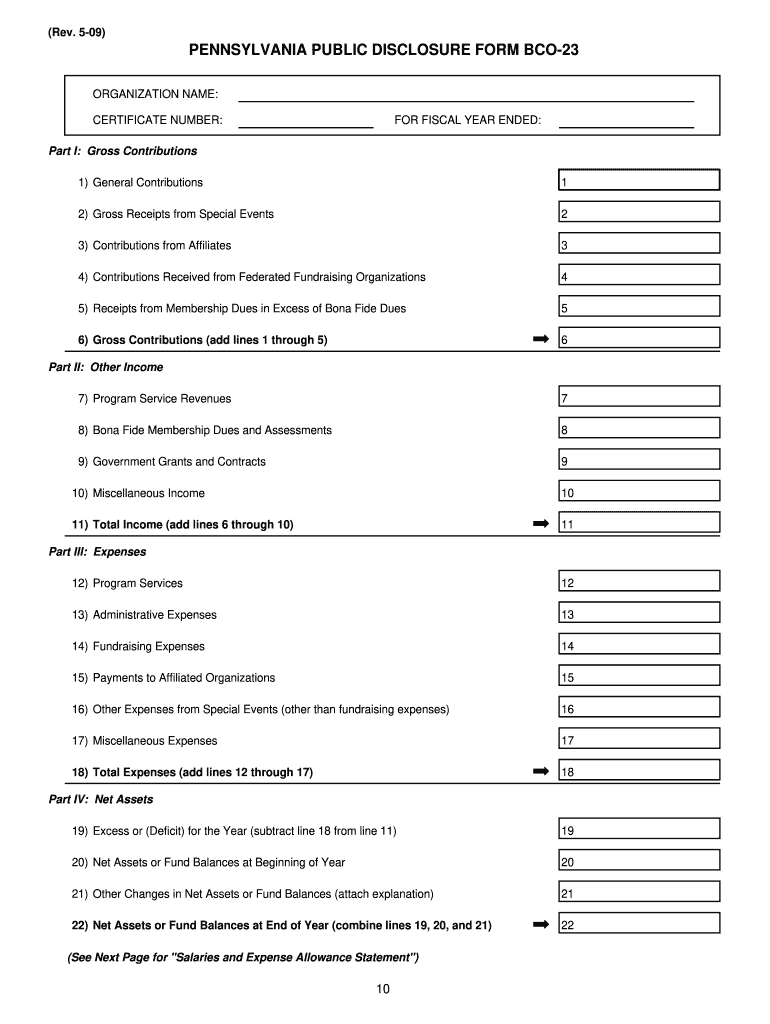
- Begin with Part I: Gross Contributions. Fill in the total amounts for General Contributions, Gross Receipts from Special Events, and other specified categories. Ensure you include all relevant contributions as outlined in the instructions.
- Proceed to Part II: Other Income. Enter figures for Program Service Revenues, Bona Fide Membership Dues, Government Grants, and Miscellaneous Income. Sum these amounts to calculate Total Income.
- Move on to Part III: Expenses. Document costs related to Program Services, Administrative Expenses, Fundraising Expenses, and any other relevant expenses. Add these up for Total Expenses.
- Finally, complete Part IV: Net Assets by calculating Excess or (Deficit) for the Year and reporting on Net Assets at both the beginning and end of the year.
Start using our platform today to fill out your bco 23 form easily and efficiently!
Fill out bco 23 online
It's free
It's free
See more bco 23 versions
We've got more versions of the bco 23 form. Select the right bco 23 version from the list and start editing it straight away!
| Versions | Form popularity | Fillable & printable |
|---|---|---|
| 2009 | 4 Satisfied (22 Votes) |
Security and compliance
At DocHub, your data security is our priority. We follow HIPAA, SOC2, GDPR, and other standards, so you can work on your documents with confidence.
Learn more




