Form care printable 2026

Get Form
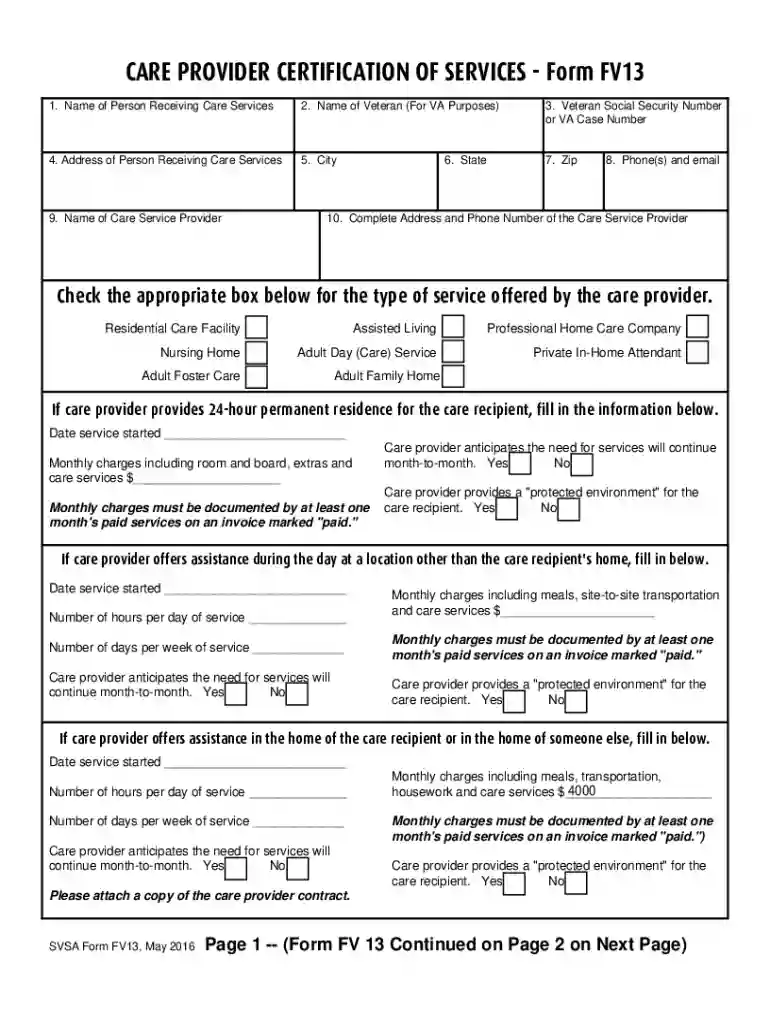
form fv13 Preview on Page 1

Here's how it works

01. Edit your form fv13 online
Type text, add images, blackout confidential details, add comments, highlights and more.

02. Sign it in a few clicks
Draw your signature, type it, upload its image, or use your mobile device as a signature pad.

03. Share your form with others
Send va form fv13 via email, link, or fax. You can also download it, export it or print it out.

How to use or fill out form care printable with our platform

Form edit decoration
9.5
Ease of Setup
DocHub User Ratings on G2
9.0
Ease of Use
DocHub User Ratings on G2
  1. Click ‘Get Form’ to open it in the editor.
  2. Begin by filling in Line 1 with the name of the person receiving care services, which can be a veteran or their spouse.
  3. In Line 2, enter the name of the veteran for VA purposes. This is essential for identification.
  4. Line 3 requires the veteran's Social Security Number or VA Case Number. Ensure accuracy as this is crucial for processing.
  5. Complete Lines 4 through 10 with relevant details about the care service provider, including their address and contact information.
  6. Select the type of service offered by checking the appropriate box. This helps clarify the nature of care provided.
  7. Fill in any additional details regarding monthly charges and service duration as required in subsequent sections.
  8. Finally, ensure both the claimant and care provider sign at the end of the form to validate all information provided.

Start using our platform today to easily fill out your form care printable for free!

See more form care printable versions

We've got more versions of the form care printable form. Select the right form care printable version from the list and start editing it straight away!
Versions Form popularity Fillable & printable
2016 4.8 Satisfied (121 Votes)
2012 4 Satisfied (22 Votes)
be ready to get more

Complete this form in 5 minutes or less

Get form

Got questions?

We have answers to the most popular questions from our customers. If you can't find an answer to your question, please contact us.
Contact us
Go to .irs.gov/Form2441 for instructions and the latest information. A You cant claim a credit for child and dependent care expenses if your filing status is married filing separately unless you meet the requirements listed in the instructions under Married Persons Filing Separately.
Form 2441 is used to claim the Child and Dependent Care Credit, which is available to those who pay someone to care for dependent children under 13, disabled spouses, or other dependents who cannot mentally or physically care for themselves.
A Wisconsin medical power of attorney lets a person select a health care agent to step in and make decisions if a patient becomes incapacitated. The patient can make special instructions for the agent and must be signed with two (2) witnesses to be legal.
Reporting on your tax return If you qualify for the credit, complete Form 2441, Child and Dependent Care Expenses and attach to Form 1040, U.S Individual Income Tax Return, Form 1040-SR, U.S. Tax Return for Seniors or Form 1040-NR, U.S. Nonresident Alien Income Tax Return.
Daycare centers are required to provide parents with an annual daycare tax statement. This statement shows the total amount parents spent on child care costs during the past year.

People also ask

Form 2441 is a two-page form divided into three sections. Each section details a separate area of qualifying factors and calculations. The first two sections appear on the first page. All pages of Form 2441 are available on the IRS website.
The agents power is typically activated upon a determination by two physicians or one physician and one psychologist who have personally examined you and have determined that you are incapacitated. The certification of incapacity must be attached to the POA-HC document.

care expense statement