Type text, add images, blackout confidential details, add comments, highlights and more.
02. Sign it in a few clicks
Draw your signature, type it, upload its image, or use your mobile device as a signature pad.
03. Share your form with others
Send it via email, link, or fax. You can also download it, export it or print it out.
How to use or fill out phs 7047 with our platform
Ease of Setup
DocHub User Ratings on G2
Ease of Use
DocHub User Ratings on G2
Click ‘Get Form’ to open the phs 7047 in the editor.
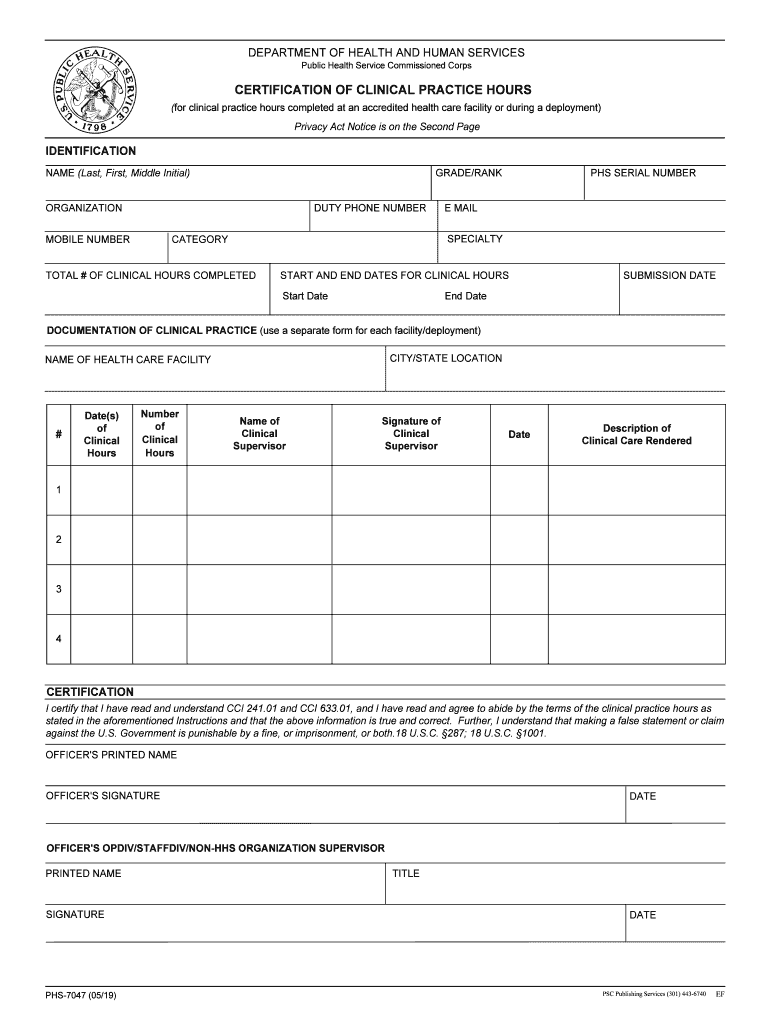
Begin by filling out the Identification section. Enter your grade/rank, full name, organization, duty phone number, mobile number, PHS serial number, email, specialty, and category.
In the Clinical Hours section, input the total number of clinical hours completed along with the start and end dates for these hours.
Document your clinical practice by providing details for each facility or deployment. Include city/state location, name of the health care facility, dates of clinical hours, number of clinical hours completed, name and signature of the clinical supervisor, and a description of care rendered.
Finally, complete the Certification section by signing and dating it. Ensure that both you and your supervisor provide printed names and signatures.
Start using our platform today to fill out your phs 7047 easily and for free!
Form PHS-7047 is submitted annually after the officer has performed the required number of practice hours for clinical proficiency or readiness. Only oneRead more
Cookie consent notice
This site uses cookies to enhance site navigation and personalize your experience.
By using this site you agree to our use of cookies as described in our Privacy Notice.
You can modify your selections by visiting our Cookie and Advertising Notice.