Type text, add images, blackout confidential details, add comments, highlights and more.

02. Sign it in a few clicks
Draw your signature, type it, upload its image, or use your mobile device as a signature pad.

03. Share your form with others
Send meeting wise checklist via email, link, or fax. You can also download it, export it or print it out.

How to use or fill out meeting wise agenda template with our platform
Ease of Setup
DocHub User Ratings on G2
Ease of Use
DocHub User Ratings on G2
Click ‘Get Form’ to open the meeting wise agenda template in the editor.
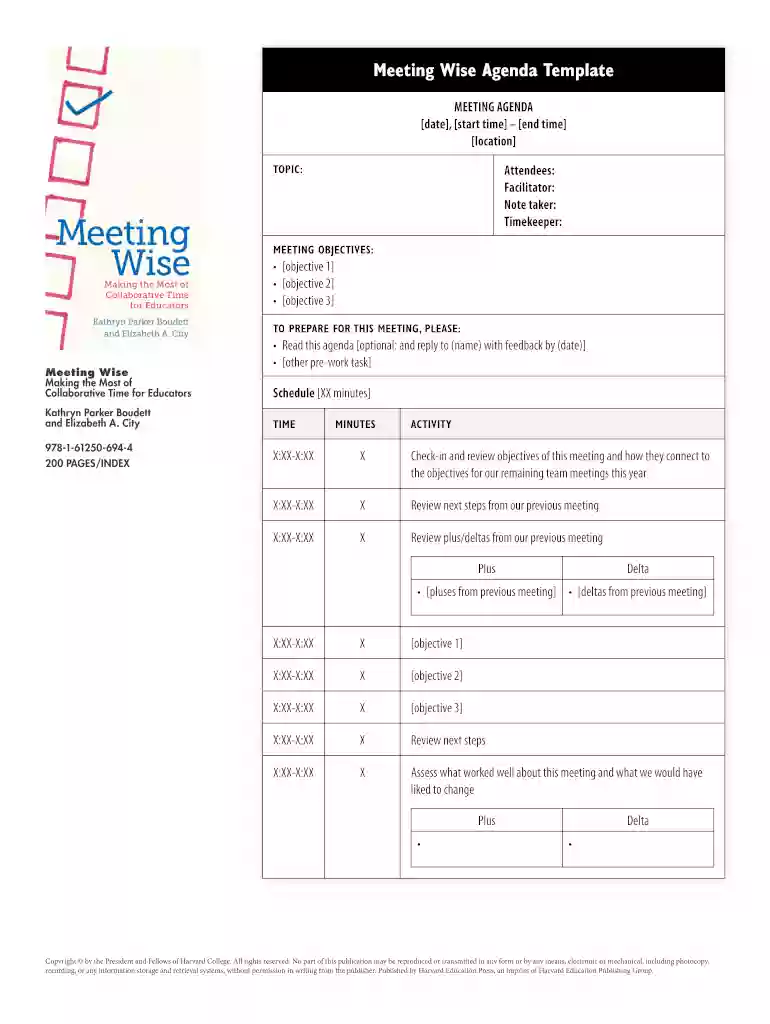
Begin by entering the date, start time, and end time of your meeting at the top of the form. This sets a clear schedule for all attendees.
Fill in the location where the meeting will take place, along with the names of attendees, facilitator, note taker, and timekeeper. This ensures everyone knows their roles.
In the 'TOPIC' section, specify what will be discussed during the meeting. This helps keep discussions focused.
Outline your 'MEETING OBJECTIVES' by listing key goals you aim to achieve. This guides participants on what to prepare for.
For preparation tasks, include any readings or feedback requests that need to be completed before the meeting.
Schedule activities by filling in specific times and minutes allocated for each agenda item. This keeps your meeting organized and efficient.
Finally, review plus/deltas from previous meetings to assess progress and areas for improvement.
Start using our platform today to streamline your meeting planning process for free!
Fill out meeting wise agenda template online It's free
Aug 20, 2025 1. Establish Your Evaluation Criteria and Weightings 3. Evaluate Each Proposal in Detail 4. Normalize and Combine Scores 5. Conduct TeamRead more
Cookie consent notice
This site uses cookies to enhance site navigation and personalize your experience.
By using this site you agree to our use of cookies as described in our Privacy Notice.
You can modify your selections by visiting our Cookie and Advertising Notice.