Estimated 2017 form-2026

Get Form
estimated 2017 form Preview on Page 1

Here's how it works

01. Edit your form online
Type text, add images, blackout confidential details, add comments, highlights and more.
02. Sign it in a few clicks
Draw your signature, type it, upload its image, or use your mobile device as a signature pad.
03. Share your form with others
Send it via email, link, or fax. You can also download it, export it or print it out.

How to use or fill out estimated 2017 form with our platform

Form edit decoration
9.5
Ease of Setup
DocHub User Ratings on G2
9.0
Ease of Use
DocHub User Ratings on G2
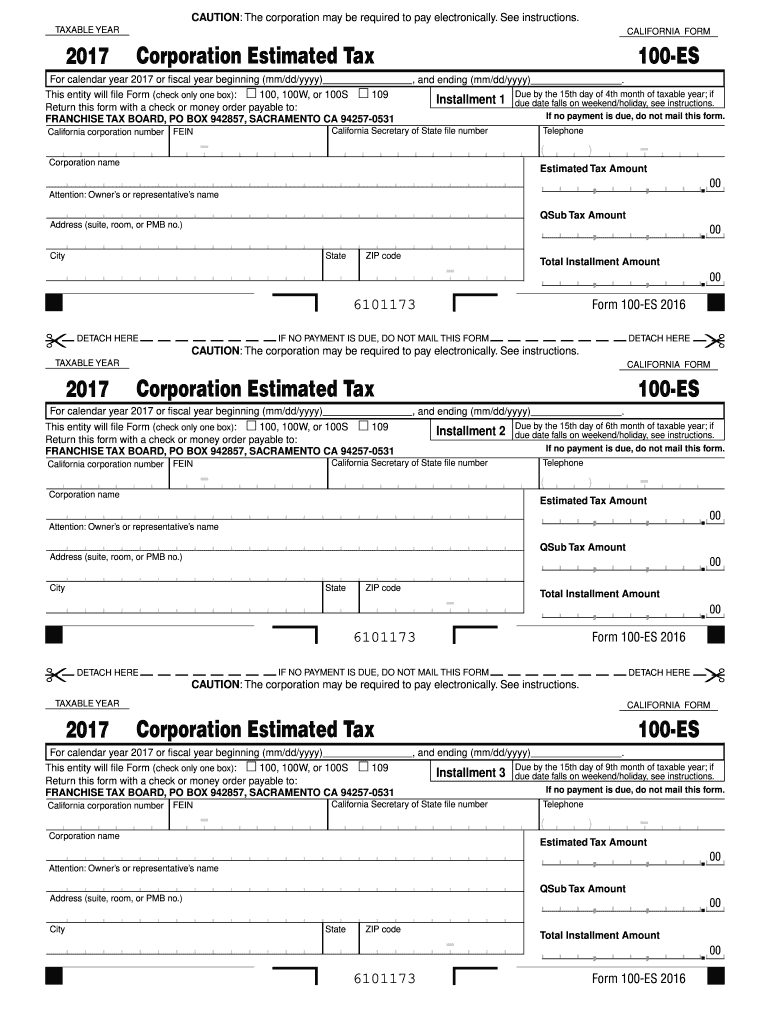
  1. Click ‘Get Form’ to open the estimated 2017 form in the editor.
  2. Begin by entering the taxable year at the top of the form. Ensure it reflects '2017' accurately.
  3. Select the type of entity filing by checking one box: either '100, 100W, or 100S' or '109'.
  4. Fill in your California corporation number and Federal Employer Identification Number (FEIN) in the designated fields.
  5. Provide your corporation name, address, city, state, and ZIP code to ensure proper identification.
  6. For each installment (1 through 4), enter the due date and estimated tax amount. Make sure to follow any specific instructions regarding payment methods.
  7. Review all entries for accuracy before finalizing your document. If no payment is due, remember not to mail this form.

Start using our platform today for free to streamline your form completion process!

See more estimated 2017 form versions

We've got more versions of the estimated 2017 form form. Select the right estimated 2017 form version from the list and start editing it straight away!
Versions Form popularity Fillable & printable
2023 4.1 Satisfied (27 Votes)
2022 4.8 Satisfied (110 Votes)
2021 4.1 Satisfied (47 Votes)
2020 4.4 Satisfied (162 Votes)
2019 4.2 Satisfied (41 Votes)
2018 4 Satisfied (59 Votes)
2017 4.4 Satisfied (187 Votes)
2016 4.2 Satisfied (113 Votes)
2015 4 Satisfied (32 Votes)
2014 4 Satisfied (54 Votes)
be ready to get more

Complete this form in 5 minutes or less

Get form

Got questions?

We have answers to the most popular questions from our customers. If you can't find an answer to your question, please contact us.
Contact us
How to make an estimate of your expected income. Your total (or gross) income for the tax year, minus certain adjustments youre allowed to take. Adjustments include deductions for conventional IRA contributions, student loan interest, and more.
If you expect to owe more than $1,000 in federal taxes for the tax year, you may need to make estimated quarterly tax payments using Form 1040-ES, or else face a penalty for underpayment.
Follow these steps to view how the underpayment of estimated tax is calculated: Go to the Check Return tab. Select Forms from the left menu. Select 2210 from the list (if its not showing, select All then enter 2210 in the search field). Scroll to the final page of the form to view the Underpayment Penalty Worksheet.
In most cases, you must have filed your return within 3 years of the return due date to claim a refund. After November 1st you will not be able to complete a 2017 tax return with our software. A 2017 tax return, that is completed in 2025, will still be available to print or download until October 31, 2026.
Find your prior years total tax: This is located on line 24 of your previous years Form 1040. Check any applicable boxes: If any specific conditions apply to your situation, such as exceptions or adjustments, mark the corresponding boxes on Form 2210.

People also ask

Go to .irs.gov/Form2210 for instructions and the latest information. Do You Have To File Form 2210? ▶ Dont file Form 2210. You dont owe a penalty.
You may need this form if: Youre self-employed or have other income that isnt subject to withholding, such as investment income. You dont make estimated tax payments or paid too little. You dont have enough taxes withheld from your paycheck.

Related links