Type text, add images, blackout confidential details, add comments, highlights and more.

02. Sign it in a few clicks
Draw your signature, type it, upload its image, or use your mobile device as a signature pad.

03. Share your form with others
Send pt61 form pdf via email, link, or fax. You can also download it, export it or print it out.

How to use or fill out georgia form pt 61 pdf with our platform
Ease of Setup
DocHub User Ratings on G2
Ease of Use
DocHub User Ratings on G2
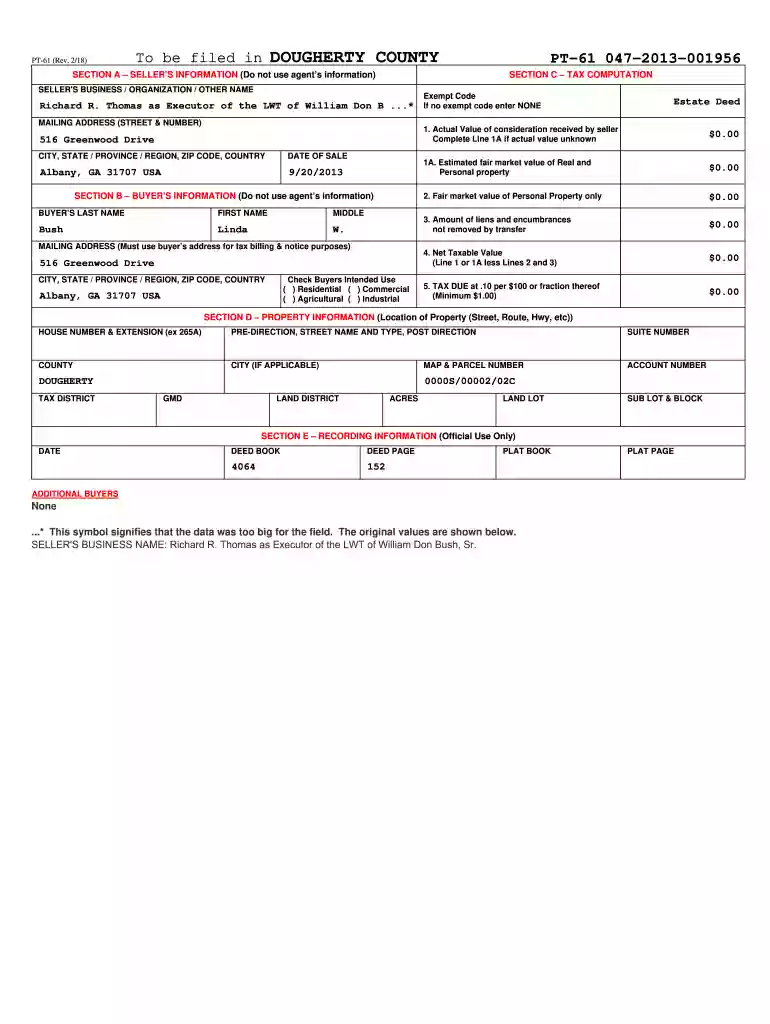
Click ‘Get Form’ to open the Georgia Form PT-61 in the editor.
Begin with SECTION A – SELLER’S INFORMATION. Enter the seller's name, mailing address, and date of sale. Ensure you do not include agent information.
Proceed to SECTION B – BUYER’S INFORMATION. Fill in the buyer's last name, first name, middle initial, and their mailing address. Select the intended use of the property by checking the appropriate box.
In SECTION C – TAX COMPUTATION, input values for actual consideration received by the seller and any liens or encumbrances. Calculate the net taxable value and tax due based on provided formulas.
Complete SECTION D – PROPERTY INFORMATION by entering details about the property location including house number, street name, county, and account number.
Finally, if applicable, fill out SECTION E – RECORDING INFORMATION for official use only.
Start using our platform today to easily complete your Georgia Form PT-61 online for free!
Georgia form pt 61 pdf free downloadPT-61 printable formPT-61 printable form pdfGeorgia form pt 61 pdf downloadGeorgia form pt 61 pdf 2021How do I get a PT-61 formPT-61 form examplePT-61 for quit claim deed
Security and compliance
At DocHub, your data security is our priority. We follow HIPAA, SOC2, GDPR, and other standards, so you can work on your documents with confidence.
by D Faulk 1998 There are five different forms associated with filing personal property tax in Georgia: (1) business personal property report, (2) agricultural personalRead more
U.S. Department of Veterans Affairs: Graphic Standards
Below are the sole approved template-based treatments for both Administration and inter-office identification. These format settings are required for use inRead more
Real Estate Transfer Tax | Department of Revenue - Georgia.gov
If you have questions about the electronic filing of the PT-61, you should contact GSCCCA customer support at (800) 304-5174 or locally at (404) 327-9760. AboutRead more
Cookie consent notice
This site uses cookies to enhance site navigation and personalize your experience.
By using this site you agree to our use of cookies as described in our Privacy Notice.
You can modify your selections by visiting our Cookie and Advertising Notice.