




Here's how it works

01. Edit your sample petition to remove trustee california online
Type text, add images, blackout confidential details, add comments, highlights and more.

02. Sign it in a few clicks
Draw your signature, type it, upload its image, or use your mobile device as a signature pad.

03. Share your form with others
Send petition to remove trustee california pdf via email, link, or fax. You can also download it, export it or print it out.
How to use or fill out California Trustee Form with DocHub

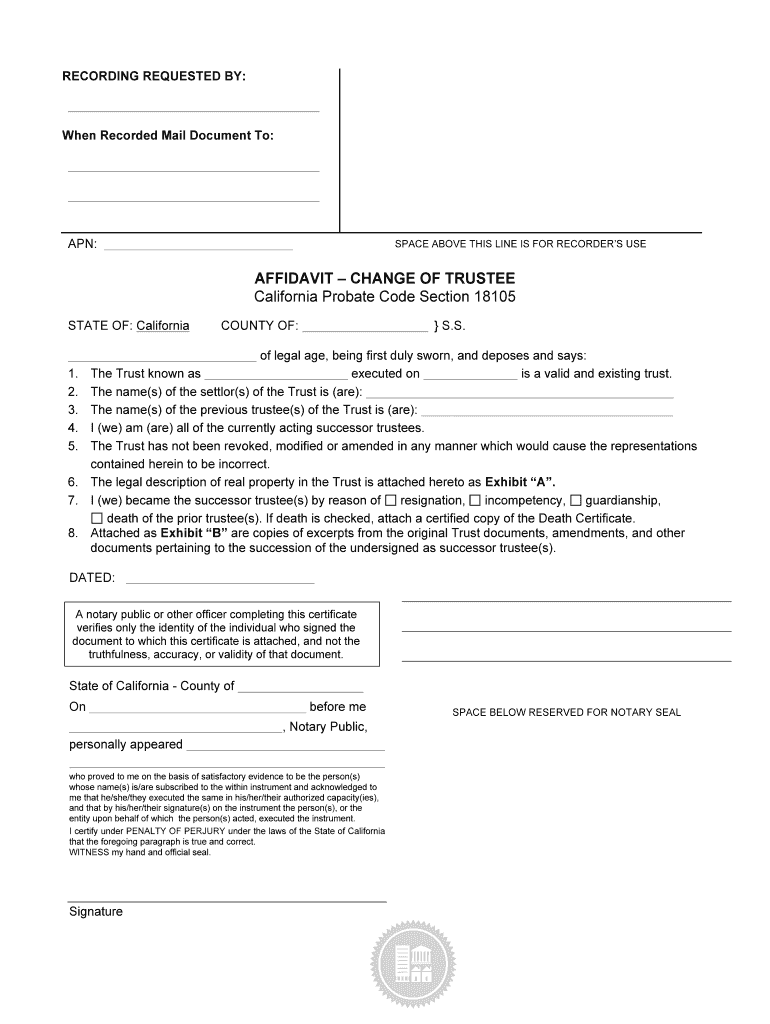
- Click ‘Get Form’ to open the California Trustee Form in our editor.
- Begin by filling in the 'Recording Requested By' section with your name and contact information. This ensures that the document is properly attributed.
- In the 'APN' field, enter the Assessor's Parcel Number associated with the property in question. This is crucial for identifying the property.
- Complete the affidavit section by stating your legal age and confirming that you are a successor trustee. Provide details about the trust, including its name and execution date.
- Indicate the names of both the settlor(s) and previous trustee(s) of the trust. This establishes a clear chain of authority.
- Select the reason for becoming a successor trustee (e.g., death, resignation). If applicable, attach necessary documents like a Death Certificate.
- Attach any required exhibits, such as legal descriptions or excerpts from original trust documents, ensuring all relevant information is included.
- Finally, have your document notarized by signing in front of a notary public to validate your affidavit.
Start using our platform today to fill out your California Trustee Form easily and for free!
Fill out california trustee form online
It's free
It's free
Security and compliance
At DocHub, your data security is our priority. We follow HIPAA, SOC2, GDPR, and other standards, so you can work on your documents with confidence.
Learn more


