







Definition & Purpose of the Academic Forms
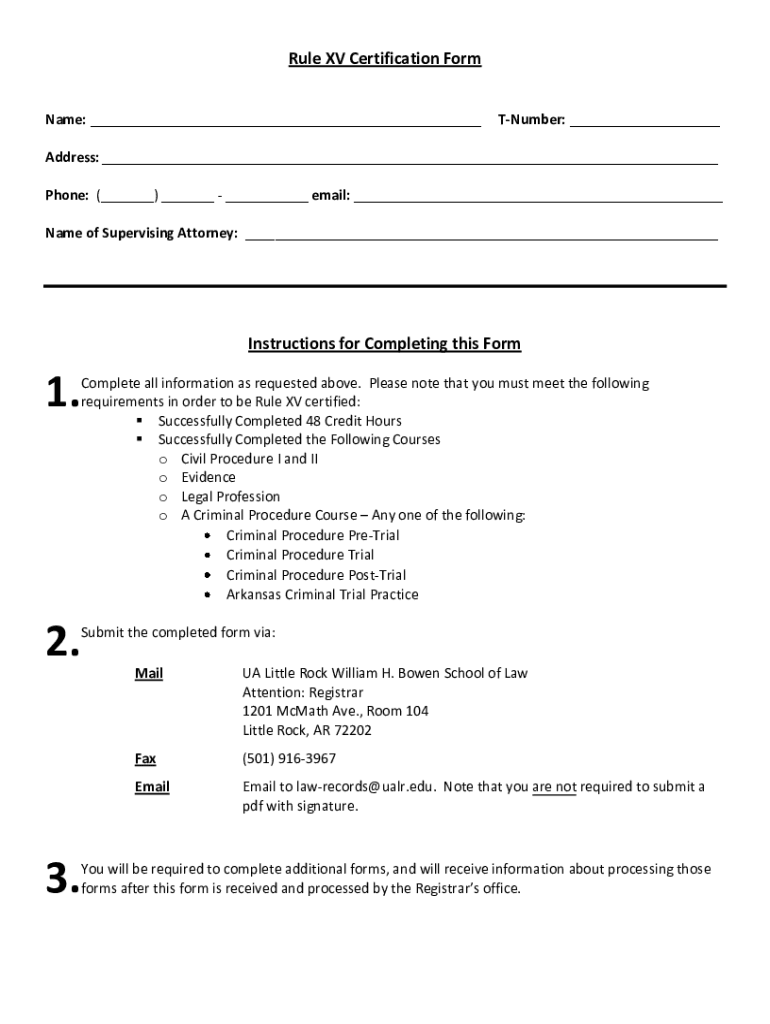
The "Academic Forms William H Bowen School of Law - University of" serve as essential documents for students involved with the William H. Bowen School of Law at the University of Arkansas. These forms are integral in facilitating various academic processes, enabling students to fulfill requirements associated with certifications, course completions, and legal education milestones. Specifically, the forms may include certifications like the Rule XV Certification Form, which mandates the completion of specific courses and hours critical for legal education accreditation.
- Essential for various academic processes at William H. Bowen School of Law.
- Includes forms for course completions and certifications, like the Rule XV Certification.
Steps to Complete the Academic Forms
Filling out the forms accurately is crucial for the intended academic processes. Here's a step-by-step guide:
- Download the Form: Access the form through the student portal or request it via email from the administration office.
- Personal Information: Input your personal details like name, student ID, and contact information.
- Course Details: Specify the legal courses you have completed; typically, 48 credit hours are necessary for certification requirements.
- Signatures: Obtain necessary signatures from faculty or administrative staff if required.
- Submission: Follow the submission methods specified by the university, which may include email, online submission, or in-person delivery.
- Ensure accuracy in personal details to avoid processing delays.
- Confirm completion of all required courses to meet the credit criteria.
How to Obtain the Academic Forms
Students can easily access these forms through multiple channels to accommodate their preferences for digital or paper copies.
-
Online Portal: Most forms are available for download from the student portal of the William H. Bowen School of Law website.
-
Administrative Office: Visit the school's administrative office to obtain physical copies.
-
Email Requests: Contact the academic services office via email to have forms sent to your university email account.
-
Check the school's academic portal for downloadable forms.
-
Request hard copies if digital access is unavailable.
Important Terms and Instructions
Understanding key terms and instructions in these forms ensures compliance and prevents errors:
-
Course Credit Hours: Refers to the specific academic credit required for certification; typically includes 48 hours for law certification.
-
Certification: A formal recognition of course completion and competency.
-
Submission Deadlines: Each form may have specific deadlines that align with academic schedules or certification requirements.
-
Pay attention to mandatory credit requirements to maintain academic standing.
-
Adhere to submission deadlines to avoid penalties.
Key Elements of the Forms
The forms contain critical sections that must be completed accurately to fulfill academic requirements:
-
Personal Information Section: Requires the student's name, ID, and contact details.
-
Course Details: Lists the courses you have completed and their corresponding credit hours.
-
Signature Section: Space for necessary approvals from faculty or academic advisors.
-
Ensure all fields, especially personal and course details, are filled out correctly.
-
Authenticate the form with the needed signatures to validate your application.
State-Specific Rules and Compliance
Certain forms might have state-specific requirements given the law school's location and its governing jurisdiction:
-
Comply with the University of Arkansas's regulations regarding legal education and certification requirements.
-
Ensure all submissions meet the state education department's standards.
-
verify that forms satisfy both school and state regulations.
-
Look for any state-specific procedures that might influence form completion.
Legal Use and Certification
These forms are legally binding and serve to certify the student's completion of educational prerequisites:
-
Confirm compliance with the ESIGN Act for electronically submitted forms, where applicable.
-
Utilize electronic signatures that adhere to legal standards, ensuring authenticity and validity.
-
Review legal obligations associated with the use of electronic submissions.
-
Ensure all electronic signatures are legally valid within the legal education framework.
Submission Methods for the Academic Forms
Multiple submission options are provided to enhance convenience for students:
-
Online Submission: Some forms may be digitally submitted through the university's portal.
-
Email Delivery: Email the completed forms to designated academic officers.
-
In-Person Delivery: Hand-deliver forms to the administrative office during business hours.
-
Select the submission method that aligns with your accessibility and preferences.
-
Confirm receipt of forms via email or in-person acknowledgment for verification.
Legally Binding Electronic Signatures
Forms that require electronic submissions must comply with legal standards around digital signatures:
-
Drawing, typing, or uploading a signature are acceptable methods.
-
Ensure signatures comply with ESIGN Act, making them legally binding.
-
Save signatures for future use on subsequent forms where applicable.
-
Use electronic signing options suitable for your device and preference.
-
Implement saved signatures to streamline future form submissions.
Software Compatibility and Digital Processing
Understanding software compatibility is essential for handling form submissions:
-
The forms can be managed using platforms like DocHub, providing extensive editing and processing tools.
-
Compatible with PDF formats and integrated with cloud services like Google Drive, facilitating access and management.
-
Utilize compatible software for seamless form completion and submission.
-
Leverage digital tools to enhance processing efficiency and accuracy.




