NRGI Detailed patient past medical history.xlsx 2026

Get Form
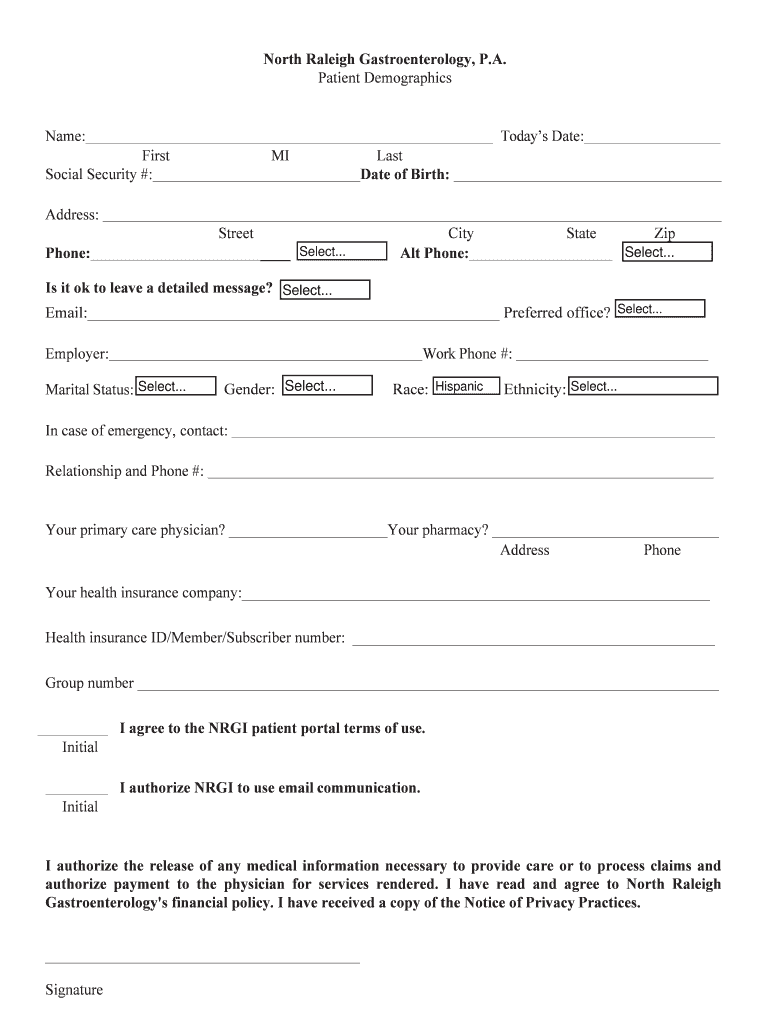
NRGI Detailed patient past medical history.xlsx Preview on Page 1

Here's how it works

01. Edit your form online
Type text, add images, blackout confidential details, add comments, highlights and more.
02. Sign it in a few clicks
Draw your signature, type it, upload its image, or use your mobile device as a signature pad.
03. Share your form with others
Send it via email, link, or fax. You can also download it, export it or print it out.

How to use or fill out NRGI Detailed patient past medical history.xlsx with our platform

Form edit decoration
9.5
Ease of Setup
DocHub User Ratings on G2
9.0
Ease of Use
DocHub User Ratings on G2
  1. Click ‘Get Form’ to open the NRGI Detailed patient past medical history.xlsx in the editor.
  2. Begin by filling in your personal information at the top of the form, including your name, date of birth, and today's date. Ensure accuracy as this information is crucial for your medical records.
  3. Proceed to the Patient Demographics section. Fill out all required fields such as address, phone numbers, email, and insurance details. Use dropdown menus where available for convenience.
  4. In the Patient History Questionnaire section, provide detailed responses regarding your gastrointestinal issues over the last three months. Answer yes or no to specific symptoms and rate any abdominal pain on a scale from 1-10.
  5. Complete the Medication History section by listing all medications you are currently taking, including dosages and frequency. Don’t forget to note any allergies you may have.
  6. Review all sections for completeness and accuracy before saving your document. Utilize our platform's features to easily edit or adjust any information as needed.

Start using our platform today to effortlessly complete your NRGI Detailed patient past medical history.xlsx for free!

See more NRGI Detailed patient past medical history.xlsx versions

We've got more versions of the NRGI Detailed patient past medical history.xlsx form. Select the right NRGI Detailed patient past medical history.xlsx version from the list and start editing it straight away!
Versions Form popularity Fillable & printable
2016 4.5 Satisfied (52 Votes)
be ready to get more

Complete this form in 5 minutes or less

Get form

Got questions?

We have answers to the most popular questions from our customers. If you can't find an answer to your question, please contact us.
Contact us
Explanation. A detailed assessment of a patients medical history is easily viewed in the problem list. The problem list is a comprehensive collection of a patients issues, which includes current, ongoing, and past illnesses, as well as any other major patient concerns.
Past Medical History: Start by asking the patient if they have any medical problems. If you receive little/no response, the following questions can help uncover important past events: Have they ever received medical care? If so, what problems/issues were addressed?
Most hospitals and other large health care providers keep patient data in computerized systems called electronic health records (EHRs), which make it easy to find information to treat you, or to share with you.
You may be able to request your record through your providers patient portal. You may have to fill out a form called a health or medical record release form, or request for accesssend an email, or mail or fax a letter to your provider.
A health history is part of the Assessment phase of the nursing process. It consists of using directed, focused interview questions and open-ended questions to obtain symptoms and perceptions from the patient about their illnesses, functioning, and life processes.

Security and compliance

At DocHub, your data security is our priority. We follow HIPAA, SOC2, GDPR, and other standards, so you can work on your documents with confidence.

Learn more
ccpa2
pci-dss
gdpr-compliance
hipaa
soc-compliance
be ready to get more

Complete this form in 5 minutes or less

Get form