




01. Edit your form online
Type text, add images, blackout confidential details, add comments, highlights and more.

Type text, add images, blackout confidential details, add comments, highlights and more.

Draw your signature, type it, upload its image, or use your mobile device as a signature pad.

Send it via email, link, or fax. You can also download it, export it or print it out.
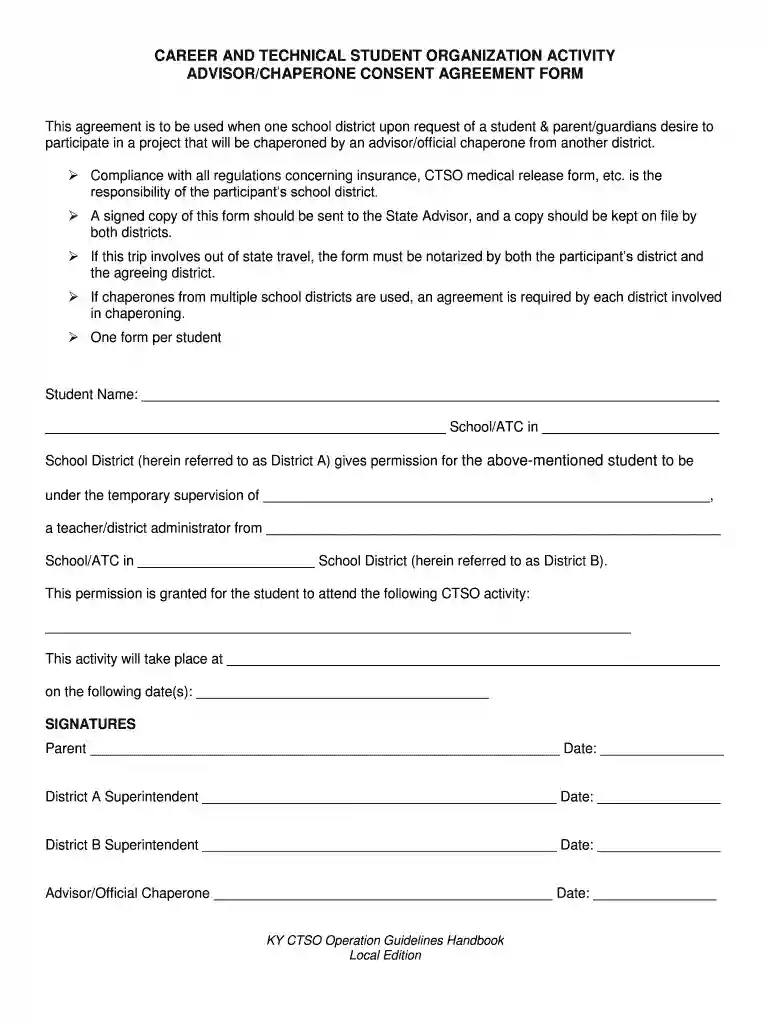
The CTSO Chaperone Consent form is a pivotal document for students participating in Career and Technical Student Organization (CTSO) activities. It authorizes an advisor from a different school district to act as the chaperone, ensuring students adhere to outlined responsibilities. This consent covers insurance obligations and medical release arrangements, empowering students to engage in educational events beyond their immediate learning environment safely. The form is a testament to educational collaboration, seeking to enrich students' learning experiences through diverse, organized activities.
The CTSO Chaperone Consent form is fundamental for students seeking enriched learning opportunities. Beyond sanctioning participation, it facilitates legal assurances that protect students' welfare during educational events. By outlining specific responsibilities and obtaining necessary signatures, the form embeds trust and understanding between participating school districts, ensuring an organized and secure environment for students.


One real-world example includes a student participating in a national CTSO competition. The form ensures that an advisor from another district can appropriately chaperone the student by covering medical, travel, and insurance needs. Another scenario involves a multi-district collaboration where advisors manage students' safety and documentation while engaged in hands-on learning experiences.
While the CTSO Chaperone Consent form has general requirements, tailoring may be necessary according to state laws. Some states impose additional documentation for out-of-state travel, while others might have specific insurance regulations. Familiarity with these differences ensures the form's legality and effectiveness in varied jurisdictions.
The legal facet of the CTSO Chaperone Consent is vital, ensuring all parties comply with applicable laws. These consent forms are governed by state educational laws, mandatory for schools arranging cross-district CTSO participation. Legal usage extends to securing signatures, notarizing where needed, and maintaining transparent documentation for potential audits or review processes.
We've got more versions of the CTSO Chaperone Consent form. Select the right CTSO Chaperone Consent version from the list and start editing it straight away!
| Versions | Form popularity | Fillable & printable |
|---|---|---|
| 2018 | 4.4 Satisfied (45 Votes) |
Signing paperwork on a mobile device is quick, simple, and doesn’t require software installation if you have an account with DocHub. Sign in from any browser, complete your blank fields with your information, and click on Sign → Create your signature. You can draw your eSignature the same way you usually do on paper, add its picture to your CTSO Chaperone Consent, or type in your name and stylize its look. No matter what option you select, your document will be valid.
Document editing with DocHub is equally convenient on desktop and mobile devices. You just need an internet browser to edit your CTSO Chaperone Consent on Android. Open our site and sign in to access the instruments you require. Add your document and introduce your intended modifications. After that, you can keep your form in your document storage or send it out instantly.
At DocHub, your data security is our priority. We follow HIPAA, SOC2, GDPR, and other standards, so you can work on your documents with confidence.


