Type text, add images, blackout confidential details, add comments, highlights and more.
02. Sign it in a few clicks
Draw your signature, type it, upload its image, or use your mobile device as a signature pad.
03. Share your form with others
Send it via email, link, or fax. You can also download it, export it or print it out.
How to use or fill out pt 441 with our platform
Ease of Setup
DocHub User Ratings on G2
Ease of Use
DocHub User Ratings on G2
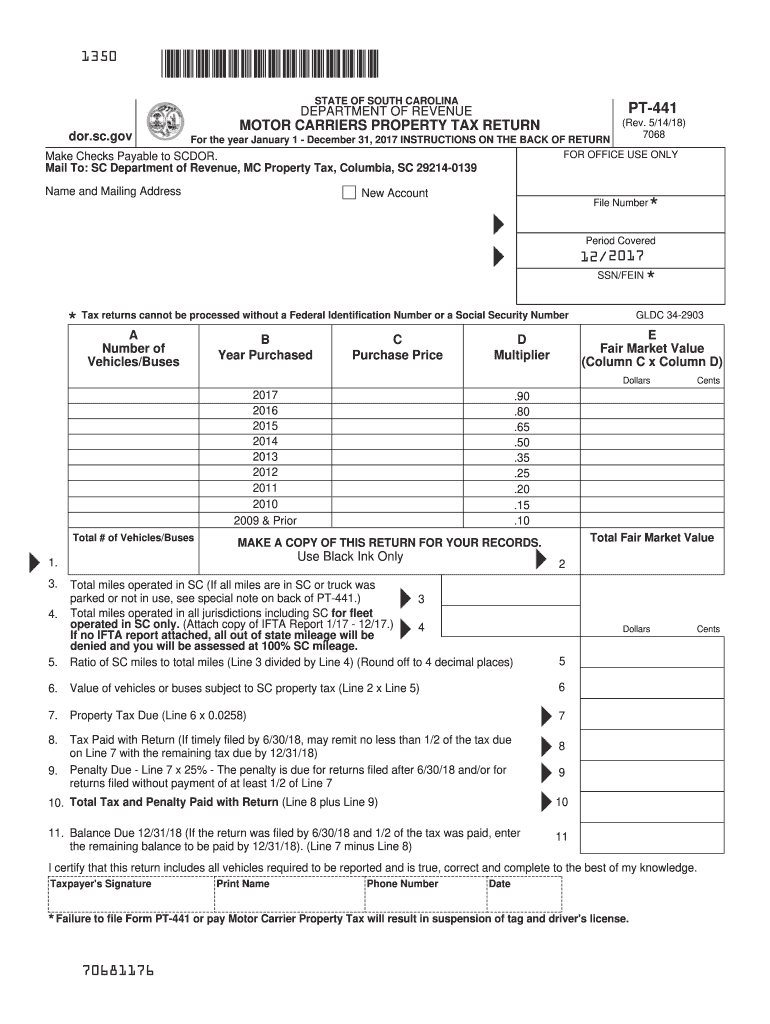
Click ‘Get Form’ to open the PT-441 in the editor.
Begin by entering your name and mailing address at the top of the form. If this is your first time filing, check the 'New Account' box.
In Column A, list the number of vehicles or buses owned as of December 31, 2017. In Column B, indicate the year each vehicle was purchased.
Enter the purchase price of each vehicle in Column C. Remember, this should be the original cost excluding taxes and interest.
Fill in Column D with the appropriate multiplier for depreciation. Then calculate and enter the fair market value in Column E by multiplying Columns C and D.
Complete lines 1 through 11 as instructed, ensuring all calculations are accurate. Attach any necessary documents such as IFTA reports if applicable.
Start using our platform today to simplify your PT-441 form completion!
Cookie consent notice
This site uses cookies to enhance site navigation and personalize your experience.
By using this site you agree to our use of cookies as described in our Privacy Notice.
You can modify your selections by visiting our Cookie and Advertising Notice.