




01. Edit your form online
Type text, add images, blackout confidential details, add comments, highlights and more.

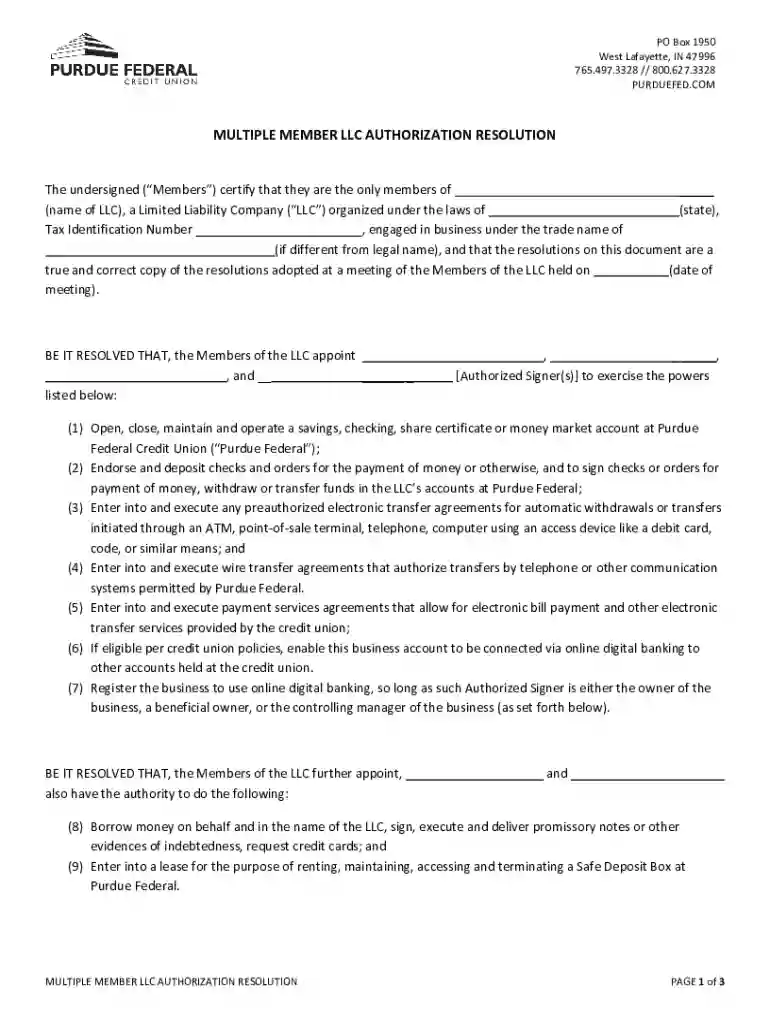
Type text, add images, blackout confidential details, add comments, highlights and more.

Draw your signature, type it, upload its image, or use your mobile device as a signature pad.

Send it via email, link, or fax. You can also download it, export it or print it out.
Using a form online is a streamlined process that DocHub simplifies for users. Here's a detailed guide on how you can effectively utilize this feature:
Accessing the Form: You can start by importing the document from your computer or connecting to cloud storage services like Google Drive, Dropbox, or OneDrive. DocHub allows you to work on files in various formats like PDF, DOC, PPT, and XLS.
Editing and Filling: Once the form is uploaded, you can edit and fill it using various tools. Add text boxes, dropdown menus, checkboxes, and signature fields as needed. DocHub ensures that users can customize forms according to specific requirements without conversion issues.
Collaboration and Sharing: For forms requiring input from multiple contributors, DocHub facilitates real-time collaboration. You can set permissions for viewing, editing, or signing, and share the document via email directly from the platform.
Saving and Exporting: After making the necessary changes, you can save the form to your device or export it to connected cloud services like Google Drive. This ensures that you can manage your documents efficiently without downloading or re-uploading them unnecessarily.
Completing a form online can be broken down into specific steps to ensure accuracy and efficiency:
Gather Required Information: Before starting, gather all necessary information that you will need for the form. This might include personal data, financial details, or other specifics depending on the form type.
Open the Document in DocHub: Import the form into DocHub by selecting it from your local storage or through a connected cloud service. This step ensures you are ready to start filling it out immediately.
Fill Out Mandatory Fields: Make sure to fill out all mandatory fields. DocHub's form management tools can highlight these sections and ensure no critical areas are missed before finalizing.
Add Necessary Attachments or References: If the form requires additional documents or references, attach them via DocHub's file attachment options to ensure comprehensive submission.
Review and Edit: Double-check the filled information for any errors. Review each section, utilizing the platform's editing tools to make corrections as needed.
Finalize and Submit: Once everything is accurately filled, submit the form directly via email or export it to the appropriate destination. DocHub allows seamless submissions, reducing the chances of errors or omission.
When working with online forms, certain key elements must be considered for successful completion:
Mandatory Fields: These are fields that must be completed before submitting the form. They ensure that all crucial information is captured accurately.
Signature Fields: For forms that require authentication, electronic signatures are necessary. DocHub’s legally compliant signature tools provide an easy way to sign forms online.
Fillable Fields: These include text boxes, checkboxes, and dropdown menus that enable you to input data directly into the form. The flexibility to customize these fields ensures the form meets specific needs.
Attachment Options: Some forms require additional documents. DocHub's platform supports attaching files, which are often essential for providing supplementary information or clarification.
Security Features: DocHub guarantees security using features like 256-bit SSL encryption and password protection, safeguarding sensitive data throughout the submission process.
For any online form, understanding the legal requirements is critical:
Compliance with Laws: Forms used for official purposes must comply with relevant legal standards, such as the ESIGN Act for electronic signatures. DocHub ensures that all electronic signatures meet these legal requirements, making them as valid as handwritten signatures.
Data Protection: Forms often contain sensitive information. DocHub employs stringent security measures, including encryption and secure authentication processes, to protect user data.
Authorization and Authentication: For collaborative forms, setting proper access levels and authentication ensures that only authorized individuals can view or modify the content, maintaining the form's integrity.
Audit Trails: DocHub provides detailed audit trails that document the history of the form, including changes made and sign-offs. This is essential for maintaining accountability and transparency.
Online forms can be effectively used in various real-world scenarios:
Employment Applications: Companies use online forms to streamline the hiring process, allowing candidates to apply and submit resumes electronically.
Tax Documents: Taxpayers can complete forms like the W-9 online, simplifying their tax filing processes.
Customer Surveys: Businesses utilize online forms to gather customer feedback efficiently, analyzing responses to improve services or products.
Legal Contracts: Parties can sign agreements electronically, speeding up the contractual process without the need for physical meetings.
Depending on the form’s purpose, required documents may vary but typically include:
Identification Proof: For verification, documents like a driver’s license or passport may be required.
Financial Statements: Forms related to financial or tax matters often need income statements or bank records.
Supportive Legal Documents: When dealing with legal forms, additional documentation proving authority or ownership might be necessary.
The usability of online forms extends across different user groups:
Businesses: They use forms for operations like invoicing, HR processes, and customer interactions.
Individuals: Ordinary users engage with forms for applications, registrations, and personal tax filings.
Nonprofits and Educational Institutions: They employ forms for donations, event registrations, and data collection for research.
Government Agencies: For processes like census data collection or public service applications, online forms are pivotal for efficient administration.


Understanding the differences between digital and paper forms is essential:
Efficiency: Digital forms offer convenience and speed, enabling instant submission and processing. Conversely, paper forms are slower, requiring physical handling and delivery.
Environmental Impact: Online forms reduce paper waste, offering an eco-friendly alternative compared to traditional methods.
Accessibility: Digital forms can be filled out anywhere with internet access, whereas paper forms may necessitate physical presence or postage.
We've got more versions of the Multiple Member LLC Authorization Resolution form. Select the right Multiple Member LLC Authorization Resolution version from the list and start editing it straight away!
At DocHub, your data security is our priority. We follow HIPAA, SOC2, GDPR, and other standards, so you can work on your documents with confidence.
Download the arsyspin.zip file and you will get the documentation and samples on how to start and create application group, application and folders.
Jun 5, 2023 Multi-Member LLC/GP Resolution by the consent of the [Members/Managers] of the Limited Liability Company. AYES NAYS ABSTAIN ABSENT CERTIFICATE
Apr 2, 2026 Operating Agreement (Manager-Managed, Multiple Members) (GA LLC) Board Resolution: DocHub Commercial Contract Approval (GA Corporation).Read more


