




01. Edit your south state bank direct deposit form online
Type text, add images, blackout confidential details, add comments, highlights and more.

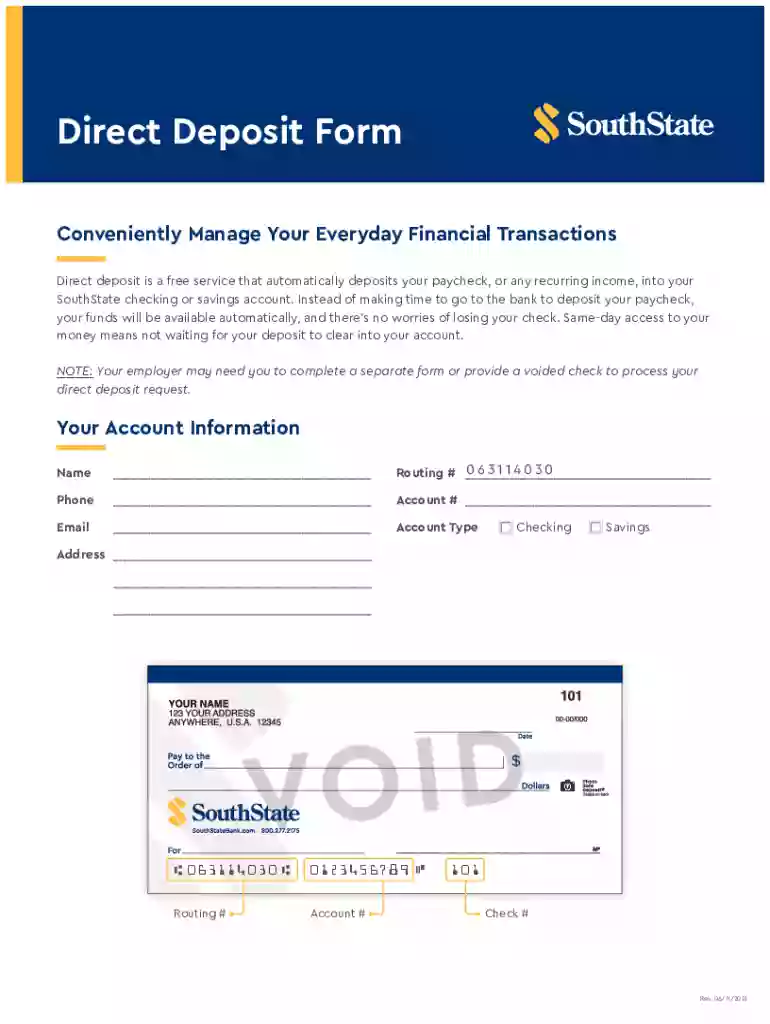
Type text, add images, blackout confidential details, add comments, highlights and more.

Draw your signature, type it, upload its image, or use your mobile device as a signature pad.

Send south state direct deposit form via email, link, or fax. You can also download it, export it or print it out.
A direct deposit form is a document used to authorize the automatic electronic transfer of funds into a specified bank account. Typically utilized by employees for payroll purposes, the form specifies the bank account into which wages or salaries will be deposited. Its purpose extends beyond payroll; it can also be used for regular payments like social security benefits, pensions, or tax refunds. By filling out a direct deposit form, individuals and organizations initiate a streamlined method for fund transfers, eliminating the need for paper checks and physical bank visits.
Using a direct deposit form involves several key steps to ensure that funds are accurately and securely transferred. Initially, the individual or organization must acquire the form from the payor, frequently the employer. After completing the form with necessary bank details, such as the routing and account numbers, it is returned to the payor for processing. The payor then inputs this information into their electronic payment system. This allows for the automation of funds transfer on specified dates, ensuring timely and consistent availability of money.
To obtain a direct deposit form, individuals can typically find it in several locations. Most commonly, employers and government agencies that offer the service will provide the form during onboarding or as part of account setup procedures. Alternatively, financial institutions often offer downloadable versions of the form on their websites. Online banking platforms might also feature an option to generate a filled-out form based on the account owner's data, simplifying the process of obtaining and completing the form.
Gather Information: Before beginning the form, collect all necessary banking details, including the bank's name, routing number, and the individual account number.
Enter Personal Details: Fill out personal contact information, such as full name and address, ensuring accuracy to prevent processing delays.
Input Banking Information: Carefully enter the gathered banking information into the appropriate spaces on the form; any error here can result in misdirected funds.
Provide Necessary Verifications: Some forms may require a voided check to verify the account details. Attach this to the completed form if requested.
Submit the Form: Return the completed form to the entity responsible for processing the payments, such as the employer or government office, who will set up the direct deposit.
The primary advantage of using a direct deposit form is the enhanced convenience and security it provides. Automated deposits mean quicker access to funds compared to checks, which require a physical deposit. Additionally, electronic transfers reduce the risk of lost or stolen checks, as funds transfer directly between accounts. The use of direct deposit also eliminates the need to visit a bank or ATM to deposit a paycheck, saving time. Moreover, this method facilitates better management of income by supporting automatic divisions of funds into multiple accounts, enabling more effective budgeting.
Direct deposit forms are used by a diverse range of individuals and organizations. Employees in various sectors use them to receive consistent wage payments. Retirees frequently use the forms for pension and social security funds. Businesses utilize direct deposit to streamline employee payroll processing. Self-employed individuals and freelancers may also set up direct deposits for regular clients, ensuring seamless income flow. Essentially, anyone who receives regular payments can benefit from using a direct deposit form for efficient financial management.


A direct deposit form encompasses several crucial components that ensure the accurate transfer of funds:
Account Holder Information: Full name, address, and contact details are required to identify the recipient.
Bank Details: The bank's routing number and the individual's account number, crucial for the precise transfer of funds.
Void Check or Deposit Slip: Often requested as confirmation of the bank account details provided on the form.
Authorization Signature: The account holder's signature is necessary to authorize the electronic fund transfers, affirming consent to the transactions.
While direct deposit forms serve a universal purpose, specific rules and guidelines can vary by state. Some states may have particular requirements regarding employee consent and the information necessary on the form. Additionally, states may regulate the timeframe in which an employer must process and initiate direct deposit services once forms are submitted. Those using direct deposit should verify any state-specific regulations to ensure compliance and prevent any potential legal issues or delays.
Direct deposit forms find application in numerous scenarios:
Payroll Deposits: Employees fill out direct deposit forms upon hiring to facilitate wage payments directly into their checking or savings accounts.
Social Security Benefits: Retirees use direct deposit forms to receive monthly government benefits efficiently.
Tax Refunds: Taxpayers may provide direct deposit information when filing returns to expedite receipt of refunds.
Expense Reimbursements: In corporate settings, employees might utilize direct deposit for swift reimbursement of expenses incurred on behalf of the company.
Through these examples, the value of direct deposit forms is evident in their ability to facilitate secure, timely, and efficient fund transfers across various financial transactions.
We've got more versions of the south state bank direct deposit form form. Select the right south state bank direct deposit form version from the list and start editing it straight away!
At DocHub, your data security is our priority. We follow HIPAA, SOC2, GDPR, and other standards, so you can work on your documents with confidence.
Participating in full Direct Deposit requires one balance account; this account will receive any excess of funds after all other distributions are deposited asRead more
HOW DO YOU REPORT A CHANGE OF ADDRESS OR DIRECT DEPOSIT? Please notify us by calling our toll-free number at 1-877-838-2778. VA FORM 21-8764, May 2009.Read more


