Champva provider credentialing 2008 form-2025

Get Form
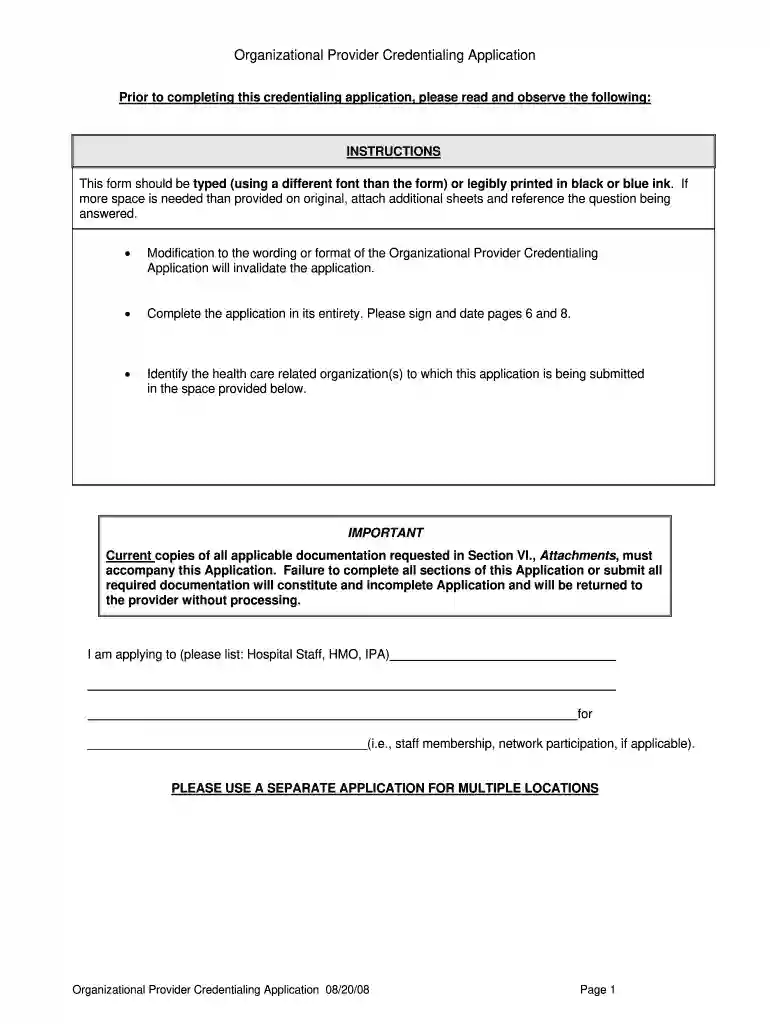
champva provider portal Preview on Page 1

Here's how it works

01. Edit your champva provider portal online
Type text, add images, blackout confidential details, add comments, highlights and more.

02. Sign it in a few clicks
Draw your signature, type it, upload its image, or use your mobile device as a signature pad.

03. Share your form with others
Send champva provider enrollment via email, link, or fax. You can also download it, export it or print it out.

How to use or fill out champva provider credentialing 2008 form with our platform

Form edit decoration
9.5
Ease of Setup
DocHub User Ratings on G2
9.0
Ease of Use
DocHub User Ratings on G2
  1. Click ‘Get Form’ to open the champva provider credentialing 2008 form in the editor.
  2. Begin with Section I: PROVIDER IDENTIFICATION. Fill in your legal business name as reported to the IRS and any 'Doing Business As' (DBA) name, if applicable. Ensure accuracy as payments will be issued under this name.
  3. Complete the Current Practice Location(s) section by providing the practice location name, address, and primary contact details. This information is crucial for correspondence.
  4. In Section II: CERTIFICATION AND ACCREDITATION, indicate your participation in Medicare and provide relevant dates. If there are deficiencies from surveys, ensure you attach evidence of corrections.
  5. Proceed to Section VI: ATTACHMENTS. Check off all required documents that accompany your application, ensuring completeness to avoid processing delays.
  6. Finally, review all sections for accuracy before signing and dating pages 6 and 8. Use our platform's features to save your progress and make edits easily.

Start using our platform today for free to streamline your form completion process!

See more champva provider credentialing 2008 form versions

We've got more versions of the champva provider credentialing 2008 form form. Select the right champva provider credentialing 2008 form version from the list and start editing it straight away!
Versions Form popularity Fillable & printable
2011 4.9 Satisfied (403 Votes)
2008 4 Satisfied (50 Votes)
be ready to get more

Complete this form in 5 minutes or less

Get form

Got questions?

We have answers to the most popular questions from our customers. If you can't find an answer to your question, please contact us.
Contact us
Use this form if youre applying for Civilian Health and Medical Program of the Department of Veterans Affairs (CHAMPVA) benefits and have other non-VA health insurance. You can also use this form to report changes in your non-VA health insurance or your personal information, like your address or phone number.
Theres no specific network of CHAMPVA providers. When you find a new provider, ask if they accept assignment from CHAMPVA. This means they agree to accept CHAMPVA insurance and to charge only the allowable amount. If you go to a provider who doesnt accept CHAMPVA, we may still cover some of the cost.
For questions, please contact CHAMPVA (800-733-8387) or OptumRx Pharmacy (888-546-5503). The VHA Office of Integrated Veteran Care (IVC) processes CHAMPVA applications, determines eligibility, authorizes benefits, and processes medical claims.
What form is used when turning in excess furniture or equipment? Excess is processed via VA Form 2237 (Request, Turn-In and Receipt for Property or Services) which can be found on VA Forms.