




01. Edit your form online
Type text, add images, blackout confidential details, add comments, highlights and more.

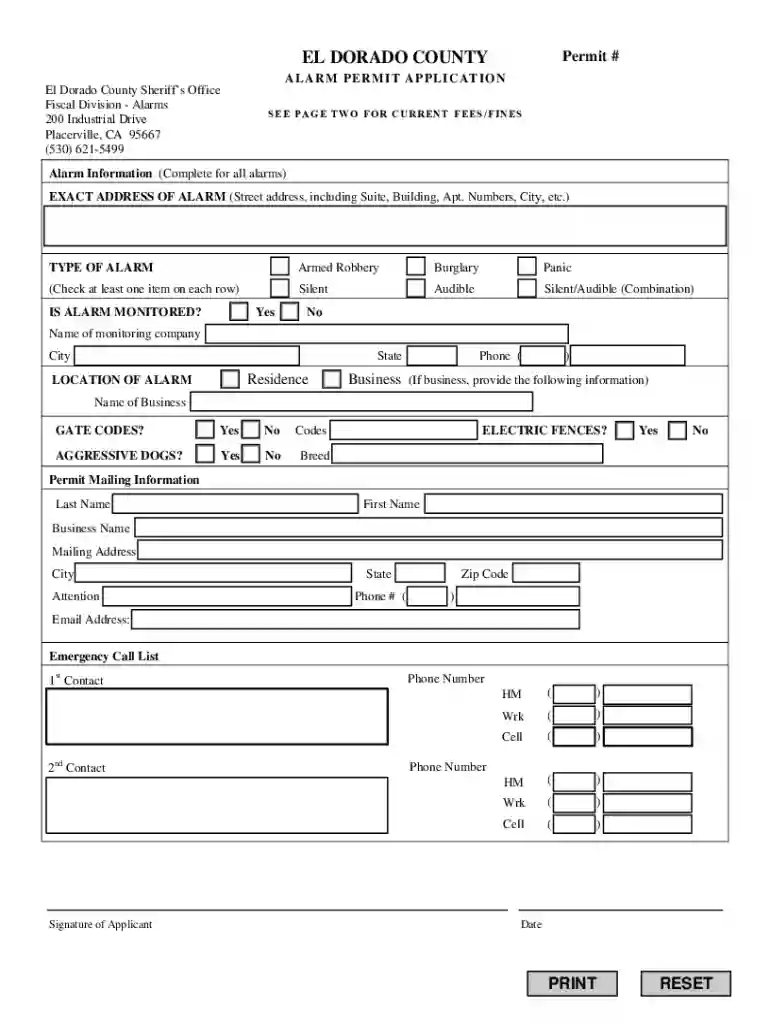
Type text, add images, blackout confidential details, add comments, highlights and more.

Draw your signature, type it, upload its image, or use your mobile device as a signature pad.

Send it via email, link, or fax. You can also download it, export it or print it out.
The Alarm Permit Application is a critical document often required by local governments to regulate and monitor alarm systems within a specific area. In El Dorado County, this application ensures compliance with local ordinances regarding alarm installations and usage, particularly for safety and emergency response purposes. This application records necessary details such as the type of alarm, monitoring arrangements, and responsible parties' contact information. By obtaining this permit, individuals and businesses contribute to a coordinated effort to minimize false alarms and ensure efficient use of emergency resources.
Gather Necessary Information: Begin by collecting relevant details about the alarm system, including the type of alarm (e.g., intrusion, fire), monitoring company details, and installation dates.
Fill Out Personal and Property Information: Provide the applicant's name, contact details, and the address where the alarm system is installed. If the property is a business, include the business name and type.
Specify Alarm Details: Clearly define the type of alarm system, the areas it covers, and any additional features. This section may also ask for the installer’s information or system documentation.
Review Fee and Fine Schedule: Familiarize yourself with the applicable fees for new permits and the penalties associated with false alarms. Ensure all fee payments are ready to accompany the application.
Submit the Application: Submit the completed application through the prescribed method, which could be online, via mail, or in person. Ensure that all sections are completed accurately to avoid processing delays.
False Alarm: An alert from an alarm system that results in unnecessary emergency services dispatch. It's important to understand the fines associated with repeated false alarms as part of the permit process.
Monitoring Company: A third-party service that oversees the alarm system and communicates with emergency responders as needed. This entity's details are crucial for the permit.
Permit Holder: The individual or business responsible for maintaining the alarm system per local regulations and for any associated fees or fines.
The Alarm Permit Application serves as a legal agreement between the permit holder and local authorities. It obligates the holder to comply with specific regulations, such as maintaining operational alarm systems and addressing malfunctions promptly. Failure to adhere to these standards can result in fines and permit revocation. The application legally binds the applicant to ensure that all provided information is accurate and up-to-date.
Applicant Information: Includes personal or business details necessary to identify the responsible party.
Alarm System Specifications: Detailed description of the alarm system, including its type, function, and coverage area.
Emergency Contacts: List of individuals who can be contacted in the event of an alarm activation, essential for facilitating timely responses.
Each state, and often each county, may have unique regulations governing the issuance and management of alarm permits. In El Dorado County, for example, permits must be accompanied by an understanding of local ordinances regarding noise levels, false alarms, and emergency access. Stay informed on specific requirements and deadlines unique to your jurisdiction to remain compliant.
Proof of Ownership: Such as a deed or lease document confirming the applicant’s authority to install an alarm system on the property.
System Installation Details: Documentation from the alarm service provider that verifies the system's functionality and installation date.
Identification: A government-issued ID or business registration documents if the applicant is a corporate entity.
Failure to promptly obtain or renew an alarm permit can lead to several consequences. These may include:
Fines: Repeated false alarms or operating without a permit can result in financial penalties.
Service Interruptions: Non-compliance might lead to disconnecting the alarm system’s access to emergency services.
Understanding and adhering to the rules associated with the Alarm Permit Application can mitigate these risks and enhance the coordination of security measures within the community.
We've got more versions of the AL ARM P ERM I T APP L IC A TI O N form. Select the right AL ARM P ERM I T APP L IC A TI O N version from the list and start editing it straight away!
| Versions | Form popularity | Fillable & printable |
|---|---|---|
| 2018 | 4.8 Satisfied (30 Votes) |
At DocHub, your data security is our priority. We follow HIPAA, SOC2, GDPR, and other standards, so you can work on your documents with confidence.
The Paramedic program follows the most recent National EMS Educational Standards to fulfill the requirements to practice, under medical direction, the art and sRead more
permit application to be accepted. Upon completion of your submittal to the MGO system, a staff member will review your uploaded materials for generalRead more
Warning notice system. This manual contains notices you have to observe in order to ensure your personal safety, as well as to prevent damage to property.Read more


