




01. Edit your form 14568 online
Type text, add images, blackout confidential details, add comments, highlights and more.

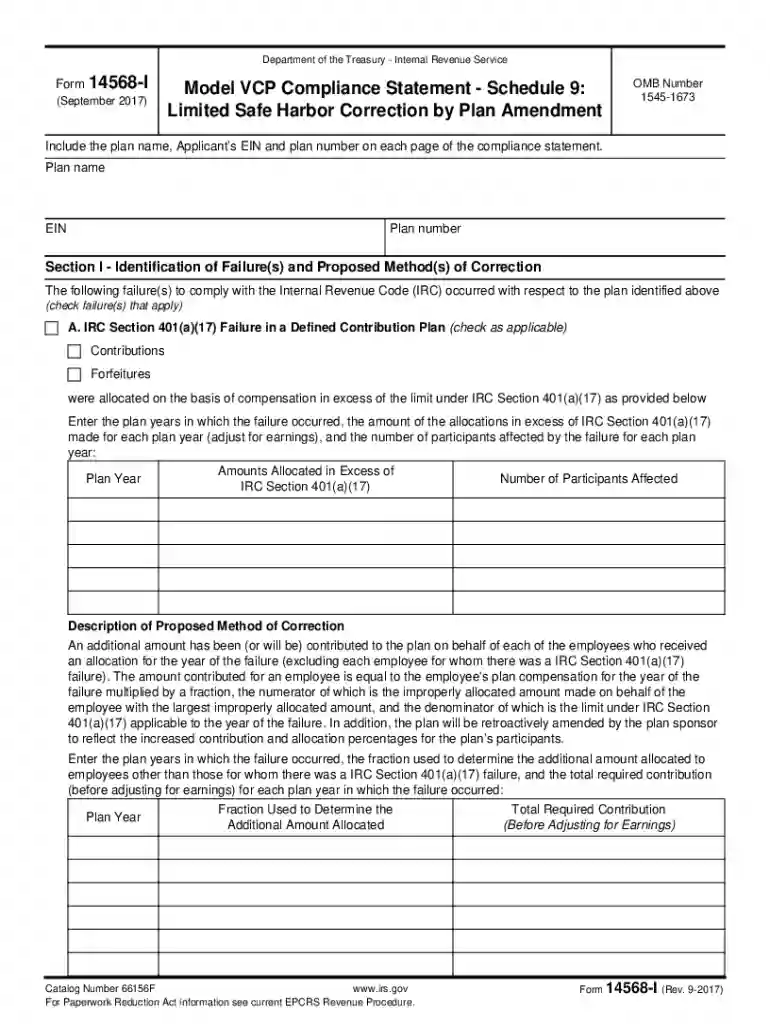
Type text, add images, blackout confidential details, add comments, highlights and more.

Draw your signature, type it, upload its image, or use your mobile device as a signature pad.

Send form 14568 h via email, link, or fax. You can also download it, export it or print it out.
The Fillable Form 14568, also known as the Model VCP Compliance Statement, is an essential document in addressing compliance failures in retirement plans under the Internal Revenue Code. This form enables plan sponsors to identify, document, and propose corrections for various types of plan failures, such as issues with contribution allocations, hardship distributions, plan loans, and early inclusion of eligible employees. The form ensures that these errors are rectified in accordance with IRS regulations and helps maintain the integrity of retirement plans.
The process of using the Fillable Form 14568 involves ensuring accuracy in detailing plan failures and the proposed corrective actions. Here’s how to effectively complete this form:
Acquiring the Fillable Form 14568 is straightforward. It can be downloaded from the IRS website or accessed through document management platforms like DocHub. Utilizing an online document solution allows for seamless editing and saving directly from the web, ensuring that your compliance efforts are both efficient and paperless.
Filling out the Form 14568 accurately is crucial for compliance. Follow these detailed steps:
The Fillable Form 14568 serves a vital role in maintaining compliance with IRS regulations for retirement plans. Its significance includes:
Understanding the crucial components of the Fillable Form 14568 is essential for effective completion:
Following IRS guidelines is critical when using Form 14568 to ensure that all proposed corrections meet regulatory standards. Adherence to these guidelines ensures:
Failing to submit Form 14568 or incorrect submissions can result in significant repercussions, such as:
Ensuring accurate completion and submission of the Fillable Form 14568 is crucial in minimizing these risks and maintaining the integrity of the retirement plan.
We've got more versions of the form 14568 form. Select the right form 14568 version from the list and start editing it straight away!
Electronic document approval requires a software solution that works in compliance with data protection and eSignature standards. DocHub is a perfect tool for that, since it fulfills all the above mentioned requirements. Whatever method you prefer to sign your form 14568 instructions in DocHub, your electronic signature will be legally binding and court-admissible.
You may easily complete, modify, and even eSign your irs form 14568 h utilizing DocHub. Create a new account and start your free trial. After that, you may add the file with the form and easily make all the needed edits. No need to print on paper or use a third-party application to sign it, as you can place your electronic signature on your document quicker via DocHub.
At DocHub, your data security is our priority. We follow HIPAA, SOC2, GDPR, and other standards, so you can work on your documents with confidence.


