




01. Edit your form online
Type text, add images, blackout confidential details, add comments, highlights and more.

Type text, add images, blackout confidential details, add comments, highlights and more.

Draw your signature, type it, upload its image, or use your mobile device as a signature pad.

Send it via email, link, or fax. You can also download it, export it or print it out.
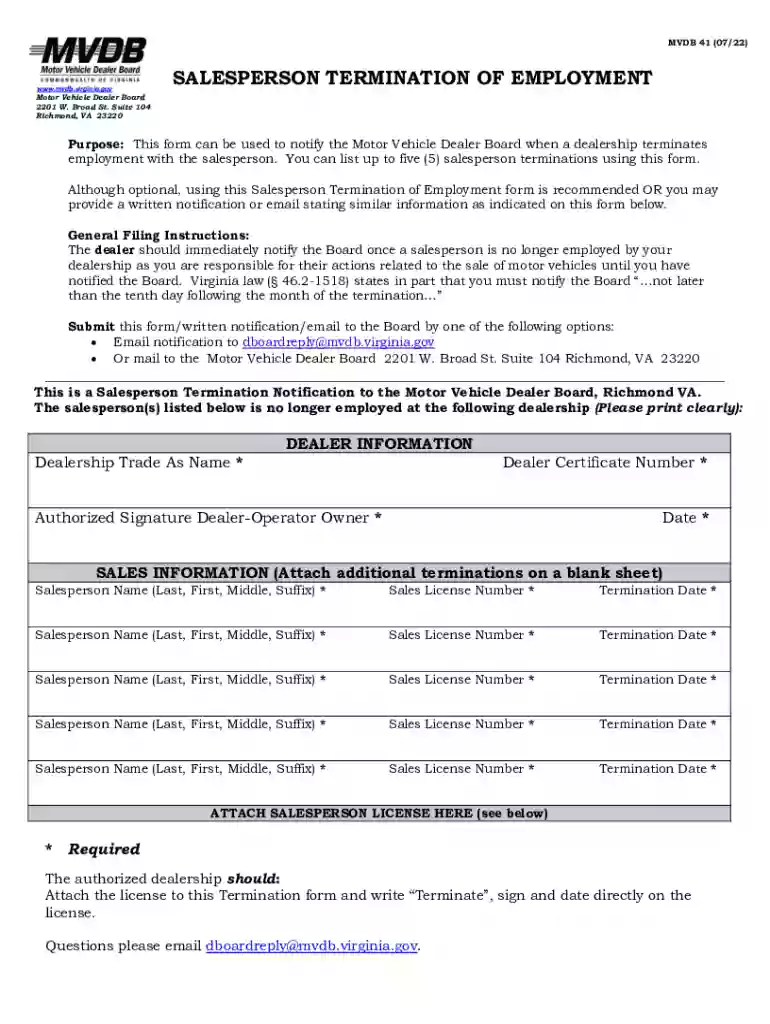
The MVDB 41 form is utilized by motor vehicle dealerships in Virginia as a tool to notify the Motor Vehicle Dealer Board about the termination of salespersons. This legal document is critical for maintaining compliance with state regulations governing dealership operations. By filing the MVDB 41, dealerships formally document personnel changes, ensuring that all salesperson terminations are communicated in a timely manner. This process helps maintain an accurate and up-to-date registry of authorized salespersons within the state.
Dealerships must follow specific procedures to effectively use the MVDB 41 form. Generally, the form should be completed in cases where a salesperson is no longer affiliated with the dealership, either due to resignation, termination, or other circumstances leading to their departure. To use the form:
Completing the MVDB 41 accurately and comprehensively is essential for maintaining compliance. The following steps outline how to fill out the form:
Using the MVDB 41 form is essential for several reasons:
Several critical elements must be addressed when completing the MVDB 41 form:
The MVDB 41 form is governed by Virginia-specific regulations. Dealers operating in Virginia must adhere to these rules to ensure compliance. This includes timely submission within prescribed deadlines and adherence to guidelines for documenting dealer and salesperson information. Understanding the nuances of Virginia’s legal framework assists in accurate form completion and legal adherence.
Consider scenarios where the MVDB 41 form is applied:
Failure to submit the MVDB 41 form within the required timelines or providing inaccurate information can lead to significant penalties:
We've got more versions of the mvdb 41 form. Select the right mvdb 41 version from the list and start editing it straight away!
Yes, you can use DocHub for signing any business and private paperwork, including your mvdb 41. All electronic signatures you generate with our tool are legally binding and court-admissible, as DocHub complies with standards required by ESIGN and UETA. Save your completed form with a detailed Audit Trail if necessary.
Apart from an extensive toolset for editing PDFs on mobile devices, DocHub allows you to sign your mvdb 41 along the way. Open our editor in your web browser, make modifications using DocHub’s toolset, and complete your editing by eSigning the completed form.
At DocHub, your data security is our priority. We follow HIPAA, SOC2, GDPR, and other standards, so you can work on your documents with confidence.
If you use the MVDB 41 , attach the terminated license directly to the form below. If the Dealer is unable to obtain the terminated salespersons licenseRead more
Name Last modified Size Description. [PARENTDIR], Parent Directory, -. [ ], BTA.mvdb, 2022-11-29 21:31, 41M. [ ], CEL.mvdb, 2022-11-29 21:31, 34M.Read more


