




Here's how it works



How to use or fill out Form D1-XB 'Business Income Tax Return Request for Extension' with our platform

- Click ‘Get Form’ to open it in the editor.
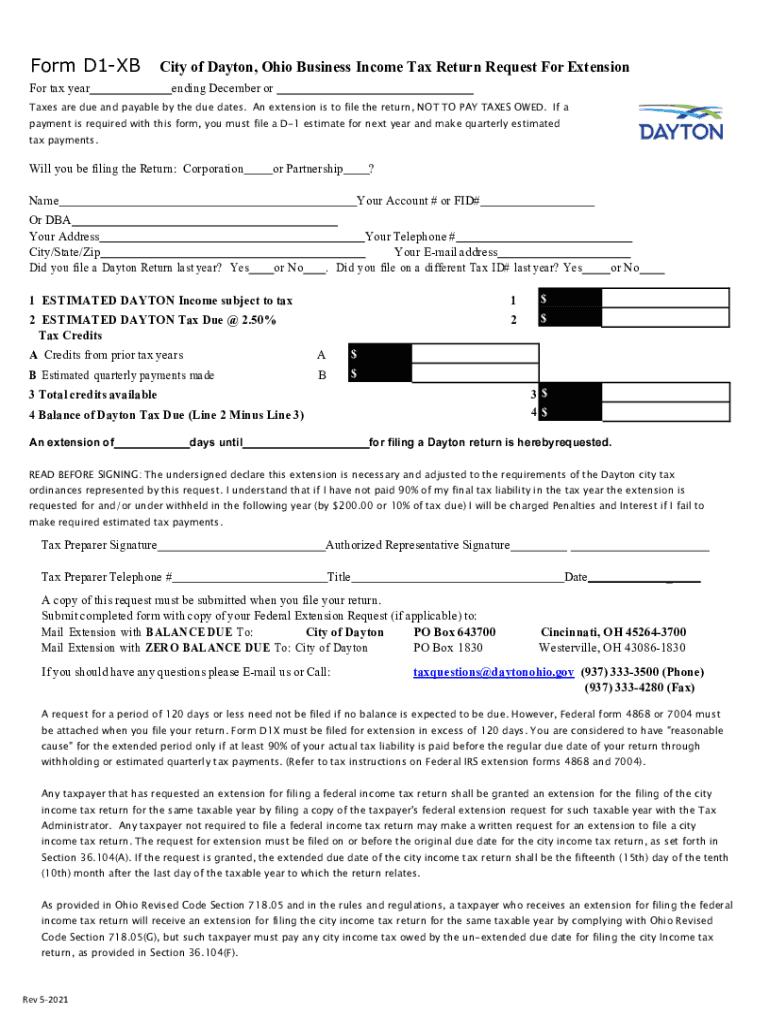
- Begin by entering the tax year at the top of the form. This is crucial for ensuring your extension request aligns with the correct fiscal period.
- Indicate whether you are filing as a Corporation or Partnership by selecting the appropriate option.
- Fill in your business name, account number or FID#, and DBA (Doing Business As) if applicable. Ensure that all information is accurate to avoid processing delays.
- Provide your address, including city, state, and zip code. This helps in identifying your business location for tax purposes.
- Answer whether you filed a Dayton return last year by selecting 'Yes' or 'No'.
- Complete the estimated income and tax due sections. Enter your estimated Dayton income subject to tax and calculate the tax due at 2.50%.
- List any credits from prior years and estimated quarterly payments made to determine total credits available.
- Calculate the balance of Dayton tax due by subtracting total credits from tax due.
- Request an extension period by specifying the number of days needed until filing your return.
- Sign and date the form, ensuring that both the Tax Preparer and Authorized Representative signatures are included if applicable.
Start using our platform today to streamline your form completion process for free!
It's free
See more Form D1-XB "Business Income Tax Return Request for Extension ... versions
Got questions?
What do I need to sign my tax extension form 2026 electronically?
Electronic document signing demands a software solution that works in compliance with data security and eSignature standards. DocHub is an excellent tool for that, as it meets all the previously mentioned requirements. Whatever method you prefer to sign your tax extension form 2026 in DocHub, your electronic signature will be legally binding and court-admissible.
How do you create an e-signature for the business tax return extension form on iOS?
Apart from an extensive toolset for editing PDFs on mobile devices, DocHub enables you to sign your business tax return extension form along the way. Open our editor in your web browser, make modifications using DocHub’s toolset, and complete your editing by eSigning the finished form.
How do I request a business tax extension?
Is there a penalty for requesting an extension on your taxes?
How to ask the IRS for an extension?
Security and compliance
At DocHub, your data security is our priority. We follow HIPAA, SOC2, GDPR, and other standards, so you can work on your documents with confidence.
Learn more


