




01. Edit your form online
Type text, add images, blackout confidential details, add comments, highlights and more.

Type text, add images, blackout confidential details, add comments, highlights and more.

Draw your signature, type it, upload its image, or use your mobile device as a signature pad.

Send it via email, link, or fax. You can also download it, export it or print it out.
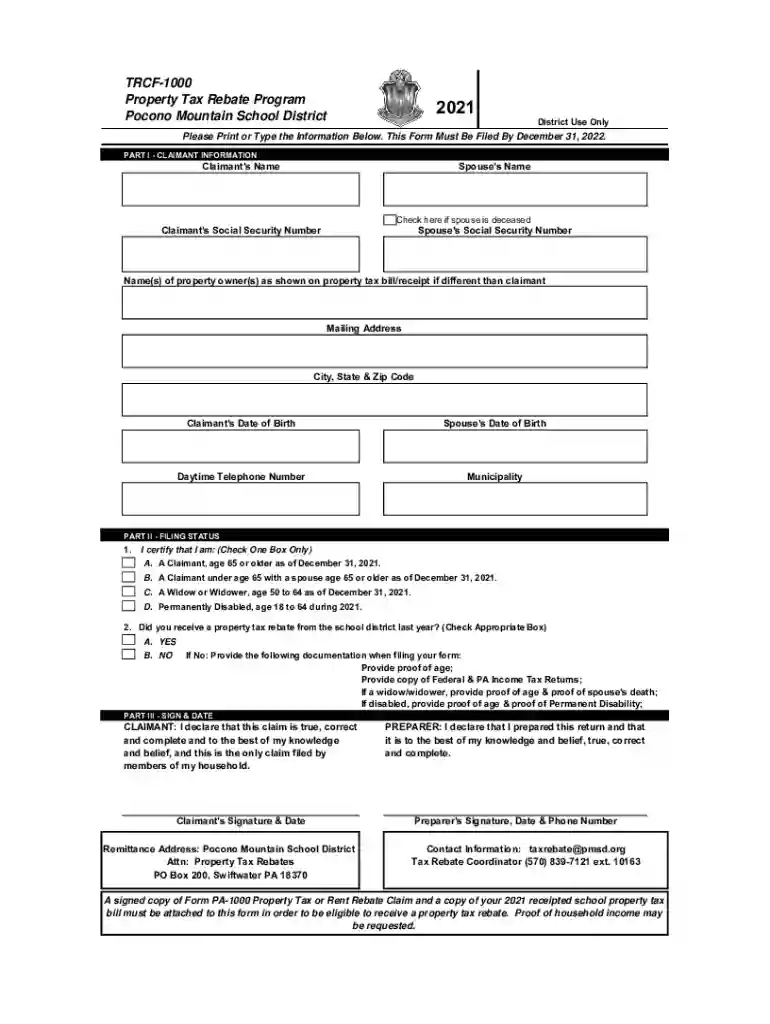
The 2021 TRCF-1000 (Tax Form) R1 - Pocono Mountain School District is a specialized tax document used within the context of the Pocono Mountain School District. It is intended to facilitate the application for the Property Tax Rebate Program during the 2021 tax year. This form is critical in assisting eligible applicants, specifically certain senior citizens, widows/widowers, and individuals with disabilities, in claiming tax rebates offered by the district to alleviate their financial burden.
Applicants falling into these categories can maximize their understanding and execution of this process by recognizing this form as a pathway to accessing financial relief through tax rebates.
To acquire the 2021 TRCF-1000 tax form, applicants can access it through multiple channels, ensuring convenience and ease of acquisition.
Ensuring applicants have open access to the form streamlines the beginning of the rebate application process, foundational to compliance and eligibility.
Completing the 2021 TRCF-1000 form involves several stages:
Gather Required Documentation: Before starting, applicants should collect necessary documents, including proof of age, income documentation, and evidence of paid taxes for the relevant year.
Fill Out Claimant Information: Enter personal details such as full name, address, and date of birth. Ensure accuracy to avoid delays in processing.
Determine Filing Status: Applicants need to declare their filing status, which helps define the corresponding eligibility criteria for the rebate program.
Provide Income Details: Accurately report all forms of income received during the year 2021. This is crucial for determining rebate eligibility.
Attach Necessary Proofs: Attach copies of age verification, disability documentation (if applicable), and tax payment proofs.
Review and Submit: Double-check all particulars for precision, attach all necessary proof, and submit the form through the preferred method (e.g., in-person or mail).
These detailed steps ensure applicants can efficiently complete the form and submit it accurately.
Timeliness is pivotal in successfully applying using the 2021 TRCF-1000 form.
Being mindful of these dates assists applicants in avoiding missed opportunities for tax rebates due to late submissions.
To effectively accompany the 2021 TRCF-1000 form submission, compiling the right documents is essential.
Each document serves to substantiate the claim, supporting the applicant's position for rebate eligibility.
The legal implications surrounding the use of the 2021 TRCF-1000 form are substantial as it constitutes a formal request for government-based financial rebates.
Understanding these legal parameters fosters a trustworthy and compliant use of the form.
Familiarity with key terms is vital in effectively navigating the form.
Knowledge of these terms is important for grasping the broader context and specific expectations tied to the form’s use.
Failure to accurately complete and submit the 2021 TRCF-1000 form can lead to significant consequences.
Recognition of these penalties encourages adherence to the form's guidelines and procedures to prevent adverse outcomes.
We've got more versions of the 2021 TRCF-1000 (Tax Form) R1 - Pocono Mountain School District form. Select the right 2021 TRCF-1000 (Tax Form) R1 - Pocono Mountain School District version from the list and start editing it straight away!
Sure, electronically drawing your signature is appropriate, but only if you use a tool that complies with industry regulations and policies. Try DocHub, which ensures eSignature validity under ESIGN and UETA requirements. All you need to approve your 2021 TRCF-1000 (Tax Form) R1 - Pocono Mountain School District electronically is an account with DocHub and an internet connection. When you open your document in our editor, click Sign and choose the Draw tool.
When you go for analog ways of completing your 2021 TRCF-1000 (Tax Form) R1 - Pocono Mountain School District, it is simple to download your file for printing. Search DocHub’s Forms & Templates catalog to find the exact document template you require and open it for editing or download it on your device in the format of your liking. It is easy to complete your form electronically and put your handwritten signature on it after printing or eSign your document with DocHub.
At DocHub, your data security is our priority. We follow HIPAA, SOC2, GDPR, and other standards, so you can work on your documents with confidence.


