




Here's how it works

01. Edit your form e 1r online
Type text, add images, blackout confidential details, add comments, highlights and more.

02. Sign it in a few clicks
Draw your signature, type it, upload its image, or use your mobile device as a signature pad.

03. Share your form with others
Send el1 form via email, link, or fax. You can also download it, export it or print it out.
How to use or fill out E-1R Form (Fillable) - St. Louis

- Click ‘Get Form’ to open it in the editor.
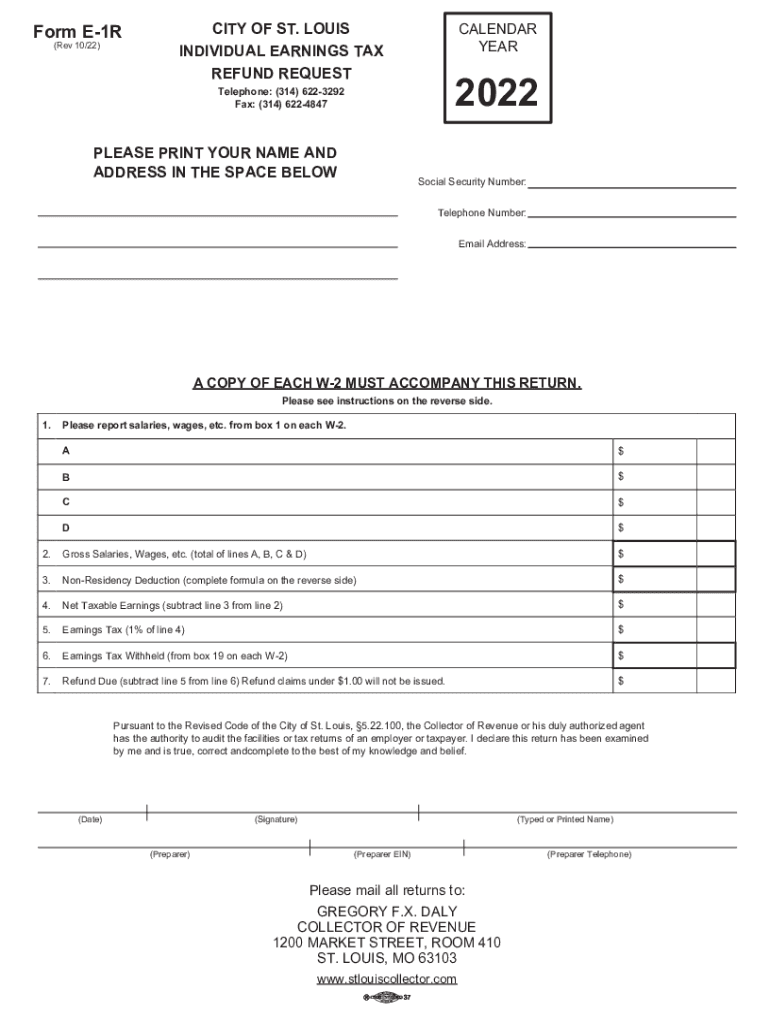
- Begin by entering your name and address in the designated fields at the top of the form.
- Input your Social Security Number, telephone number, and email address in the respective fields.
- Attach a copy of each W-2 form as required. Report salaries from box 1 of each W-2 on lines A, B, C, and D.
- Calculate the total gross salaries by summing lines A through D and enter this amount on line 2.
- Complete the non-residency deduction formula on the reverse side and enter the result on line 3.
- Subtract line 3 from line 2 to find your net taxable earnings and record this on line 4.
- Calculate your earnings tax by entering 1% of line 4 on line 5.
- Enter the total earnings tax withheld from each W-2 on line 6.
- Finally, subtract line 5 from line 6 to determine your refund due and write this amount on line 7.
Start using our platform today to easily complete your E-1R Form for free!
Fill out E-1R Form (Fillable) - St. Louis online
It's free
See more E-1R Form (Fillable) - St. Louis versions
We've got more versions of the E-1R Form (Fillable) - St. Louis form. Select the right E-1R Form (Fillable) - St. Louis version from the list and start editing it straight away!
Got questions?
We have answers to the most popular questions from our customers. If you can't find an answer to your question, please contact us.
Contact us
What form is used for St. Louis earnings tax refund?
Form E-1R is a tax return used by a non-resident of St. Louis to request a refund of tax withheld based on the fact that the employee had whole days worked out of the city. The number of days worked out of the city must be verified by the employer.
How to fill out a PDF tax form?
- Visit the IRS website and download the required tax form. - Open the form using a reputable PDF editor like PDF Expert. - Use the Fill Sign tool to fill in all the required information carefully. Add a date and checkmarks if necessary.
Are IRS PDF forms fillable?
IRS fill-in PDF forms use some of the features provided with docHub software, such as the ability to save the data you input (document rights).
How to electronically fill out a PDF form?
To complete and sign PDF forms, open the form in Acrobat and then select E-Sign from the global bar. Alternatively, you can select All tools Fill Sign. It displays the Fill Sign tools in the left pane. You can now fill in the form fields and sign the form using the sign tools described in the following topics.
What tax form do I use for a non-resident in Missouri?
Filing Form MO-CR or Form MO-NRI Missouri residents with income from another state, nonresidents, and part-year residents need to file Form MO-CR or Form MO-NRI with Form MO-1040 (long form).
Security and compliance
At DocHub, your data security is our priority. We follow HIPAA, SOC2, GDPR, and other standards, so you can work on your documents with confidence.
Learn more


People also ask
How do I fill out a PDF form and return it?
How to fill and sign a PDF form: Open a PDF document in Acrobat. Click the Fill Sign tool in the right pane. Fill out your form: Complete form filling by clicking a text field and typing or adding a text box. Sign your form: Click Sign in the toolbar at the top of the page.
What is the St. Louis City earnings tax refund lawsuit?
As part of the settlement involving six individual plaintiffs, the City of St. Louis and the Collector of Revenue have agreed to issue earnings tax refunds to all eligible NON-CITY RESIDENTS for days they worked outside the City for tax years 2020, 2021, 2022, and 2023.