




01. Edit your or cppr pdf online
Type text, add images, blackout confidential details, add comments, highlights and more.

Type text, add images, blackout confidential details, add comments, highlights and more.

Draw your signature, type it, upload its image, or use your mobile device as a signature pad.

Send 150 553 via email, link, or fax. You can also download it, export it or print it out.
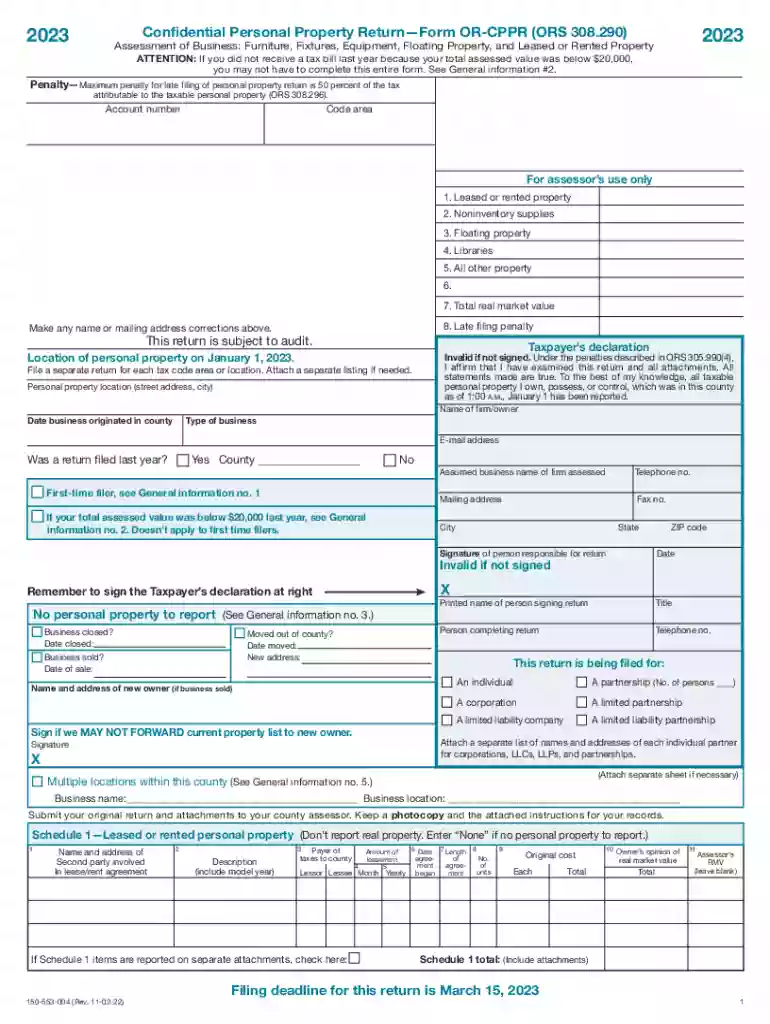
Form OR-CPPR (150-553-004), known as the "Confidential Personal Property Return," is utilized in Oregon for the assessment of business personal property. The form is essential for detailing various types of personal property owned by businesses, including furniture, fixtures, equipment, and leased or rented assets, to ensure they adhere to state property tax laws. Notably, it distinguishes between taxable and non-taxable items, ensuring compliance with local taxation requirements.
To effectively use the Form OR-CPPR, businesses must accurately document and disclose all relevant personal property information. This involves listing property types, corresponding values, and the manner of acquisition. The form requires detailed descriptions to comply with Oregon's taxation regulations and should be submitted to the local county assessor by March 15 for accurate tax assessment and processing.
Completing the OR-CPPR requires a methodical approach to ensure accuracy and compliance with tax regulations:
In Oregon, the legal use of the Form OR-CPPR mandates businesses to report personal property as part of their annual tax obligations. This form ensures transparency and accuracy in tax assessments, as dictated by Oregon tax laws. Failure to comply with these legal requirements can result in fines and penalties. Businesses are encouraged to adhere strictly to these legal uses to maintain good standing with state taxation authorities.
The crucial deadline for submitting the Form OR-CPPR is March 15. Preparing and submitting the form on time helps avoid late filing penalties. Businesses should maintain a year-round record-keeping practice to easily compile necessary data for this deadline. It's advisable to start this process well ahead of the due date to accommodate for any unforeseen issues that may arise during compilation.
Non-compliance with the filing of the Form OR-CPPR can lead to significant financial penalties. Late submissions incur a penalty based on a percentage of the property tax due. Additionally, omissions or inaccuracies may attract penalties or result in an audit. Understanding these repercussions underscores the importance of precision and timely filing of the form.
Form OR-CPPR can be completed using various digital platforms, such as DocHub, which streamlines editing and submission processes. Compatibility with widely-used software like TurboTax and QuickBooks can enhance efficiency in form compilation, ensuring that business records are easily transferable and manageable during tax season.
To complete the Form OR-CPPR, businesses need access to an array of supporting documents:
Ensuring these documents are well-organized can streamline the filing process and enhance accuracy in reporting.
This form is applicable across varying business entity types, from corporations to sole proprietorships. Specifically, businesses that own or lease significant personal property assets should be conscious of their reporting responsibilities. Understanding unique requirements based on entity type helps in ensuring compliance during form submission.
We've got more versions of the or cppr pdf form. Select the right or cppr pdf version from the list and start editing it straight away!
| Versions | Form popularity | Fillable & printable |
|---|---|---|
| 2025 | 4.2 Satisfied (40 Votes) | |
| 2024 | 4.7 Satisfied (20 Votes) | |
| 2023 | 4.8 Satisfied (57 Votes) | |
| 2022 | 4.8 Satisfied (101 Votes) | |
| 2021 | 4.3 Satisfied (217 Votes) | |
| 2020 | 4.4 Satisfied (355 Votes) | |
| 2019 | 4.4 Satisfied (245 Votes) | |
| 2018 | 4.4 Satisfied (181 Votes) | |
| 2016 | 1 Satisfied (16202 Votes) |
Yes, you can utilize DocHub for signing any business and personal documentation, including your 150 553 004. All electronic signatures you generate with our tool are legally binding and court-admissible, as DocHub complies with standards required by ESIGN and UETA. Save your accomplished paperwork with a detailed Audit Trail if necessary.
You can quickly complete, edit, and even eSign your 2023 form or utilizing DocHub. Create a new account and begin your free trial. After that, you may upload the file with the form and simply make all the needed edits. No need to print on paper or use a third-party application to sign it, as you can place your electronic signature on your document quicker through DocHub.
At DocHub, your data security is our priority. We follow HIPAA, SOC2, GDPR, and other standards, so you can work on your documents with confidence.


