Qfr 300 2026

Get Form
qfr 300 Preview on Page 1

Here's how it works

01. Edit your qfr 300 online
Type text, add images, blackout confidential details, add comments, highlights and more.

02. Sign it in a few clicks
Draw your signature, type it, upload its image, or use your mobile device as a signature pad.

03. Share your form with others
Send it via email, link, or fax. You can also download it, export it or print it out.

How to use or fill out qfr 300 with our platform

Form edit decoration
9.5
Ease of Setup
DocHub User Ratings on G2
9.0
Ease of Use
DocHub User Ratings on G2
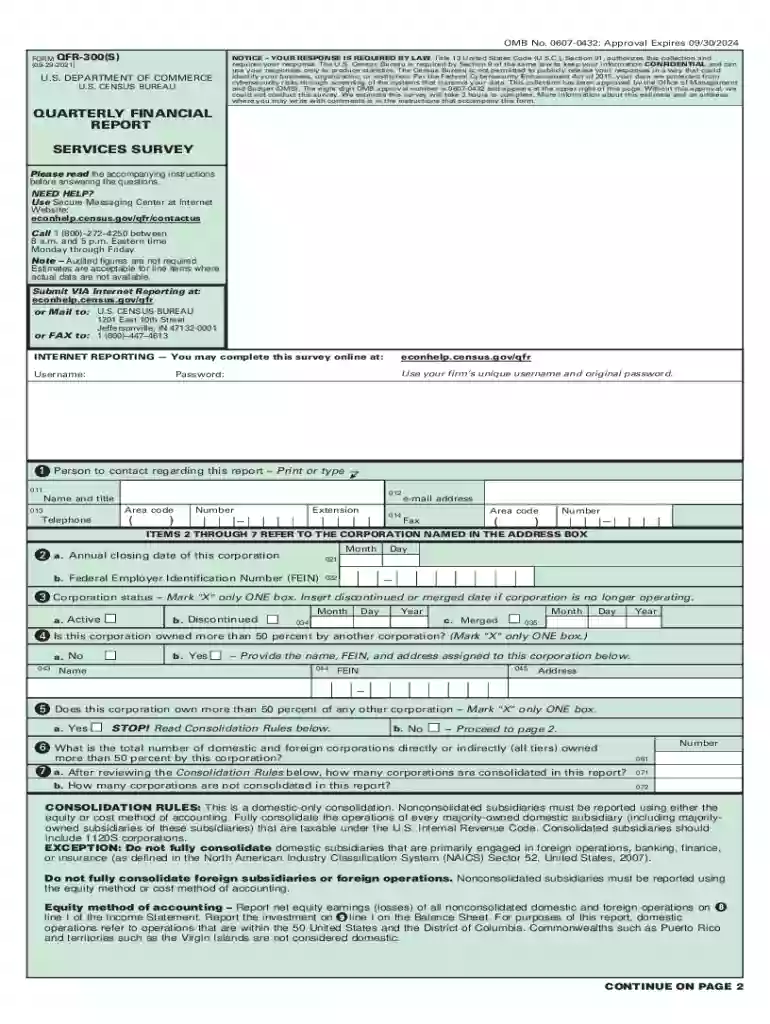
  1. Click ‘Get Form’ to open the qfr 300 in the editor.
  2. Begin by entering your corporation's unique username and password in the designated fields.
  3. Fill out Section 1, providing the name and contact details of the person responsible for this report. Ensure accuracy in the telephone number and email address.
  4. In Section 2, input your corporation's annual closing date and Federal Employer Identification Number (FEIN). This information is crucial for identification purposes.
  5. Proceed to Section 3, where you will indicate your corporation's status. Mark only one box: Active, Discontinued, or Merged. If applicable, provide additional details as required.
  6. Continue through Sections 4 to 7, answering questions about ownership and consolidation rules. Be sure to read any accompanying instructions carefully for clarity on reporting requirements.
  7. Complete Schedule A and B sections by reporting financial figures accurately. Remember that estimates are acceptable where actual data is unavailable.

Start filling out your qfr 300 online for free today!

See more qfr 300 versions

We've got more versions of the qfr 300 form. Select the right qfr 300 version from the list and start editing it straight away!
Versions Form popularity Fillable & printable
2021 4.7 Satisfied (146 Votes)
2019 4.3 Satisfied (127 Votes)
2012 4.4 Satisfied (357 Votes)
be ready to get more

Complete this form in 5 minutes or less

Get form

Got questions?

We have answers to the most popular questions from our customers. If you can't find an answer to your question, please contact us.
Contact us
The Commerce Department regularly employs QFR data as an important component in determining corporate profits for the Gross Domestic Product (GDP) and National Income estimates; the Federal Reserve Board uses QFR data to assess industrial debt structure, liquidity, and profitability; the Treasury Department estimates

Security and compliance

At DocHub, your data security is our priority. We follow HIPAA, SOC2, GDPR, and other standards, so you can work on your documents with confidence.

Learn more
ccpa2
pci-dss
gdpr-compliance
hipaa
soc-compliance
be ready to get more

Complete this form in 5 minutes or less

Get form