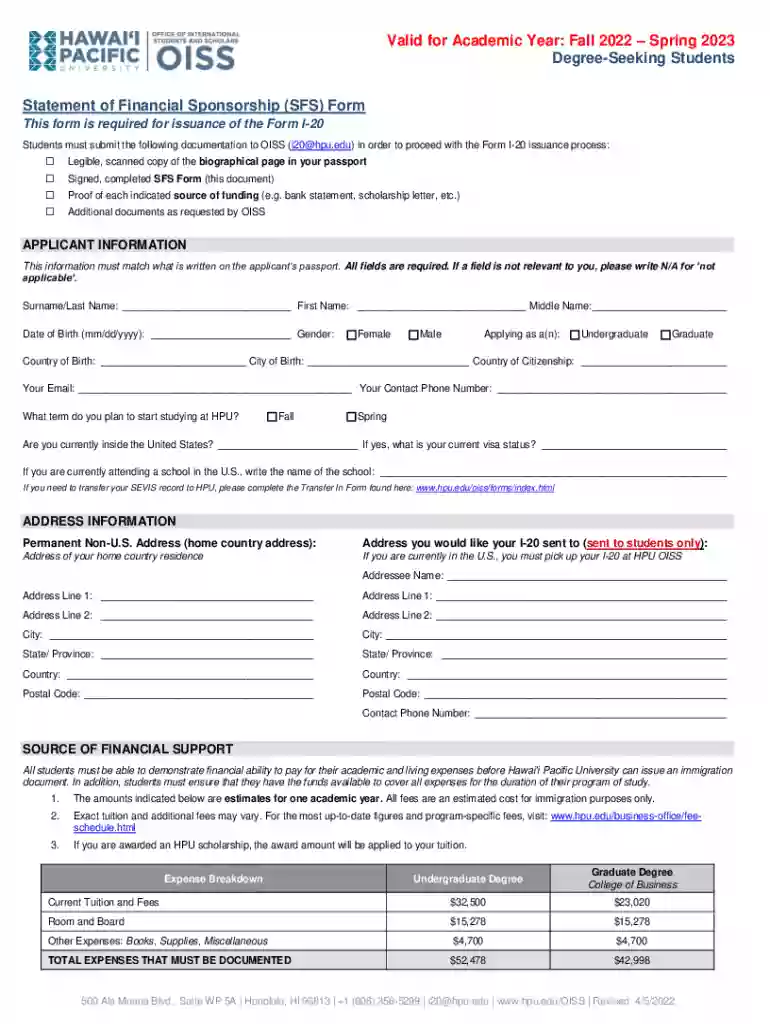
Sfs form 2026

Get Form
statement sponsorship Preview on Page 1

Here's how it works

01. Edit your statement sponsorship online
Type text, add images, blackout confidential details, add comments, highlights and more.

02. Sign it in a few clicks
Draw your signature, type it, upload its image, or use your mobile device as a signature pad.

03. Share your form with others
Send sfs form via email, link, or fax. You can also download it, export it or print it out.

How to use or fill out the SFS form with our platform

Form edit decoration
9.5
Ease of Setup
DocHub User Ratings on G2
9.0
Ease of Use
DocHub User Ratings on G2
  1. Click ‘Get Form’ to open the SFS form in the editor.
  2. Begin by filling out the 'Applicant Information' section. Ensure that all details match your passport, including your surname, first name, middle name, date of birth, and gender. If a field is not applicable, write 'N/A'.
  3. Next, provide your contact information and indicate your intended term of study at HPU. If you are currently in the U.S., specify your visa status and the name of your current school if applicable.
  4. In the 'Address Information' section, enter both your permanent non-U.S. address and the address where you would like your I-20 sent. Make sure to include all relevant details such as city, state/province, country, and postal code.
  5. Proceed to the 'Source of Financial Support' section. Here you will need to demonstrate financial ability by providing proof for each source of funding listed. Attach necessary documents as specified.
  6. Finally, review all entries for accuracy before signing and dating the form at the bottom. Remember that electronic signatures are not accepted.

Start using our platform today to easily complete your SFS form online for free!

See more sfs form versions

We've got more versions of the sfs form form. Select the right sfs form version from the list and start editing it straight away!
Versions Form popularity Fillable & printable
2022 4.8 Satisfied (100 Votes)
2020 4.2 Satisfied (143 Votes)
2018 4.1 Satisfied (44 Votes)
be ready to get more

Complete this form in 5 minutes or less

Get form

Got questions?

We have answers to the most popular questions from our customers. If you can't find an answer to your question, please contact us.
Contact us

Yes, you can utilize DocHub for signing any business and personal documentation, including your sfs form template. All electronic signatures you create with our service are legally binding and court-admissible, as DocHub complies with criteria required by ESIGN and UETA. Save your completed document with a detailed Audit Trail if needed.

You need only a web connection and a browser to complete your sfs template by using an iOS phone. Open the DocHub website and authenticate. Then, add your document or select it from the list in your dashboard. Then use our editing tools to complete your form and preserve all your changes. You can also send it to a specified recipient right away.

What is the Standard Financial Statement? The SFS helps you to set out your current financial situation. After you complete it, your mortgage provider will assess your information as part of the Mortgage Arrears Resolution Process (MARP).
Ship from store (SFS) is a fulfillment strategy where orders that are placed on an e-commerce platform are fulfilled by shipping the orders to the customers.
The CyberCorps: Scholarship For Service (SFS) program provides the means for program-approved academic institutions to grant scholarships to students (hereinafter referred to as participants) who agree to pursue a degree in the information assurance fields and serve at an approved Federal, State, local, or tribal

Security and compliance

At DocHub, your data security is our priority. We follow HIPAA, SOC2, GDPR, and other standards, so you can work on your documents with confidence.

Learn more
ccpa2
pci-dss
gdpr-compliance
hipaa
soc-compliance
be ready to get more

Complete this form in 5 minutes or less

Get form

People also ask

SFS is an acronym with a few different meanings. On Instagram, #SFS is a hashtag that indicates a user is looking for a shoutout for shoutout or spam for spam, which is a way to cross promote posts on the platform.

Related links