PDF Resident Individual - Income Tax Forms and Instructions 2026

Get Form
PDF Resident Individual - Income Tax Forms and Instructions Preview on Page 1

Here's how it works

01. Edit your form online
Type text, add images, blackout confidential details, add comments, highlights and more.

02. Sign it in a few clicks
Draw your signature, type it, upload its image, or use your mobile device as a signature pad.

03. Share your form with others
Send it via email, link, or fax. You can also download it, export it or print it out.

How to use or fill out PDF Resident Individual - Income Tax Forms and Instructions with our platform

Form edit decoration
9.5
Ease of Setup
DocHub User Ratings on G2
9.0
Ease of Use
DocHub User Ratings on G2
  1. Click ‘Get Form’ to open the PDF Resident Individual - Income Tax Forms and Instructions in the editor.
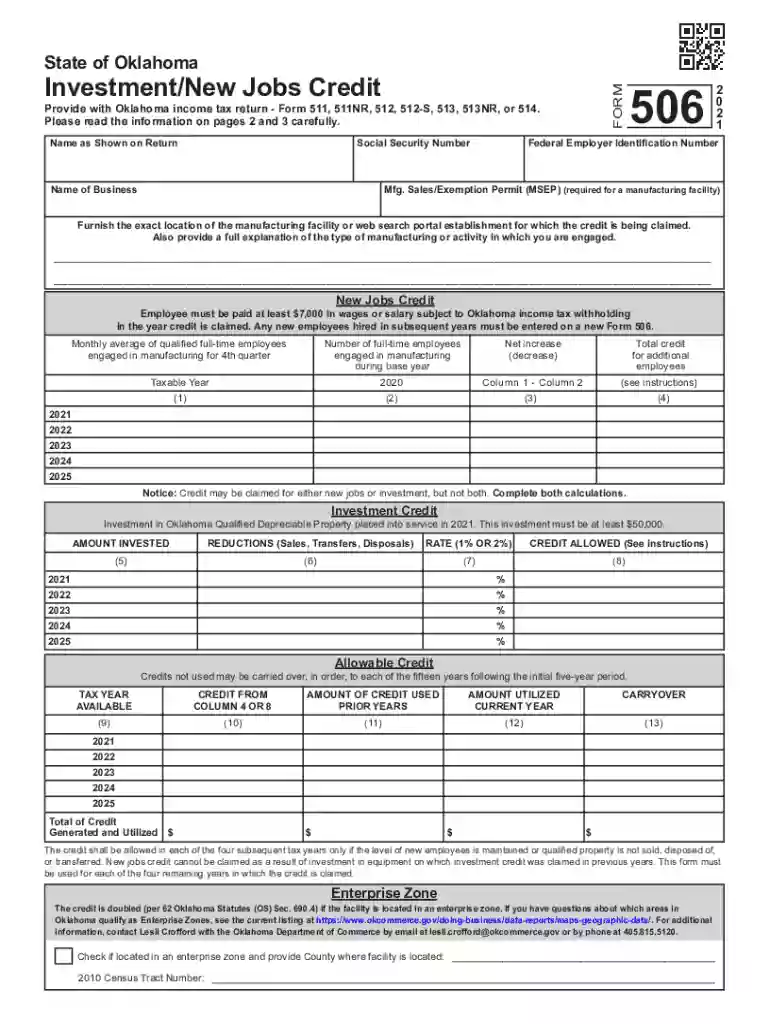
  2. Begin by entering your name as shown on your tax return along with your Social Security Number. This information is crucial for identification purposes.
  3. Fill in the details of your business, including the Federal Employer Identification Number and the exact location of your manufacturing facility if applicable.
  4. For the New Jobs Credit section, input the number of full-time employees engaged in manufacturing during the fourth quarter. Ensure that these employees meet the wage requirement of at least $7,000.
  5. In the Investment Credit section, enter any qualified depreciable property investments made during the taxable year. Remember, this must be at least $50,000 to qualify.
  6. Review all entries for accuracy before saving or exporting your completed form. Utilize our platform’s features to sign and distribute your document seamlessly.

Start using our platform today to simplify filling out your tax forms for free!

See more PDF Resident Individual - Income Tax Forms and Instructions versions

We've got more versions of the PDF Resident Individual - Income Tax Forms and Instructions form. Select the right PDF Resident Individual - Income Tax Forms and Instructions version from the list and start editing it straight away!
Versions Form popularity Fillable & printable
2023 4.5 Satisfied (56 Votes)
2021 4.8 Satisfied (102 Votes)
2020 4.3 Satisfied (190 Votes)
be ready to get more

Complete this form in 5 minutes or less

Get form

Got questions?

We have answers to the most popular questions from our customers. If you can't find an answer to your question, please contact us.
Contact us
Get the current filing years forms, instructions, and publications for free from the IRS. Download them from IRS.gov. Order online and have them delivered by U.S. mail. Order by phone at 1-800-TAX-FORM (1-800-829-3676)
Step 1: Go to the Income Tax India website at .incometax.gov.in and log in. Step 2: Select the e-FileIncome Tax ReturnsView Filed Returns option to see e-filed tax returns. Step 3: To download ITR-V click on the Download Form button of the relevant assessment year.
Log onto the i-Tax profile with your PIN and password 2. Go to the Returns menu, select File Return, choose Tax Obligation as Income Tax - Resident Individual then click Next. 3. Download the Excel/ODS Template using the link provided.
- Visit the IRS website and download the required tax form. - Open the form using a reputable PDF editor like PDF Expert. - Use the Fill Sign tool to fill in all the required information carefully. Add a date and checkmarks if necessary.
Portable Document Format (PDF) Right click on the link, which is usually the item number (if your mouse is configured for left-handed operation use the left mouse button). Select Save Target As or Save Link As when presented with a menu. Use docHub Reader to open the file after downloading.

Security and compliance

At DocHub, your data security is our priority. We follow HIPAA, SOC2, GDPR, and other standards, so you can work on your documents with confidence.

Learn more
be ready to get more

Complete this form in 5 minutes or less

Get form

People also ask

You can download a PDF of the 1040 tax form on the IRS website. If you hire a tax preparer to help you, they might also provide the form.
On the mobile website Click on the menu icon in the upper-right corner. Select Tax Returns. Select the PDF you want to view. Select View on the form you would like to view to open a PDF of your return. Print or save the PDF as needed.
There are three ways to request a transcript: Visit the IRS website for instant online access to your transcript. Call 1-800-908-9946. Use Form 4506-T.

Related links