Rhode island claim refund 2026

Get Form
rhode island tax refund delays Preview on Page 1

Here's how it works

01. Edit your rhode island tax refund delays online
Type text, add images, blackout confidential details, add comments, highlights and more.
02. Sign it in a few clicks
Draw your signature, type it, upload its image, or use your mobile device as a signature pad.
03. Share your form with others
Send it via email, link, or fax. You can also download it, export it or print it out.

How to use or fill out rhode island claim refund with our platform

Form edit decoration
9.5
Ease of Setup
DocHub User Ratings on G2
9.0
Ease of Use
DocHub User Ratings on G2
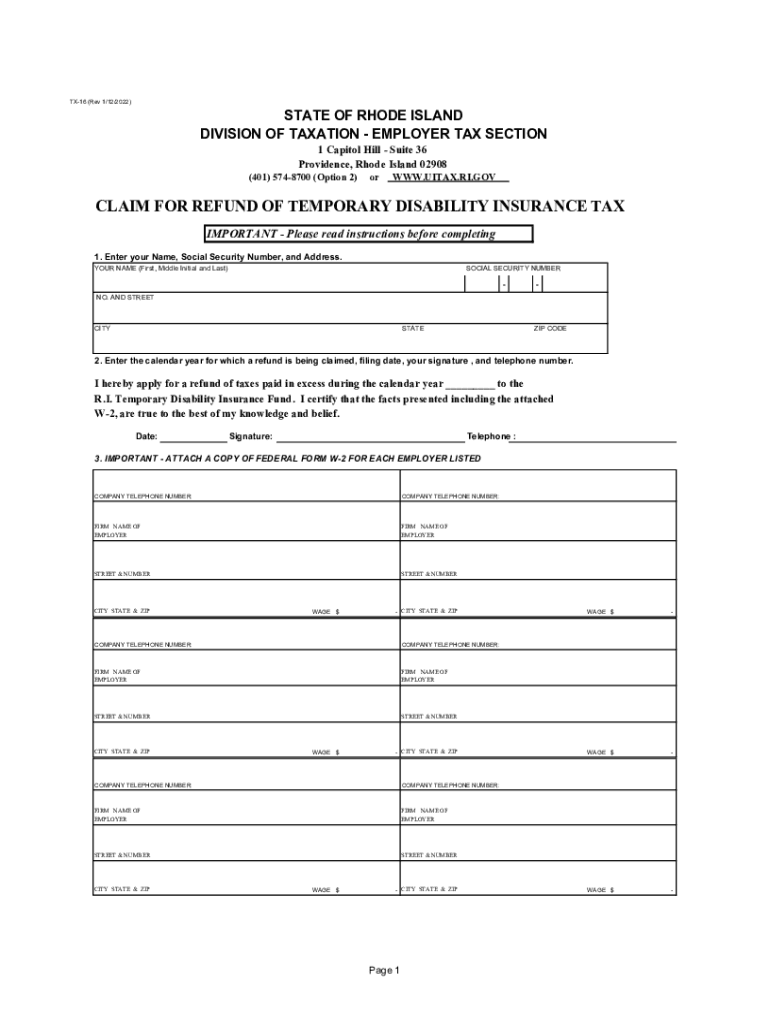
  1. Click ‘Get Form’ to open the Rhode Island Claim for Refund in the editor.
  2. In Section 1, enter your Name, Social Security Number, and Address. Ensure all details are accurate to avoid processing delays.
  3. Proceed to Section 2. Fill in the calendar year for which you are claiming a refund, the filing date, and provide your signature along with your telephone number.
  4. In Section 3, list each employer you worked for during the calendar year. Include their name, address, telephone number, and wages paid. Remember to only include Rhode Island registered employers.
  5. Attach a copy of Federal Form W-2 for each employer listed. Ensure that each W-2 is legible and has a different Federal Identification Number.
  6. Review your completed form carefully before signing it. Once satisfied, return it to the Division of Taxation at the specified address.

Start using our platform today to fill out your Rhode Island Claim for Refund easily and for free!

See more rhode island claim refund versions

We've got more versions of the rhode island claim refund form. Select the right rhode island claim refund version from the list and start editing it straight away!
Versions Form popularity Fillable & printable
2022 4.3 Satisfied (20 Votes)
2022 4.8 Satisfied (58 Votes)
2021 4.3 Satisfied (113 Votes)
2019 4.3 Satisfied (65 Votes)
2018 4.3 Satisfied (87 Votes)
2017 4.4 Satisfied (98 Votes)
2013 4.2 Satisfied (79 Votes)
2008 4.9 Satisfied (40 Votes)
be ready to get more

Complete this form in 5 minutes or less

Get form

Got questions?

We have answers to the most popular questions from our customers. If you can't find an answer to your question, please contact us.
Contact us

Sure, electronically drawing your signature is appropriate, but only if you utilize a tool that complies with industry laws and regulations. Try DocHub, which ensures eSignature validity under ESIGN and UETA requirements. All you need to eSign your rhode island claim refund is an account with DocHub and an internet connection. After you open your paperwork in our editor, click Sign and choose the Draw tool.

Having a swift editing platform like DocHub, you do not require anything but a browser and internet connection to edit your rhode island claim refund on the internet swiftly. Upload your document or find the appropriate form in DocHub’s catalog, open our editor with one click, and finish it electronically. To revise your forms at any time, register a free account with DocHub.

Refund delivery Most refunds are issued in less than 21 calendar days. The fastest way to get a refund is by filing electronically and choosing direct deposit as the delivery method. Taxpayers who do this typically get their refund in less than 21 days.
To use Wheres My Refund?, taxpayers must enter their Social Security number or Individual Taxpayer Identification Number, their filing status and the exact whole dollar amount of their refund. The IRS updates the tool once a day, usually overnight, so theres no need to check more often.
The EITC is designed to support low- to moderate-income workers. Its one of the largest refundable tax credits the IRS offers. Depending on your income, marital status, and how many qualifying children you have, the EITC could be worth up to $7,830. Still, its not a flat $3,000 for everyone.

Security and compliance

At DocHub, your data security is our priority. We follow HIPAA, SOC2, GDPR, and other standards, so you can work on your documents with confidence.

Learn more
ccpa2
pci-dss
gdpr-compliance
hipaa
soc-compliance
be ready to get more

Complete this form in 5 minutes or less

Get form

People also ask

Taxpayers can view status of refund 10 days after their refund has been sent by the Assessing Officer to the Refund Banker. Status of paid refund, being paid other than through Refund Banker, can also be viewed at .tin-nsdl.com by entering the PAN and Assessment Year.
How to check your tax refund status SARS WhatsApp on 0800 11 7277 just say Hi or Hello and select Refund Status, enter ID/passport/Asylum Seeker number provide your Tax Ref number, and hit Send SARS MobiApp on the Home Screen, tap Refund Status, and follow the prompts.
Follow the below steps to file a refund application in RFD-01: Step 1: Log in to the GST portal and go to the Services tab, click on Refunds and select the Application of refund option. Step 2: In the page that appears, select the reason for refund or the type of refund and click on Create refund application.
If you dont have internet, call the automated refund hotline at 800-829-1954 for a current-year refund or 866-464-2050 for an amended return. If you think we made a mistake with your refund, check Wheres My Refund or your online account for details.
In accordance with the Income Tax Act 1961, taxpayers will have to file their return within the 31st July of an assessment year to claim the refund. Applying for an IT refund requires filling up the income tax refund form, as well as submitting necessary documents like utility forms and pre-filled ITR.

Related links