Type text, add images, blackout confidential details, add comments, highlights and more.
02. Sign it in a few clicks
Draw your signature, type it, upload its image, or use your mobile device as a signature pad.
03. Share your form with others
Send it via email, link, or fax. You can also download it, export it or print it out.
How to use or fill out Attachment to Form IT-2658, Report of Estimated MCTMT with Our Platform
Ease of Setup
DocHub User Ratings on G2
Ease of Use
DocHub User Ratings on G2
Click ‘Get Form’ to open the Attachment to Form IT-2658 in the editor.
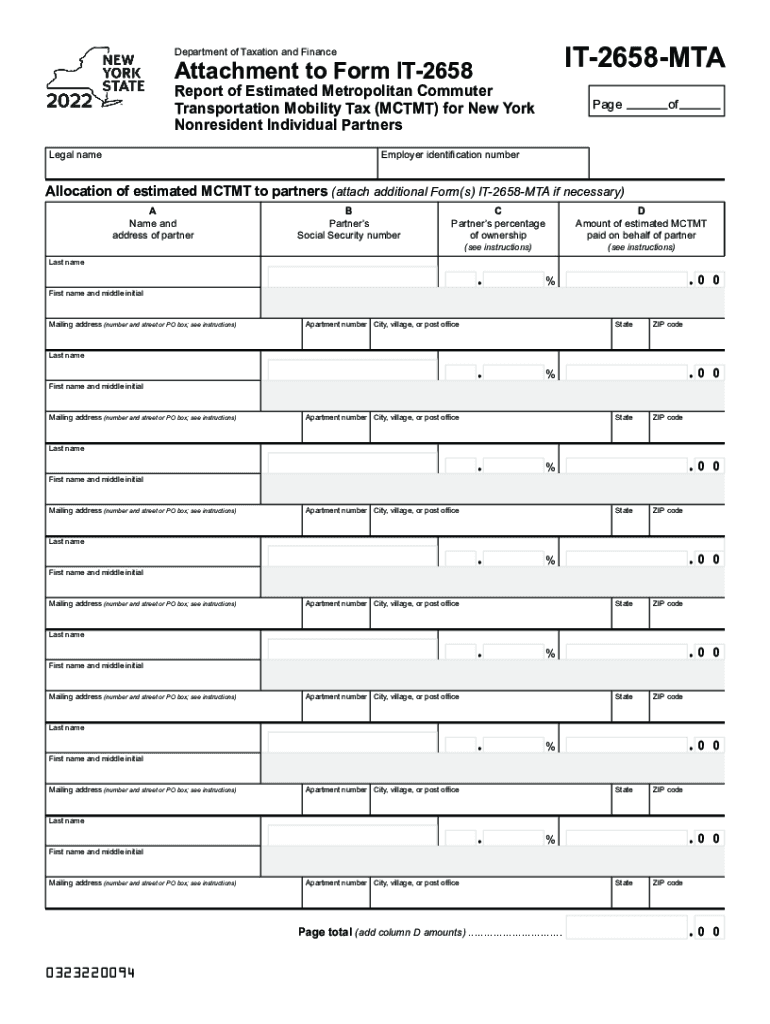
Begin by entering the legal name and employer identification number at the top of the form. This information is crucial for identifying your partnership.
In Section A, list each partner's name and address. Ensure that you include their full mailing address as specified in the instructions.
For each partner, enter their Social Security number in Section B. This is necessary for tax reporting purposes.
In Section C, indicate each partner’s percentage of ownership. This should reflect their stake in the partnership accurately.
Finally, in Section D, input the amount of estimated MCTMT paid on behalf of each partner. Make sure to double-check these figures for accuracy.
If you have more partners than can fit on one page, attach additional Form(s) IT-2658-MTA as needed.
Once completed, review all entries for correctness before saving or exporting your document.
Start using our platform today to simplify your form completion process for free!
Fill out Attachment to Form IT-2658, Report of Estimated ... online It's free
See more Attachment to Form IT-2658, Report of Estimated ... versions
We've got more versions of the Attachment to Form IT-2658, Report of Estimated ... form. Select the right Attachment to Form IT-2658, Report of Estimated ... version from the list and start editing it straight away!
How to pay estimated taxes. You may send estimated tax payments with Form 1040-ES by mail, or you can pay online, by phone or from your mobile device using the IRS2Go app.
How to report estimated income?
Use Form 1040-ES to figure and pay your estimated tax. Estimated tax is the method used to pay tax on income that is not subject to withholding (for example, earnings from self-employment, interest, dividends, rents, alimony, etc.).
Where do I mail my New York State estimated tax payments?
Enter applicable amount(s) and total payment in the boxes to the right. Print the last four digits of your SSN or taxpayer ID number and 2025 IT‑2105 on your payment. Make payable to NYS Income Tax. Mail voucher and payment to: NYS Estimated Income Tax, Processing Center, PO Box 4122, Binghamton NY 13902-4122.
Does IRS accept PDF?
We use docHub PDF files to provide electronic access to our forms and publications. You will need to have the docHub Reader software installed to access them. We recommend using the most recent version of docHub Reader -- available free from docHubs website.
Related Searches
Attachment to form it 2658 report of estimated pdfAttachment to form it 2658 report of estimated nysIT-2658 InstructionsIT-2658-NYSIT 2658 attachmentIT-2658-EIT-2658 Instructions 2025CT-2658 instructions 2024
Security and compliance
At DocHub, your data security is our priority. We follow HIPAA, SOC2, GDPR, and other standards, so you can work on your documents with confidence.
The Quad-Core Intel Xeon Processor X5400 Series is designed to go into various form factors, including the volumetrically constrained 1U and custom blade form.Read more
by FSAFL Tax The Department of Revenue publishes a biennial Tax Expenditure Report estimating the value of several hundred state and federal provisions that reduce the tax.Read more
Attachment to Form IT-2658. Report of Estimated Personal Income Tax for. Nonresident Individuals. Legal name. Employer identification number. IT-2658-NYS.Read more
Cookie consent notice
This site uses cookies to enhance site navigation and personalize your experience.
By using this site you agree to our use of cookies as described in our Privacy Notice.
You can modify your selections by visiting our Cookie and Advertising Notice.