Type text, add images, blackout confidential details, add comments, highlights and more.
02. Sign it in a few clicks
Draw your signature, type it, upload its image, or use your mobile device as a signature pad.
03. Share your form with others
Send it via email, link, or fax. You can also download it, export it or print it out.
How to use or fill out IT-638 with our platform
Ease of Setup
DocHub User Ratings on G2
Ease of Use
DocHub User Ratings on G2
Click ‘Get Form’ to open the IT-638 in the editor.
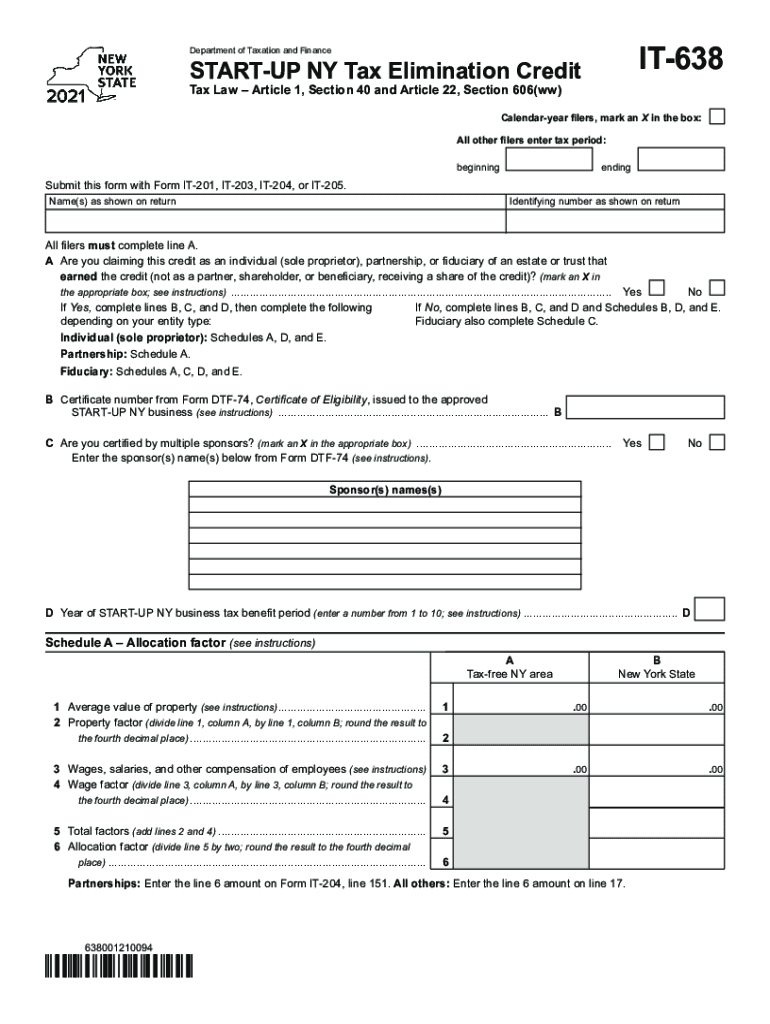
Begin by marking an X in the box for calendar-year filers or enter your tax period dates. Ensure you submit this form alongside Form IT-201, IT-203, IT-204, or IT-205.
Fill in your name(s) and identifying number as shown on your return. All filers must complete line A regarding the type of entity claiming the credit.
If claiming as an individual, partnership, or fiduciary, mark the appropriate box and proceed to complete lines B, C, and D based on your entity type.
For Schedule A, calculate your allocation factor by entering property values and employee compensation as instructed. Complete all necessary calculations carefully.
Continue through Schedules B, C, D, and E as applicable to provide detailed information about partnerships or fiduciaries involved.
Start using our platform today for free to streamline your IT-638 form completion!
Form IT-638 START-UP NY Tax Elimination Credit Tax Year
All filers must complete line A. A Are you claiming this credit as an individual (sole proprietor), partnership, or fiduciary of an estate or trust that.Read more
Cookie consent notice
This site uses cookies to enhance site navigation and personalize your experience.
By using this site you agree to our use of cookies as described in our Privacy Notice.
You can modify your selections by visiting our Cookie and Advertising Notice.